Samsung LE32B450 Review
By Vincent Teoh • Thursday, 25 June 2009, 6:25 pm GMT
Samsung’s latest mid- and high-end flat screen HDTVs have received rave reviews from us in recent months, but it’s been a while since we tested a model from their budget range (especially pertinent in these economically uncertain times). With this in mind, we got our hands on a Samsung LE32B450 LCD TV which can be found online at a credit-crunch-busting price of £350. Well and truly affordable then, but how does the Samsung LE32B450 fare in our picture quality tests? Let’s find out…
Note: The specific model we reviewed was the Samsung LE32B450C4W, which may be sold as Samsung LE32B450, Samsung LE32B450C, Samsung LE32B450C4 or Samsung LE32B450C4W by high-street stores like John Lewis, Comet and Currys, or online retailers such as Amazon or Dixons. These terms may be used interchangeably throughout this review to refer to the same model.
Design
The Samsung LE32B450 LCD television sports a glossy black bezel which is largely no-frills except for a transparent layer of perspex extending beyond the subtly-curved bottom border. The LCD screen itself is not as reflective as those found on the B650 and B750 series, due to the absence of Samsung’s “Ultra Clear Panel“.
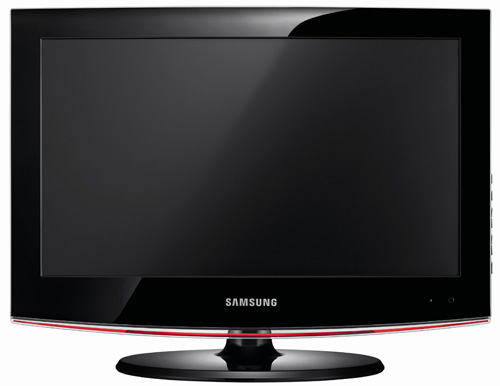
Build quality is reasonable, and the swivelling table-top stand (packaged separately from the LCD screen inside the shipping box) provides solid support for the panel. Although its soundstage and stereo separation can be left wanting as a result of the speakers’ downfiring arrangement, the Samsung LE32B450 still musters sufficient midrange clarity (for dialogue) and volume to satisfy any run-of-the-mill needs.
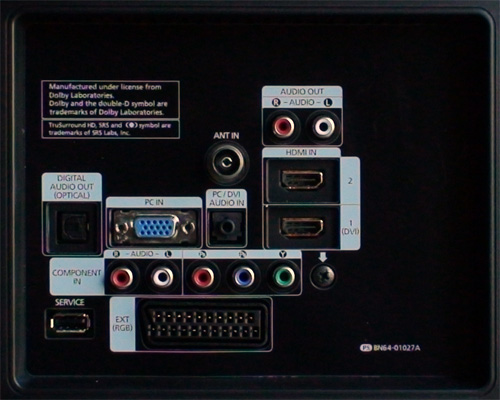
Connections
![]() |
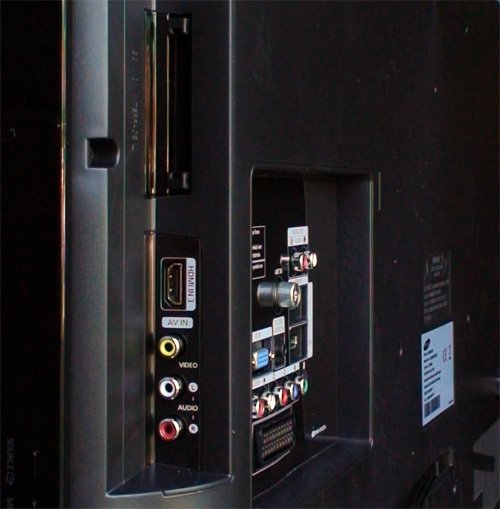
| Rear: 2 x HDMI, VGA, component, Scart, aerial, digital & analogue audio out |
![]() |
| Side: HDMI, composite, Common Interface slot |
Calibration
Greyscale
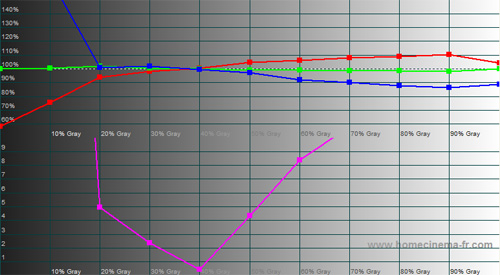
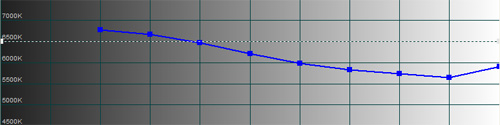
Out of the box, “Movie” [Mode] with its default “Warm2” [Colour Tone] yielded the greyscale closest to D65 standard on the Samsung LE32B450 LCD TV:
![]() |
| Pre-calibration CCT with “Movie” [Mode] & “Warm2″ [Colour Tone] |
![]() |
| Pre-calibration RGB tracking and delta errors (dEs) |
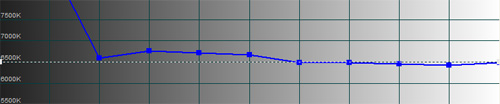
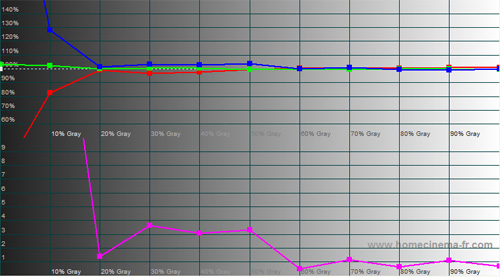
Taking full advantage of the RGB offset and gain controls available in the [White Balance] submenu, we slowly brought the divergent red and blue channels (above 40% stimulus) back into line:
![]() |
| CCT after greyscale calibration in “Movie” [Mode] |
![]() |
| RGB tracking and delta errors (dEs) after greyscale calibration |
There remained a bump in blue between 30% and 50% stimulus, but at least delta errors (dEs) were kept below the perceptible limit of 4 from 20% stimulus onwards.
Gamma
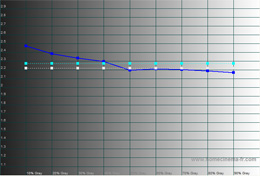
Overall gamma was around 2.55 initially, which was a bit too dark for our liking. Fortunately the user-accessible gamma control on the Samsung LE32B450 allowed us to adjust it closer to the 2.2 ideal:
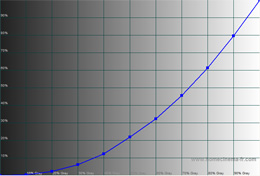
![]() |
|
| Gamma curve after calibration | Gamma tracking after calibration |
Colour
Unlike the B650 and B750 series, the Samsung LE32B450 is not equipped with a colour management system (CMS). Instead, two [Colour Space] presets are provided, namely “Auto” and “Native“:
![]() |
![]() |
| [Colour Space] “Auto” | [Colour Space] “Native” |
Apart from yellow and magenta secondaries, the colour gamut on both [Colour Space] options looked quite similar at first glance. However, we found it much easier to align the colour decoding accurately (at least for high-definition sources) with [Colour Space] set to “Native“. Because the [Tint] control rotated all 3 secondary colours around a central axis, aligning any one of them entailed sacrificing one or two of the others, so unfortunately we would have to make do with a slightly off yellow:
![]() |
| Post-calibration CIE chart with reference to HD Rec. 709 |
Benchmark Test Results
| Dead pixels | None |
| Screen uniformity | Excellent |
| Overscanning on HDMI | 0% with [Size] set to “Screen Fit“ |
| Blacker than black | Passed |
| Black level | Deepest among non-LED LCDs (0.04 cd/m2 calibrated) |
| Black level retention | Stable in “Movie” [Mode] during normal content |
| Primary chromaticity | Green primary deviated towards blue |
| Scaling | Good |
| Video mode deinterlacing | Good; largely effective jaggies reduction |
| Film mode deinterlacing | Passed 3:2 & 2:2 cadences in all resolution |
| Viewing angle | 90° |
| Motion resolution | 300 |
| Digital noise reduction | Acceptable at baseline |
| Sharpness | Very mild ringing for full HD content (due to downscaling) |
| 1080p/24 capability (PS3) | Accepts 1080p/24 video signal; no telecine judder |
| Input lag | On par with Samsung F96 |
Power Consumption
| Default “Standard” [Mode] | 70 watts |
| Calibrated “Movie” [Mode] | 45 watts |
| Standby | <1 watt |
Picture Performance
Even though it sits pretty low in Samsung’s hierarchy of LCD HDTV for 2009, the Samsung LE32B450 did not have any difficulty matching its higher-end siblings (like the B650 and B750 series) in terms of black-level performance. Calibrated black level was measured at 0.04 cd/m2, which lent ample depth and contrast to the picture on screen.
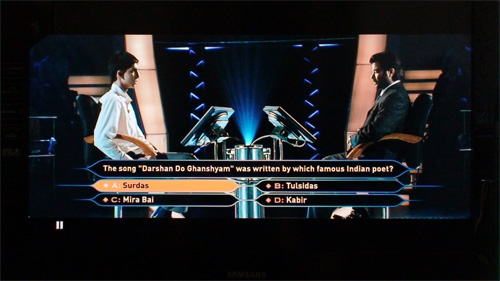
On some flat panel HDTVs, deep blacks are inevitably spoiled by muddy shadow detail, but that is not the case here with the Samsung LE32B450: we could still appreciate the individual figures in the audience behind Jamal (Dev Patel) as the lights dimmed down on the game show in Slumdog Millionaire (Blu-ray).
Screen uniformity was excellent, perhaps due to the smaller screen size. We noticed some very brief black level fluctuations when the source player loaded the disc (DVD or Blu-ray), which caused the info banner at the top left of the screen to brighten then darken, but once the info banner went away, no auto-dimming was detected either in test patterns or real-world viewing material.
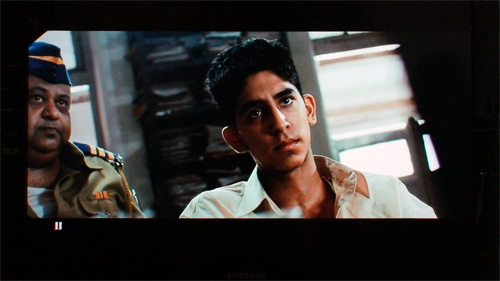
Colours appeared naturally balanced, with skin tones suitably convincing due to the absence of red push. The Samsung LE32B450 also handled 1080p/24 video signal from our PS3 well, portraying the sweeping shots of the Mumbai slums without any sign of telecine judder.
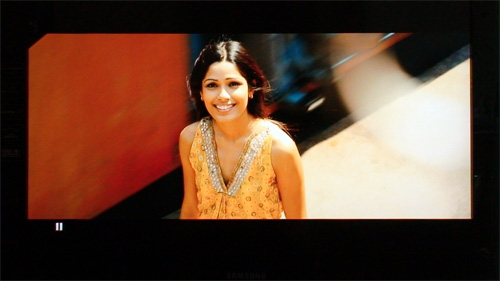
Up-close, the Samsung LE32B450’s native resolution of 1366 x 768 precludes it from displaying 1080 content with the razor-sharp crispness seen on other full HD models. However, unless you sit less than 4 feet away from the screen, you’ll be hard-pressed to tell the difference due to the resolving limit of our eyes.
Standard Definition
Herein lies the greatest strength of the Samsung LE32B450: it dealt with standard-def content better than any other 32-inch LCD televisions we’ve tested thus far. Scaling/ upconversion quality was good, capturing sufficiently sharp detail either off-air or from DVDs. Jagged edges in video-based material were cleaned up effectively, and digital noise was adequately suppressed at baseline.
With [Film Mode] set to “Auto“, the Samsung LE32B450 LCD television successfully detected and processed 3:2 cadence over 480i and 1080i, and 2:2 cadence over 576i for film-based content. It even managed to eradicate the moiré from the red Coca Cola sign saying “Go Bridget Go” in the notorious test scene from the PAL DVD of Bridget Jones: The Edge Of Reason.
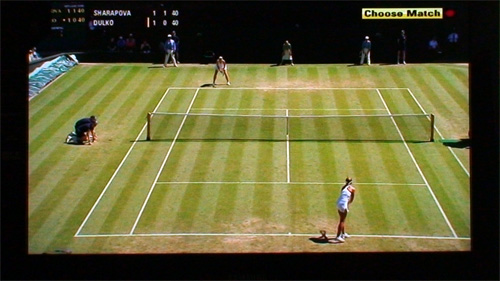
Add class-leading blacks and natural colours to the mix, and you have one very solid SD performer. The lack of 100Hz motion-compensated frame interpolation (MCFI) technology did put a slight dent in motion resolution, but we were never overly troubled by motion blurring when we watched Wimbledon tennis on BBC.
Console Gaming
Bucking the trend of high(ish) input lag experienced on the latest Samsung flat-screen HDTVs, the LE32B450 delivered praiseworthy gaming response. With [Game Mode] engaged, we measured input lag on the Samsung LE32B450 to be on par with that on our resident Samsung F96 LED-backlit LCD TV reference. Disabling [Game Mode] did not seem to cripple the Samsung LE32B450’s gaming response too much either: 8 times out of 10 the recorded input lag would equal that on the F96.
Conclusion
Exhibiting class-leading black-level performance and standard-definition handling, the Samsung LE32B450 gets a wholehearted recommendation from us here at HDTVTest. It does not offer 100Hz technology nor full HD 1920 x 1080 native screen resolution, but these are minor niggles especially considering its bargain-basement price. The Samsung LE32B450 is conclusive proof that you don’t need to break the bank to find a flat-screen television that is more than suitable for SD viewing, console gaming, and the occasional HD critical viewing.



![[Colour Space] Auto](http://www.hdtvtest.co.uk/image/hdtv/Samsung-LE32B450/cs-auto.jpg)
![[Colour Space] Native](http://www.hdtvtest.co.uk/image/hdtv/Samsung-LE32B450/cs-native.jpg)
![Post-calibration CIE chart in [Game Mode]](http://www.hdtvtest.co.uk/image/hdtv/Samsung-LE32B450/cie.jpg)


[...] Re: Suggestion for 32" LCD TV and Home Theater system The Samsung LE32B450 has good reviews as well. Is it available here? Samsung LE32B450 / LE32B450C / LE32B450C4W Review [...]
Hi. Is this the same as the LA32B450 seen here?
http://www.samsung.com/in/consumer/fptv/index.html?pid=in_home_c2r2contents_samsunglcdtv
I’m assuming the A and E after the initial L represent the Asian and European sub-models respectively?
Bhairav, yes that is right. Asians models also lacks DVB-T and DVB-S tuners, other than that they should be similar.
Just got this TV also, would appreciate if you can post up or email me the calibration details to help me get the best from the screen. Thanks !!!
[...] Best Picture Setting for Samsung LE32B450? I am hoping the guys on HDTVTest post up their settings soon. __________________ Main Room: Projector: Panasonic AX200 Screen: [...]
This is deep article with pictures and graphs about Samsung HDTV, its good attempt
Excellent article … buying it today … but please put up those calibration settings
Is the Overscanning on HDMI the same on the Samsung 26LEB450?
hi i need a quick answer, does this tv make any buzzing sound? it looks like a great tv, i may buy it tomorrow but i couldn’t find any information about buzzing.
No buzzing. Iv had this tv for over a week now and havent encountered any problems, great tv!
@Andrea: there shouldn’t be any difference.
@Ali: Our review sample exhibited no buzzing.
Warmest regards
Vincent
thanks guys , i bought the tv.
Can you post your settings?
Thanks!
Seems like the perfect bedroom TV, but the “transparent layer of perspex extending beyond the subtly-curved bottom border” looks terrible imho (especially the red stripe if put against my wall). Does anyone know whether its detachable? Thanks!
Thanks for this review, i’ve been looking for a new tv for my granny. This one seems to fit the bill perfectly. £200 CHEAPER THAN A PANNY OR SONY too:)
What is better (sharp, detailed picture) for not upscaling SD (tv):
Samsung 32B450 or plasma Panasonic TX-P37X10?
(Viewing distance 2 m.)
Thanks in advance for your opinions.
When will you do the Panasonic TX-P42X10B review?
I’ve been waiting!
PLEASE!

Stanislaus, the X10 i feel would better for SD performance. I have the 42″ version and it is better than the LCDs IMO
E grazie ar cazzo, il Panasonic TX-P37X10 e’ un plasma…
Can you please post calibrated setting for this. Its going to be my, and alot of other peoples choice for a budget 32″.
Great review, Thank you.
Would be fantastic if the calibrated settings were available.
Thanks
I’ve bought this tv. Please can you post the settings you used please??
Thanks.
I have had this tv delivered today - would somebody out there please list complete optimum settings (including advanced) for Movie mode as this was the tested mode,..thanks
Please post calibrated settings for best colours and gama tracking. I hope that isn’t a problem for you at HDTVtest. Thanks in advance!!!
Yep would really love some recommended settings, I’m having a little trouble making the image look right - all the more frustrating for knowing how good it can look! Any advice from anyone would be great!
I bought this tv after some research, cant seem to get it looking its best. I have one dead pixel already on day two, and real problems with motion blur when the camera does a pan shot. As far as my xbox through component , the backround judders about when moving as well. Would be great to see what settings you guys used, if they could be posted.
Another call for some settings please. I cannot get this set to look good and may return it. Thanks.
[...] for the best one. Im getting the samsung LE32B450. This review is the one that sold me on it Samsung LE32B450 / LE32B450C / LE32B450C4W Review For ps3 gaming it seems to have the least amount of input lag that they [...]
I think kinds of panels can have diffrent resolutions. My has 1360×768, NOT 1366×768 and some motion blur problem.
Warning (about reviews):
http://www.techenclave.com/consumer-electronics/suggestion-32-lcd-tv-home-theater-138947-2.html#post1170375
It’s a matter of luck
Please please please can you post the settings for the calibration to get optimal viewing. I have just bought this TV based on this review (£350 with a free 5 year warranty). There are loads of people who would appreciate the settings to be published here. Many thanks in advance.
Is better to specify what makes the Samsung F96 of inputlag than a crt? For more precise inputlag.
Please post the calibration settings used in this review.
Hi,
just bought this set from JL - fantastic performance out of the box, but like many before me I would really appreciate your calibration details to get the set working A1 - Thanks
please please please post up your calibration settings. thanks for the wonderful test results but like so many people before me, we’d really like to know the ideal settings
Looks like settings are not going to be posted. I’m suspicious that my set is using a different panel to that reviewed. Therefore, I am looking at returning and buying an alternative.
I bought this TV because of fantastic procesing power (proper deinterlace, good scaling) for good SD quality in the first place, but accurate colours would be nice to see so gentlemen from HDTVtest PLEASE POST CALIBRATED SETTINGS.
Is that realy a big issue for you?
A week on and i smell a rat. Somethings not quite right here.
Calibration settings please?
I spent half a day calibrating my LE32B450C4W, and in the end I realized that this setting is the best for games, SD, and film:
-Movie mode
-Warm 1
-sharpness 0 for XBOX360 over component, and 50 for SD
-contrast 90
-brightness about 40
-gama 0, -1 or +1 (It’s up to you)
-all NR, Dynamic contrast, Black level, ect. shoul be off
P.S. You can use warm 2, but for me is far too yellow. White balance I left intact.
Post your settings because HDTVtest is not gona post any.
Milan, thanks for your values. What do you have Backlight and Colour set to?
Backlight for movies 7 or 6, for xbox360 7 and for SD 6. Colour saturation for SD around 55, but for film(720p mkv) around 50 and same for xbox360. I am always sayin’ “around” because it’s up to your taste couple of klicks left or right. Most important thing is movie mode and warm 1, everything starting from that point. Warm 2 is realy too yellow, but some of you may like it.
Must say somethin about xbox360 over VGA. It’s terrible and DO NOT connect xbox360 over VGA. Picture is washed out, muted and without punch. With component cable it’s another world and colours, contrast are there, BUT again Movie mode and Warm 1 must be mode for playing games because Standard and Dynamic add ugly artifacts mainly because of sharpness boost. So for xbox360 over component Movie mode, Warm 1 and sharpness 0, zero nada.
I forgot to say, colour space set to Native because Auto boost yellow colour. But I found Native is not enough for me so I set Flesh tone +2 to avoid yellow skin tone witch I noticed. This LCD is realy a little bit on yellow side so we must do anything to rid off that yellow tone. In my opinion this is far better then red push. White balance settings would be nice to see, but that is part witch HDTVtest could provide.
P.S. Contrast for all inputs can be set between 80-85, this is maybe better then 90.
Thanks. I need to boost contrast to 95 as too much detail is lost in the shadows with Movie mode. I’m still left with high-def material that only looks like a good standard def transfer. I think I have to accept that this is a budget TV with an OK picture.
There’s a way to know which panel Samsung b450 is using:
in “Model” part you can see a letter at right…
A (it means AUO, “AU Optronics”: it would be use an “advanced-mva”, the best panel, slighty better than samsung’s s-pva)
C (it means CMO, “Chi Mei Optoelectronics”)
P or W (it means CPT, “Chunghwa Picture Tubes”)
S or nothing (it means Samsung S-PVA: maybe the same tested in this hdtvtest’s review? Could HDTV answer please …)
So, “A”, “S” letter or nothing would be fine.
bye
PC connected via VGA provide terrible picture. I couldn’t believe my eyes that this LCD over VGA can’t produce red colour. Everything red on this tv is shown orange, red cars are orange for example and so on, and nothing I tried didn’t help. I will connect DVI-HDMI cable and I hope for better results (I would say proper results, not perfect, just proper). Samsung come on!!! RED IS NOT ORANGE!!!
Milan: I dont have any problem with VGA and DVI, everythings looks fabolus.
Car on my Samsung monitor is red, and I know that car is red, not orange, BUT on LE32B450C4W is car is completely orange. I realy don’t know.
One question. Letter witch tell us what panel is inside is written in serial number or in number PS…somethin? My serial is 85943HBS601629R and my other number is PS BN64-01027A. What should I look for?
lol I wrote in post above “witch” instead of “which” (sorry for grammar). Serial on back of my Sammy not contain any of letters mentioned above, but second number PS BN64-01027A contain “A” so probably my panel is AU Optronics advanced-mva, and black level is realy good for LCD TV. But colours over VGA is terrible, zero.
Servis menu pleaseee, how get inside?
http://www.avforums.com/forums/lcd-televisions/971872-samsung-b450-owners-thread-5.html
Last post
With TV in ‘Stand By’:
- info
- menu
- mute
- power
Select the ‘Options’ menu and look for ‘Type’. Mine is 32A6AH0C so I’ve got an inferior panel.
Use the ‘menu’ button to go back up one level in the menu structure. Power button exits service mode.
@Milan: you must look into “Model:” row (not in “Model Code:” or “S/N” row, etc.)
@Sticazzi: are you referring to the sticker on the back of the TV? I thought the only way to discover what panel is used is to go into the Service Menu at look at the ‘Type’ code.
Guy wrote:
> @Sticazzi: are you referring to the sticker on the back of the TV?
Yes
> I thought the only way to discover what panel is used is to go
> into the Service Menu at look at the ‘Type’ code.
That’s another way (but I prefer the Sticker’s way, more simple and fast)
bye
I must say that this LCD without seriuos calibration from service menu is waste of money. Colours are off, and nothing can bring them in correct colour space. I tried tint, flash tone, white balance and result is better on one side, but worse on the other side. This LCD is compromise with colours. HDTVtest plz can you provide us some service menu calibration to get red cars look red(not orange), Megan Fox lipstick look red(not orange), and so on…
[...] spanischen Elektronikkette, über diesen 32" von Samsung gestolpert, der laut der englischen Webseite scheinbar ganz gut sein soll. Kostet im Shop 428 Euro. Gibt es da Erfahrungswerte im Forum? TV [...]
Update: colours are normal (red i red) only when I set resolution to 576p on PC. 720p, 1360×768, 1080p resolutions have wrong colour decoding and red is orange. What can I do with service menu?
Milan you talk about VGA? Try dvi-hdmi.
i bought this TV yesterday and have been regretting the decision ever since. my mom has been so mad about the colours and that it can’t produce the same results as a CRT TV or whatever the big old ones are called….colours aren’t looking natural at all…i’ve played around the whole day with settings but everything is just way too gawdy or flashy
Jin Signal is SD or HD?
SD
I am talking about VGA and DVI-HDMI. I tried both ways and red is orange. My friend and I were trying to get red colour with service menu and nothing. This set can produce correct red colour only when output resolution from PC is set to 576p. That is wierd. I realy don’t like this set, waste of money. I don’t understand how that big fault passed unntoticed by HDTVtest reviewer. This TV is not supposed to be Highly Recommended. It is cheap, it is rubbish and that is it. I feel befooled.
what’s taking these guys so long to post their settings? for some models on this site, they’ve gone into so many details yet this thread lies neglected despite our pleas!
Milan, what is your “type” (service menu -> options -> type) number in the service menu?
I dont have any problems with colours that you mention.
@Milan
are your sure your cable isn’t broken? maybe it’s an issue with your pc settings
No I tried 2 different cables and my PC is ok, BUT MY LCD IS DEAD. All over the place from every output I have broken lines, artifacts, something just go wrong after service menu calibration. I have guarantee so I will send back this faulty “ORANGE” Sammy.
@Milan: do you have any other source, apart from your PC, to test the picture?
Also, I’m pretty sure the serial number or any other number on the back of the TV has nothing to do with the panel type. This information is only available when going into the service menu. I think!
From all outputs: PC, xbox360 over component, SD over air antena. All is infected.
@Milan: what about a HDMI source?
Remember, when you go into the service menu it will reset to Dynamic mode. Make sure you have changed Picture Mode back to Movie and check your settings are the same as before. If you still have a problem, return the TV.
Did you change anything in the service menu? (you shouldn’t unless you know what you are doing)
I change WB, offset and gain, a nd just tried other functions on/off, but I reset to factory settings, but something went wrong and on Monday I will call shop where I bought TV and return this Sammy ’cause I have warranty.
I just got a great deal from store where I bought this crap TV because they told me they are able to offer me Panasonic plasma TX-P37X10E(on my request) in exchange for “orange” Sammy. Huraaaaaaaa!!!!!!!!!!!! I WILL NEVER BUY AGAIN LCD TV IN MY LIFE, only PC monitor and nothin’ else really. Sammy goodbye forever!!! Plasma is the king and I knew it, but now I’am sure definitely.
[...] Re: Samsung 32b450 advice please I’m also interested in this TV so welcome any views on it. The people at HDTV seemed to like it quite a lot: Samsung LE32B450 / LE32B450C / LE32B450C4W Review [...]
@Milan: the X10 plasma is a great TV. Be cautious when using as a PC monitor though due to image retention.
well, i hope someone on HDTVTEST can put calibrated settings, i have this TV and i think is awesome, no problems with red and orange.
Also bought this tv recently, would love to see calibrated settings.
Love this site.
Thanks
seems odd theres no settings about anywhere for this tv, if its so great would have thought it would be easy to just post up the settings =/
I wouldn’t be too surprised if this site is posting up this review to be as good as it is when it’s not just to aid sales.
I trust the majority and that is all the people who have commented on this page and those on avforums, and it seems to me this TV is crap.
After all this is a budget TV…
Try this,
Mode Standard: normal/high ambient Light
Lower Backlight 7 (6-8 is typical in brighter environments)
Lower Contrast 80
Lower Sharpness 0 (upto 30 is OK but may add anomalies)
Turn Off Dynamic Contrast (Unnecessary and Unnatural)
Gamma +1
White Balance:
R-Offset 0 G-Offset 25 B-Offset 0
R-Gain 0 G-Gain 25 B-Offset 0
Turn Off Edge Enhancement (adds anomalies)
Turn Off Digital NR (Usually unnecessary may be useful in weak signal areas)
Use same settings for Movie Mode: low ambient light
Backlight 5 (4-5 is typical in dimmer environments)
Lower Colour 45
Colour Space Native (Warmer slightly innacurate Yellow/ Accurate Magenta)
Change Colour Tone Normal
Film Mode Auto when connecting SD Video source.
Also change Tint G70/R30
Actually Tint G65/R35 is better.
Can anyone from HDTVtest comment on thes settings as they are all gaged by eye and are as close as I can percieve as neutral.
Final ammendments to the above,
Contrast 85
Tint G50/R50
Gamma 0
White Balance:
R-Offset 10 G-Offset 40 B-Offset 10
R-Gain 10 G-Gain 40 B-Gain 10
I find a massive improvement on the overall clarity and detail with these settings.
Settings look good, thanks for sharing Steven.
Still hoping hdtvtest would post calibrated settings.
Cheers
I have decided that these setting are a little to green/Cyan therefore add 10R = R-offset 20 R-Gain 20 and I think everyone will agree that any attempt to tame the pinky overcast like many is the way forward with this set.
In order to try and achieve a good white balance it is necessary to view the black and white image by subtracting all colour. Then you will probably notice the normal colour tone appears a strong pink/magenta overcast. Screaming out for adding green or subtracting red and blue. By subtracting blue first until it is obviously warm or brown is a good indicator that a better balance achieved ultimately it should appear completely neutral and and silver grey momotone. I always find it unnecessary to raise gamma and could possibly be lowered slightly.
And finally, I think you will agree that having found a happy balance of blue and green. Setting R25 G40 B10 for both gain and offset is probably the best balance overall.
I find this a bit Warm and after many hours tweaking have finally settled on R15 G35 B15 though may not be metre accurate this can be judged to a stisfactory degree by eye.
What do you have colour / brightness at? I find I have most difficulty in getting vibrant but realistic colours without having over exposed whites.
Brightness can be set as low as 35 try gamma at +1
These are my current settings from default.
Mode Standard: normal/high ambient Light
Lower Contrast 90
Lower Brightness 40
Lower Sharpness 20
Lower colour 40
Turn Off Dynamic Contrast (Unnecessary and Unnatural
White Balance:
G-Offset 45
G-Gain 45
Turn Off Edge Enhancement (adds anomalies)
Turn Off Digital NR (Usually unnecessary may be useful in weak signal areas)
Use same settings for Movie Mode: low ambient light
Colour Space Native (Warmer slightly innacurate Yellow/ Accurate Magenta)
Change Colour Tone Normal
Film Mode Auto when connecting SD Video source.
The safest settings without upsetting things to much R25 G40 B10 for both offfset and gain.
Mode Standard: normal/high ambient Light
Lower Backlight 7
Contrast 95
Lower Brightness 35
Lower Sharpness 20
Lower Colour 43
Dynamic Contrast Off/Low (Effective on bright sunny days)
White Balance:
G-Offset 45
G-Gain 45
Turn Off Edge Enhancement (adds anomalies)
Turn Off Digital NR (Usually unnecessary may be useful in weak signal areas)
Use same settings for Movie Mode: low ambient light
Backlight 5
Colour Space Native (Warmer slightly innacurate Yellow/ Accurate Magenta)
Change Colour Tone Normal
Film Mode Off/Auto when connecting SD Video source.
Cheers steve , ive tried your settings , but i do find them a bit green , but it is a very good starting point im using R25 G40 B20 , before i was using warm , which apparently has more colours and if configured properly could be better than the normal colour tone. Maybe you should try to get good settings on that ?
Mode Standard: normal/high ambient Light
Lower Backlight 7
Lower Contrast 90
Lower Brightness 38
Lower Sharpness 20
Lower Colour 43
Tint G30/R70
Dynamic Contrast Off/Low (Effective on bright sunny days)
Gamma +1
White Balance:
Red-Offset 20 G-Offset 40 Blue Offset 20
Red-Gain 15 G-Gain 40 Blue-Offset 15
Flesh Tone -5
Turn Off Edge Enhancement (adds anomalies)
Turn Off Digital NR (Usually unnecessary may be useful in weak signal areas)
Use same settings for Movie Mode: low ambient light
Backlight 5
Colour Space Native (Warmer slightly innacurate Yellow/ Accurate Magenta)
Change Colour Tone Normal
Film Mode Off/Auto when connecting SD Video source.
The Green shock can be compensated with tint and flesh tone adjustment. The settings above are just about the best I can achieve.
Flesh Tone -10 Colour 45 are about right.
No! Perhaps flesh Tone 7 Tint G35/R65 is best?
Sorry FleshTone -7. Final
Mode Movie: Low ambient Light
Lower Backlight 5
Lower Contrast 82
Brightness 47 too low and you can’t see detail in blacks
Lower Sharpness 12
Colour 45
Tint G38/R62
Dynamic Contrast Off
Gamma 0
Colour space Native
Colour tone Wam1 , some may prefer warm 2
White Balance:
Red-Offset 20 G-Offset 30 Blue Offset 10
Red-Gain 15 G-Gain 38 Blue-Offset 15
Flesh Tone -5
Turn Off Edge Enhancement (adds anomalies)
Turn Off Digital NR
Try these settings , i think i nearlly have them perfect. Tell me if you notice a problem.
colour to 43 i think its all good now
New firmware released :
http://www.samsung.com/uk/consumer/detail/support.do?group=television&type=television&subtype=tftlcd&model_nm=LE32B450C4W&disp_nm=LE32B450&language=&cate_type=all&dType=D&mType=FM&vType=&prd_ia_cd=02010100&model_cd=LE32B450C4WXXC&menu=download
Cheers mate , any idea what it fixes ?
quick question: does this Tv has MPEG 4 decoder or not? i bought it 3 days ago, and i thought it has MPEG4, but i cannot find it anywhere in manual, specs, etc…
Rino: Mine has MPEG4! It is indeed not mentioned anywhere, but it works, I can get DVB-T channels, which require the MPEG4 tuner.
Rosh and Steven: Thanks for the suggested calibration settings, they improve the default image quality a lot.
John and all: I have not found any description about the firmware upgrade, other than how to install. Anybody knows if it is highly recommended to upgrade or it is only important for some special application. I use my set for TV viewing only, no game consol, no computer, no DVD. You know, I worry a little to perform any upgrade, “it is not broken, do not fix it”.
Antal, thanx….
Antal: i do not think samsung post change logs , but i would reccomend the update, as i always feel its made a difference but just cannot see it :).
With my settings did you notice any colours not being produced correctly ?
Rosh I believe Tint 45/55 is the right setting as the yellows and skin tones really suffer otherwise. Bluey green grass benefits from this setting. White Balance Offset 20 35 20 Gain 20 40 20 may work better with warm 1.
This is the best comprimise I think.
Tint G45/R55
White Balance:
R-Offset 20 G-Offset 35 B-Offset 20
R-Gain 20 G-Gain 35 B-Gain 20
Flesh -5
Hi guys, I’ve seen that there’s another model very similar, the LE32B460, but I can’t find the differences between the two. The price of this last is more than 100 euros from the B450. Do you know something about this model?
Rosh: I have not recognized any significant color shift, red car is red, blue sky is blue, etc… All in all colors look natural and not that punchy as the default. On the same time my wife finds the colors too pale, so there is still room for adujstment.
Steve and Antal are both right , the yellows were way off which makes all colours pale looking especially Skin tone. I believe i have come close to finding my perfect settings , i hope you agree.
Mode Movie: Low ambient Light
Backlight 5
Contrast 86
Brightness 49
Sharpness 12
Colour 47
Tint G45/R55
Blacktone: Low
some may find this too dark i do not however with the other settings i have set , you can add more colour without it looking cartoony and i think it helps. If you don’t like it, i would adjust the settings above slightly as they would be a bit bright.
Dynamic Contrast Off
Gamma 0 or +1
Colour space Native
Colour tone Wam1 , some may prefer warm 2
White Balance:
Red-Offset 21 G-Offset 32 Blue Offset 18
Red-Gain 20 G-Gain 32 Blue-Gain 18
Flesh Tone -5
Turn Off Edge Enhancement (adds anomalies)
Turn Off Digital NR Unless your receiing bad signal , can help
So Antal if you want more vibrant colours use the dark blacktone and crank up that colour.
Try my settings with gamma: 1 and Darktone: off, to be honest i think i may prefer these settings , but it all depends on what channel it is and what there broadcasting.
Or Darktone: low and gamma :1. Tell me what ya think.
Rosh: The good news is that using your previous suggestion as a reference, I experimented a little, and came up with my own settings, very similar to your last suggestion. The main differences (if any is significant):
my Backlight: 7
my Sharpness: 20
my Flesh tone: -3
From your last comparison I prefer the
Blacktone: Low
Gamma: 1
composition, and indeed I set my TV so.
Anyway, the TV sets may differ by production, our eyes may differ by nature, so I am not sure we all have to use the same settings. But again, the good news is that we find very similar settings for our likeness.
This is the first LCD TV I’ve bought and I was initially very disappointed with the picture quality. I used the settings provided by Milan, Steven W and Rosh (thanks to all) and acheived great improvements but was still not satisfied.
I then applied some common sense and looked at the picture settings on my SKY + box. Simply changing the aspect ratio from 4:3 to 16:9 and contrast to “dark” has improved the picture dramatically in both standard and movie modes.
Would HD secure a further dramatic improvement or would I be wasting my money?
My one remaining gripe is that you have to be almost directly in front of the TV, otherwise the picture washes out considerably.
Sorry - should have said SKY+ contrast to “high”.
Hi Chris,
I have BBC/ITV HD through freesat and pictues are truly stunning. There is still a very limited amount of HD channels with Sky not worth subscribing for but offers more choice, Freeview HD still years away. Five HD might appear on Freesat by next year and possibly 4HD may follow.
Thanks for your calibrations, guys ! ..
This TV is brilliant .. I will reccomend it to anyone who are looking for a new LCD TV. I would not hesitate .. Samsung has done well !
I’m in the US and the closest thing I could find is the LN32B460. Do you think the 460 is the same thing as the UK’s 450? I’m mostly concerned about the input lag
DK: Have read somewhere that this tv has low input lag. And I’m quite sure 460 is the same as 450. Here in Norway it is 455..
Question about PS2: My picture when connected with component is terribel. Jagged edges are destroying the picture. Any suggestions?
Forgot to say that I only get jaggies when playing games, DVDs are soft, but ok. Not much better analog TV pictures, though.
guys use this as a base then get hold of some basic calibration disc’s to tweak it
mode: movie
backlight: 2
contrast: 100
brightness: 45
sharpness: 2
color: 45
tint: 50\50
black tone: off
dynamic contrast: off
gamma: 0
color space: auto
white balance:
r offset: 25
g offset: 25
b offset: 22
r gain: 27
g gain: 25
b gain: 15
flesh tone: 0
edge enhancement: off
color tone: warm2
Digital NR: low
HDMI Black Level: low
film mode :auto
i got 450! and something i noticed in the moment when i purchased it….there is no ouptut for phones?!?!?!
There is, however, audio out connection with two RCA connectors, where you can set headphones. This is what I use with an RCA/3.5jack converter, the volume and mute functions do not affect the output.
Going into the service menu and enabling the WB Movie mode made a big difference. Colours are finally normal looking, blacks are black and whites are now fully white rather than previously dull looking.
It’s in the advanced part of the service menu (press 0000 slowly to enter it).
Hello,
Does anyone have the problem of settings not being saved when the TV is turned off? Even just onto Standby!
Thanks
My settings on movie mode after activating the WB Movie thingy in the service menu.
Backlight 8-10 depending on indoor lighting
Contrast 95
Brightness 45
R 15
G 25
B 35
R 15
G 25
B 35
Sharpness - 20 for me.
Features like black level, dynamic contrast, film mode, edge enhancement etc are set to off/0
After a week of tweaking I’m happy with the above.
whats the general consensus on this TV then. the review is glowing but the comments here a putting me off slightly. I’m still (as others are) a bit worried as to why the reviewers wont post their settings. I’ve looked at it on display and it looks fine. slightly sharper compared to the other two i’m also looking at (Tosh 32av615db & LG32LH200) is it worth my £350 and 5 year guarantee from House of Fraser?
Another tip for those with dull colour on VGA:
You will have noticed you can’t access the color option in the TV’s menu when viewing a VGA source. You can actually alter this in the WB section of the service menu. The picture from my 360 looks as sharp and vibrant as it did on R88 (ie fantastic)
As many have said, this is a great TV but requires alot of advanced tweaking to get a decent picture. At first I was dissapointed with my purchase but now I’m very pleased.
If anyone has any questions about the B450 they’d like to ask me then please feel free to do so.
Roddles ,
what is this R88 i.e fantatic mean ? i am interested in settings for the 360, i have currently got it connected via component.
I am using WB movie from service menu, and i am using game mode which i no is standard but apparently samsung nd microsoft worked together to make the perfect game mode nd i have just tweaked those settings , takin of dynamic contrast nd a few otha things. still does not look perfect though , your settings or tips are much apretiated.
The difference between component and VGA on the 360 was like night and day for me. I suggest you purchase a VGA cable and raise the colour as mentioned above.
what is R88 ??
and what differences do you see in vga compared to component ?
what changes did you make to the settings to make the vga sharp and vibrant and not red ?
Thanks alot mate im thinking of getting that vga cable
Hi
Im new to all this but would like to say that whilst everyone seems to be speculation about the various versions of screen and the LE32B450 “C” version being a poor panel, I would like to note that if you look at the top of the review it clearly states they tested a “C” version and found it to be spot on.
Perhaps people have their wires crossed ?
Where can I find the “gain” setting??
What do you think about 720p vs 1080i, for HD and digital tv ?
please hdtvTEST send us the settings this tv is winding me up!!!!
I may be wrong but after looking at the hdtv review above i noticed in a picture the red was 60% green was 100% and blue 140% pre calibration. So using these ratios i have new settings. And they look alot better to me.
Mode Movie: Low ambient Light
Backlight 5
Contrast 87
Brightness 48
Sharpness 16
Colour 44-47 up to you i use 46
Tint G45/R55
Blacktone: off
Dynamic Contrast Off
Gamma 0 or +1
Colour space: Native
Colour tone: Warm 2
White Balance:
Red-Offset 35 G-Offset 25 Blue Offset 13
Red-Gain 35 G-Gain 25 Blue-Gain 15
Flesh Tone 0 vary it for you i still have not decided
Turn Off Edge Enhancement (adds anomalies)
Turn Off Digital NR Unless your receiing bad signal , can help
How can I change the color through the vga cable?
please…please….PLEASE hdtvtest post up or send me the calibration settings you found. There’s a lot of people out there waiting for your pearls of wisdom.
We asked several times for settings in these comments, hdtvtest doesn’t care or doesn’t want to give them.
Nevertheless i’m still hoping settings will be published on this site.
Was going to by this TV but the comments here have put me off it, probably increase my budget and get something better.
Hard to trust a review sight with so many affiliate links all over the place.
It dosent look like they are going to post the settings , i would suggest to try my new settings above , after using them for a week i can say to me they are perfect , and do not see how hdtv could better them unless they used the extra options in the service menu.
Or try this until you find the best settings:
Mode Standard: normal/high ambient Light
Backlight 7
Contrast 95
Brightness 45
Lower Sharpness 20
Colour 50
Tint G45/R55
Dynamic Contrast Off
Gamma 0
White Balance:
Red-Offset 10 G-Offset 25 Blue Offset 5
Red-Gain 10 G-Gain 25 Blue-Gain 5
Flesh Tone 0
Turn Off Edge Enhancement (adds anomalies)
Digital NR Auto (This can be turned Off in Game Mode/video source)
Film Mode Off/Auto when connecting SD Video source
Use same settings for Movie Mode: low ambient light
Lower Backlight 5
Change Colour Space Native (Warmer slightly innacurate Yellow/ Accurate Magenta)
Change Colour Tone Normal
In Game mode it may be necessary to reduce Backlight to a maximum of 5
——————————————————————————–
New firmware out, version 2002.2
http://www.samsung.com/uk/consumer/detail/support.do?group=television&type=television&subtype=tftlcd&model_nm=LE32B450C4W&disp_nm=LE32B450&language=&cate_type=all&dType=D&mType=FM&vType=&prd_ia_cd=02010100&model_cd=LE32B450C4WXXC&menu=download
What do these firmwares update? I only downloaded the 2001.8 update about an hour ago then John said new firmware is out, i thought that was quick.
So is there any recommended settings for viewing SD and PS3, i would imagine game mode would be best for games but for blu-rays and DVD upscaling what would be the best setting? My PS3 is connected with an HD cable so its very good quality.
2001.8 has been out for a while now.
No idea what they fix as Samsung doesn’t give any info, but it’s recommended to upgrade.
I’m pretty happy with the settings as posted - thanks all! - but when using RGB scart from my Sky box I don’t seem to be able to access the ‘tint’ options and so reds are still quite orange, does anyone have a suggestion of how to compensate without using tint?
I am trying to connect a MacBook Pro to the Samsung 450 using HDMI. Since the MacBook Pro HDMI output does not carry audio, I need to connect the audio separately. Is there a way to tell the TV to get video from HDMI and audio from AV?
I use this TV to watch SD TV and game PS3 (connected with an HDMI cable).
What are the recommended settings with these 2 inputs ??
– I need mostly settings for PS3 gaming !! –
Current settings with PS3 input :
Mode Movie: Low ambient Light
Backlight: 5 or 6
Contrast: 90
Brightness: 45
Sharpness: 0 (is it a good choice ??)
Colour: 50
Tint: G50/R50
Blacktone: Off
Dynamic Contrast: Off
Gamma: 0
Colour Space: Native
White Balance:
R-Offset 25 G-Offset 25 B-Offset 25
R-Gain 25 G-Gain 25 B-Gain 25
Flesh Tone: 0
Colour Tone: Warm 1
Edge Enhancement: Off
Digital NR: Off
What do you think of these settings ??
(I find the image is a little dull when I game)
Thanks
I am trying to connect a MacBook Pro to the Samsung 450 using HDMI. Since the MacBook Pro HDMI output does not carry audio, I need to connect the audio separately. Is there a way to tell the TV to get video from HDMI and audio from AV?
No there is not however i have not tried this but it should work, connect the hdmi to the hdmia (DVI) port and next to that you will see a jack saying Pc audio input (dvi), so you will need another cable, a jack to jack (3.5mm) so you can connect it to the green output on the computer.
Bourat , there good standard settings , try these white balance settings.
R-Offset 28 G-Offset 25 B-Offset 15
R-Gain 22 G-Gain 25 B-Gain 27
Increase the Gamma to +1 , you might need to increase the brightness to see detail in deeper blacks and maybe decrease the contrast and colour a bit for a more realistic image. I found the tint best at G55/R45 and im sure you could have the sharpness on at least 10.
I too am eagerly awaiting word from hdtvtest.co.uk as to the optimum settings for this television. However I did recently purchase a DVE blu-ray hdtv calibration disc and i have achieved results that i am very pleased with. I use the set mostly for the PS3 and upscaling dvd’s and my settings are as follows:
mode - standard
backlight - 8
contrast - 100 (purely because on the test there was no sign of burnt out whites and I felt this high setting delivers much more clarity than if i were to drop it down for no reason)
brightness - 39 (this is very important to achieve true black)
sharpness - 50 (i left this as standard as it is very hard to differentiate on the calibration disc)
colour - 53
tint - G45/R55
black tone - off
dynamic contrast - off
gamma - 0
colour space - auto (i was reluctant to select this as opposed to ‘native’ but found it much easier to set the colour level with this setting for a reason i cannot explain)
white balance - all 25 (i left this setting alone as i have a good eye for colour but had very little understanding of the function of each of these, and on my calibration cd it was very hard to judge a correct setting)
flesh tone - 0
edge enhancement - off
colour tone - normal
size 16:9
digital NR - off
HDMI black level - normal
I am very happy with these settings, the screen looks wonderful and i have absolutely no regrets in my purchase, however any feedback would be great, especially regarding the white balance as i would love to further my understanding.
Jack
ADDITIONAL COMMENT
for anyone using the ps3 as a primary source for gaming, dvd and blu-ray playback it is important to make these changes within the settings menu for the console:
within ‘video settings’ ensure that the settings are as follows:
BD Internet Connection - allow
BD/DVD Cinema Conversion - automatic
BD/DVD Upscaler - normal
BD/DVD Video Output Format (HDMI) - Y Pb/Cb Pr/Cr
BD 1080p 24 Hz Output (HDMI) - automatic
BD/DVD Dynamic Range Control - off
BD/DVD Audio Output Format (HDMI) - linear PCM
BD Audio Output Format (Optical Digital) - bitstream
within ‘display settings’ ensure that the settings are as follows:
RGB Full Range (HDMI) - full
Y Pb/Cb Pr/Cr Super-White (HDMI) - on
Jack
Hello,
After a bit of advice. I’ve used Rosh’s picture settings and they are great so far except that I cannot change the tint.
I’ve got Sky+ and a scart with RGB active but I don’t get the option.
Any ideas anyone?
Cheers,
Tim
Great review.. looks like I’m buying this tomorrow!
Thanks guys, ur settings have improved the Sammys Output Appearance.
Just wish Hdtvtest would Post thier settings. This site would be perfect if they put more detail in every review they do. Peace out!
After looking at the HDTV pictures they provided us i have come up with new settings which are far better. This is calbirated for the built in freeview but should work for other analogue connections.
Backlight: 6 - (change this for brightness if the picture seems too dark e.g in daylight)
Contrast: 85
Brightness: 42 - needs to be close to this figure for real blacks (not grey)
Sharpness: 15
Colour: 41
Tint: G53/R47
Blacktone: Off
Dynamic Contrast: Off
Gamma: +1
Colour Space: Native
White Balance:
R-Offset 26 G-Offset 25 B-Offset 23
R-Gain 22 G-Gain 25 B-Gain 28
Flesh Tone: 0
Colour Tone: Warm 1
Edge Enhancement: Off
Digital NR: Off
Enjoy
Well still frustrated by this TV. I’ve got a great picture quality with superb blacks but very poor colour. The reds are often orange and there’s too much green.
The problem for me is that the TV will not allow you to adjust TINT if connected via Scart - there is no other way of connecting with Sky+ !!!
So I either a) shell out for Sky HD b) shell our for expensive RGB scart to component converter or c) take back and get another TV.
For this reason I def would not recommend this TV for Sky+ viewers - regardless of the positive reviews you read above.
Rosh - you’re revised setting surprise me… you’ve gone the opposite way on tint and dropped red down further and increased green???
[...] Samsung LE32B450C4 32 inch Widescreen HD Ready LCD TV: Amazon.co.uk: Electronics & Photo Review Samsung LE32B450 / LE32B450C / LE32B450C4W Review [...]
I really like the settings you have provided Rosh, I am using them for setup with my v+ hd box and my movive player.
For some reason i cant set my Colour Tone to Warm 1. I only get a choice out of the top 2 selections. Other than that, brilliant stuff, if you find an even better tweaking, please share it
[...] whathifi.com doesnt get a great review …. for a few quid more this one gets decent reviews .. Samsung LE32B450 / LE32B450C / LE32B450C4W Review its worth doing a bit of googling as I’m sure you can could get it a bit cheaprer such as here [...]
Jamie i think you are in standard mode , change it to movie mode. If not what connection are you using.
Okay, just bought this TV - my first LCD - and find the overall colour and blacks to be truly excellent .
There are plenty of settings adjustments for the average joe like me to get your preferred colours which are in your own eye, the lighting of your room and importantly the positioning of TV in relation to windows. These are all factors that people have ignored in evaluating this (and all TVs).
The fact that independent tests showed this TV is capable of excellent colour repreoduction and superb blacks for the low price was enough for me and I am not disappointed in this regard.
The only disappointment is with sports coverage (football) but I understand that is a problem with all LCD TV’s - the problem of panning making your eyes ache/head dizzy and plenty of jagged edges on long shots of players, and difficulty in dealing with bright sunshine and stand shadows. CRTs are much better for football it would seem, though there the advertising suggest HD sports coverage is much better.
Does anyone have advice for improving settings when watching football ?
Sorted Rosh, i was in standard mode, cheers
After using a few test patterns for brightness, contrast, colour and sharpness , there is no longer any extreme whites and now think i have the deepest black without losing detail.
Backlight: 7 - (change this for brightness if the picture seems too dark e.g in daylight)
Contrast: 83 - No more bright whites bleed together
Brightness: 44 - needs to be close to this figure for real blacks (not grey)
Sharpness: 0 - any more means “extra sharpness” were it adds contrast around the pixels, will add anomalyis and exagerate a bad signal.
Colour: 40- No colours bleeding together
Tint: G48/R52
Energy saving : Low - Controls the backlight , Less backlight = less power and less bright whites.
Blacktone: Off
Dynamic Contrast: Off
Gamma: +1
Colour Space: Native
White Balance:
R-Offset 26 G-Offset 25 B-Offset 24
R-Gain 22 G-Gain 25 B-Gain 27
Flesh Tone: +2
Colour Tone: Warm 2
Edge Enhancement: Off
Digital NR: Off
These settings may look dark at first especially with energy savings on, but time for it to warm up and you will notice a far better picture. Change to dynamic mode after using it for a bit.
New firmware update version 2003.4
http://www.samsung.com/uk/consumer/detail/support.do?group=television&type=television&subtype=tftlcd&model_nm=LE32B450C4W&disp_nm=LE32B450&language=&cate_type=all&dType=D&mType=FM&vType=&prd_ia_cd=02010100&model_cd=LE32B450C4WXXC&menu=download
I cant change my flesh tone rosh? will this be because of a mode im in again?
what source are you using ? is it greyed out ?
HDMI from my V+ box and yes it was, picture is very dark lol, struggling to get used to it
ohh well it is calbirated for the built in free view , it would differ slightly for hdmi , change the mode to dynamic and see how fake that looks compared to the image you have now.
Will i need different settings for my xbox 360, media player and v+ box which are all connection via hdmi? if this is the case and anyone has any settings for these, i would much appreciate it.
Thanks
Jamie
noo you won’ t you will , well you should only need one set of settings for all those inputs because they are all hdmi, and hence all digital. Easiest way of doing it would be to get some test patterns on your xbox 360 , the settings will only differ slightly from mine.
An easier method would be to maybe look at the freeview with my settings and then compare them to the v+ with my settings to see any obvious flaws ?
Got any decent recommendations for a calibration disk?
After a couple of weeks with this TV, I’ve now found *my* ideal standard mode settings for the built in Freeview.
Try them & see how these work in your enviornoment (Rosh’s 30 Sept settings for me gave colours that were far too muted and lacking richness)
(This gives superb rich colours & solid blacks)
Mode-Standard
Backlight: 6
Contrast:86
Brightness:46
Sharpness:20
Colour:48
Tint:G48/R52
Advance settings menu
Black tone:off
dyname contrast:off
gamma: -1
colour space:auto
flesh tone:-4
edge:off
White balance settings
r-offset:26
g-offset:25
b-offset:27
r-gain:23
g-gain:27
b-gain:26
Picture Options
colour tone: normal
digital n/r:off
film mode:off
Enjoy!
I have applied will’s settings on my hdmi connections, and used a Digital Video Essentials dvd to see where they leave me. The black levels are ideal and the contrast works well with my tv. I am not able to test colour but the colours look fine to me.
Thanks again for everyones input.
If somebody could point out what Flash Tone does as there seems to be differences in everybodys values.
The spec of this TV (and also on the box) says that there is a swivel base, but I cannot seem to turn the TV left or right. Am I missing something? Sorry for being dumb, but please tell me how this swivel base works. Thanks!
Backlight: 7 - (change this for brightness if the picture seems too dark e.g in daylight)
Contrast: 90
Brightness: 44
Sharpness: 0
Colour: 38- you will notice on some channels over saturation ( i did in snooker the other day) and this still might be too high.
Tint: G35/R65
Energy saving : Low - Controls the backlight , Less backlight = less power and less bright whites.
Blacktone: Off
Dynamic Contrast: Off
Gamma: +1
Colour Space: Native
White Balance:
R-Offset 26 G-Offset 25 B-Offset 24
R-Gain 22 G-Gain 25 B-Gain 27
Flesh Tone: 0
Colour Tone: Warm 2
Edge Enhancement: Off
Digital NR: Off
Colours do look alot more vibrant and less “dull looking” now. And Will your settings are way of , first your using normal which is one of the bluest colour temperatures , your using auto which they said not to in the review, you have decreased the gamma when they said in the review it was too low to start of with and you have increased the colour to 48 ?? every colour must be bleeding together , or is that the picture your going for, or are you like 15 and just love bright artificial colours.
There’s a new firmware update on the dutch samsung website :
Version 2004.0
http://www.samsung.com/nl/consumer/detail/support.do?group=televisions&type=televisions&subtype=lcdtv&model_nm=LE32B450C4W&disp_nm=LE32B450&language=&cate_type=all&dType=D&mType=FM&vType=&prd_ia_cd=02010100&model_cd=LE32B450C4WXXN&menu=download
Just a quick question to ‘Rosh’. I have tried the numerous variations that you have posted, as I am always looking to better my current setup - but I have been disappointed with them on all accounts. Since posting my own settings last month I have modified them slightly, (namely a small level of reduction to the contrast and sharpness levels) but the rate in which you are changing your suggestion for the optimum picture is unsettling. I guess I’m just the kinda person that likes a level of consistency, since this is what I am aiming to achieve within my television picture. Now, the calibration BD that I have been using seems to show your colours and brightness as being well out of whack? I wondered what source material you are using to determine the figures that you post? Thanks in advance, Jack
well you just said it yourself your using a calibration bd ? which is for blueray and is hdmi , i have said my settings are not for hdmi, if you are calibrating using test patterns on the hdmi connection they are not going to be right at all for the freeview. You will be able to have alot more contrast and maybe lower brightness for the blueray because it is digital and high definition uses a higher contrast ratio, freeview does not, so if you want to create a fake image then go ahead, if you want the blues to slightly bleed with lighter blues then keep the colour high.
There is no way to get test patterns to test the freeview source unless a channel has one up but i use my xbox 360 on anaglogue component connection , and i have differed slightly from them but i no my settings are the best i can get for now.
The only setting i can’t get right is the tint, but i found on my last settings it looked best at 35/65 maybe higher.
2004.0 firmware now on uk samsung website
http://www.samsung.com/uk/consumer/detail/support.do?group=television&type=television&subtype=tftlcd&model_nm=LE32B450C4W&disp_nm=LE32B450&language=&cate_type=all&dType=D&mType=FM&vType=&prd_ia_cd=02010100&model_cd=LE32B450C4WXXC&menu=download
I’ve updated mine, but I don’t see any difference till now
Here are my settings for hdmi and Philips DVP3360
These are calibrated with HCFR + Eye One Display 2.
Service menu: W/B Movie mode on (to access this setting select advanced in the service menu and type 0000)
Backlight: 6
Contrast: 95
Brightness: 55
Sharpness: 0
Colour: 46
Tint: G48/R52
Blacktone: Off
Dynamic Contrast: Off
Gamma: 0
Colour Space: Native
White Balance:
R-Offset 23
G-Offset 25
B-Offset 17
R-Gain 37
G-Gain 25
B-Gain 45
Flesh Tone: 0
Colour Tone: Warm 2
Edge Enhancement: Off
Digital NR: Off
How can I step into the service menu?
Pls help!
in standby mode press info , menu , mute then power and you should be in service menu , i presumed everyone was in wb movie mode , press 0000 slowly on advanced and then to wb movie and turn on .
Thanks Rosh!
ive put my tv in this wb movie mode. the settings that have been posted, are they to be entered on the normal menu mode or in the service menu?
Can someone please post settings for the following
connected to a Sky + box (not HD) using Scart.
I only bought the tv yesterday and need to do some tweaking…
Many thanks
Just got this TV. Very happy. Only complaint that out of the box the settings are a little dark. As for this orange talk, not had any of it. Watching F1 as I type this and Ferrari are nice and red. Maybe the complaints are about the inferior screen version?
Rosh, sorry to interrupt your indulgence, but… get a life. I’ve long since learned to ignore self-appointed “experts” as yourself.
The colours on the above settings I provided, the sharpness, the colour saturation, the nautralness colours, the blacks & whites are perfect.
Watching “Life” on BBC last week was a joy; the variety of scenes were spectacular on the above settings.
But, as Rosh is always right, so he tells us, I must indeed be 15!
@Jack,
Ignore the Joshmeister, and even HDTV and you will get there. Wacth BBC’s life on my settings and you may not go too worong though as I mentioned earlier, everyone has different eyesight and different lighting in their living room.
My experience is that the settings I provided do provide the consistency you are looking for, though that is not say that in certain channels I tweak the colour and brightness since signals do vary
BTW I watch with BT Vision connected with SCART.
@ Jack
You posted some settings about a month ago, saying you use this TV with your PS3.
I’m thinking about getting this one with a new PS3, so I wonder: Is the input lag really as good as they say in the review? How do you have your console connected to the set? Do you use the PS3 more for games or for blu-ray?
If anyone else feels that he can answer these questions, please do.
Thomas
ha will u make me laugh , you think because you have good picture quality for one program you have the best settings , well dynamic can look ok in very rare circumstances which is used in shops , and you seem to think all sources can be tuned from one source , i am suprised your not using all the dynamic contrast and dimming and cool temperature (nearly there with normal). haha i think i over estimated the age of 15. You get a life and don’t talk about stuff you don’t have the feintest idea of.
@ Thomas
Hi Thomas. Yes I can assure you that this TV works together with the PS3 wonderfully. I have noticed zero input lag, even with game mode set to ‘off’. I connect the two via HDMI and it looks wonderful. I use the PS3 and the TV mainly for upscaling my current dvd collection and playing games. However, I do have a couple of Blu-Ray’s which look absolutely stunning (Monsters Inc in particular). I have very recently made drastic changes to those TV settings that I posted a month ago, and I feel I have now achieved the best settings I can for the PS3. So feel free to request them once you have your PS3 and TV and I’d be more than happy to share them with you.
Take care, Jack
Does anyone know if there is a way to set volume to control Line Out volume?
I’m trying to find a way of controlling the amp volume with the tv remote. Cheers!
Also - what does wb movie mode do? (Sorry for the n00b questions!)
My settings are below , its taken me a month of playing around to figure this out and these are a very natural but incredibly sharp and clean.
Game mode on all the time makes a massive difference
Mode Standard
Backlight 10
Contrast 69
Brightness 55
Sharpness 56
Colour 75
Tint G30/R70
Advanced
Black Tone Darkest
Dynamic Contrast Medium
Gamma 0
Colour Space Native
White Balance -
Flesh Tone 0
Edge Enhancment On
Picture Options
Colour Tone Normal
Size Screen Fit
Digital NR Off
HDMI Black Level Low
Film Mode Off
Plug & Play
Game Mode On
Energy Saving Off
Melody Off
Mode Standard
Backlight 10
Contrast 84
Brightness 58
Sharpness 72
Colour 61
Tint G30/R70
Advanced
Black Tone Darkest
Dynamic Contrast Medium
Gamma 0
Colour Space Native
White Balance -
Flesh Tone 0
Edge Enhancment On
Picture Options
Colour Tone Normal
Size Screen Fit
Digital NR Off
HDMI Black Level Low
Film Mode Off
Plug & Play
Game Mode On
Energy Saving Off
Melody Off
the above are my v+ top and ps3 settings
Justin , do a little bit of research on how to calibrate a tv and you will notice the number one rule is to not use dynamic contrast , its a very fake image.
i want to know whether the samsung lcd tv when purchased does it come with the necessary materials like wall mounting brackets and such in the box?
The wall mounting bracket is extra - doesn’t come with originally
Can anyone turn the TV on its stand? The box says swivel base but I cant turn my TV.
@Rosh
I appreciate your input with your settings fella, can you provide with your latest setup or is it the same as your last post. I have seen you post on other forums but this seems to be the latest place you updated.
P.S. if theres any chance you can contact me by msn or e-mail as i’m trying to get the best from my tv!!! mynewemail88@hotmail.co.uk
So many of the setups vary so much in settings i don’t know which one to apply, i currently have one of your older ones on and it looks ok but im not sure if its perfect.
Jamie
Does anyone know how to turn off the startup and shutdown sounds? They’re disturbing my friend after she bought this TV recently.
I just bought a 32”B450 but can’t set the tint cursor for freeview setting because it’s greyed out. Is that normal?
To Colin:
You can easily disable the startup & shutdown sounds in the setting menu. :))
Chris
Does anyone at HDTC Test actually read these comments?
The amount of times that people have requested the calibrated settings and not so much as a reply saying why they can’t (or shouldn’t) be posted - never mind the actual settings themselves!
Not impressed!!
To Chris,
Sorry, but she couldn’t see it in the menus on the TV - how do you get to the settings menu.
Many thanks
Colin
To Colin,
Manual: page 20:
SETUP -> Configuring the Setup Menu ->
Melody → Off / Low / Medium / High
A melody sound can be set to come on when the TV is powered On or Off.
The Melody does not play
When no sound is output from the TV because the MUTE button has been pressed.
When no sound is output from the TV because the (–) Volume button has been pressed.
When the TV is turned off by Sleep Timer function.
Hope this helps…
@Jack
Hi there fella, I’m testing out your month old settings at the moment on my v+ connected with hdmi but also want to test it with the xbox 360 on hdmi.
I hear you have changed your settings quite a bit recently to achieve a better picture? Any chance you would be able to share these with me, would be much appreciated
mynewemail88@hotmail.co.uk
Jamie
Hi Jamie, after reading through the suggested settings on this forum, I have realised that there is a level of subjectivity to getting ‘optimum’ settings’ and there will never be a definitive answer. However, I have achieved results that I am incredibly pleased with by using constant checks and refinement with a calibration bluray disc in conjunction with suggestions from the writers of the article at the top of this page. I must stress that these settings are for use with a PS3 connected via HDMI, configured using the system settings for the PS3 that I posted on the 28th Sept. However I am more than willing to share my current settings so that you can decide if they work with your setup too. I really hope it does as the screen really can look beautiful. My settings are as follows:
mode: movie
backlight: 6 (initially you might find this dark, but your eye will get accustomed to it and it looks incredibly natural)
contrast: 95
brightness: 40 (very important so that the TV is not reproducing shades below black)
sharpness: 50 (left as standard as I am a bit of a sucker for eye candy at heart and i noticed dropping it down softened the picture)
colour: 48
tint: G60/R40
black tone: off
dynamic contrast : off
gamma: +1 (I noticed that the hdtvtest reviewers said that they increased the gamma on their setup, so i made the most minimal change i could, which is +1)
colour space: native
white balance: all 25 (changing these made very little difference on the bluray calibration disc and so I wasnt prepared to make changes on something that I wasn’t fully able to gauge, incase I began to lose detail)
flesh tone: -2 (for natural skintone)
edge enhancement : off
colour tone: warm 2 (suggested by the hdtvtest team and calibration disc)
size: screen fit (i found this to be INCREDIBLY important using the THX optimizer. This will display the whole of the screen without cropping, which is especially important for dvd or blu ray playback)
digital NR: off
HDMI black level: normal
Furthermore I have W/B Movie Mode switched ‘on’ (if you are unsure of how to do this refer to ‘Rosh’s’ post on the 15th Oct.
Enjoy,
Jack
Thanks for these, initial view is good stuff, i’ll let you know on my long term thoughts. Keep me updated if you decide anything should change
@Jack
These settings look good! The images i’m getting now are colourful and vibrant. My reds are red and my blues are blue.
The only change i have made is the sharpness setting down to 0.
Thanks again,
Jamie
Hi there!
I’ve got last week the LE32B450C4W.
I’m using it with an XBOX360 with composite cable.
I’m suffering blur effect, especially in darkest area, it’s normal?
Thanks to all
Sorry for the late reply Jamie , i was away , i have only made very slight modificiations as i find my settings very good on all channels on freeview, however if you are using hdmi i would reccomend you use Jacks settings as he as calbirated them through a hdmi source, although i have not used them they definetly will not produce a fake image.
Settings for built in freeview:
Backlight: 7 - (change this for brightness if the picture seems too dark e.g in daylight)
Contrast: 87
Brightness: 45
Sharpness: 0
Colour: 38-
Tint: G35/R65
Energy saving : Low - Controls the backlight , Less backlight = less power and no extreme whites.
Blacktone: Off
Dynamic Contrast: Off
Gamma: +1
Colour Space: Native
White Balance:
R-Offset 26 G-Offset 25 B-Offset 24
R-Gain 22 G-Gain 25 B-Gain 27
Flesh Tone: 0
Colour Tone: Warm 2
Edge Enhancement: Off
Digital NR: Off
Thanks for your settings !! i just cant change the tint…..im using a scart, ive switched on the WB movie mode in the service menu and im using movie mode and also when i switch the tv off the changes i make to the picture settings reset
Can any1 help me?
Cheers
ive managed to save my settings
but the tint is still greyed out at 50/50
I think this tv it’s got different panels and different electronics as well.
Some of you can set the tint for freeview and some others (like me) can’t!!!!!!
My tv has innatural skin colour and I’ve tried every setting but there’s nothing that can change it. Viewing angle is 20° or maybe 25° as you move your head a bit the colours turn whiter and washed out. I bought this tv because of the good review in this site. But now I won’t buy a samsung tv anymore just because someone said it’s a good tv.
This tv is crap. At least mine !!!!!!!!!!!!!!
Thanks for your settings Rosh, it is indeed the HDMI settings i need at the moment as all my equipment is connected using that, but i will bear in mind your settings when i move out and return to freeview!
Jamie
Hi,
Does anyone have the best settings for Sky+ HD? (Mainly for watching football)
I’ve read above that the ‘Dynamic’ setting on the TV gives an unrealistic picture but its the best I find to watch sports on so i’m a bit confused!
Any help would be greatly appreciated.
Thanks very much,
Paul.
Anyone who is using scart cannot change the tint , warm1 might be better for you , and paul im guessing your using hdmi as its sky HD so use jamies settings , and do not use dynamic its only used to make a tv stand out from other tvs in shops when there using specific images that it can look good in, it is brighter and more vibrant but nearlly all the time way too much, by using D65 settings( warm2, movie mode) like mine or jamies which are what the producers wanted you to see and then haveing a look at dynamic a week later or standard you will see that they are fake and they do not have as much detail.
Sorry , jacks settings not jamies
Hi.I cant swivel the tv on its stand either,just as mentioned by Simon recently.
Can anyone help or am i missing something?
Thanks
Hi to all and thanks for all yours contributions about settings on this cheap but solid tv.
I want to ask for everyone has the opportunity to go in the service menu to give me the values, for HDMI input, “Movie” setting, that you can find in the WB movie screen (in advanced section, to go in press for 5 times the number “0″).
Before I modified this values, I’ve noted down the standards values, but I’m not sure I’ve reported its correctly.
Thanks a million in advance for your collaborations!
Hi
Thanks for all your information posted here !
I have recently buy this TV (300euros) and after a “moment” for learning i get a good picture
I give you my setting for the different type of source connected on it:
source: EXT. AV TV COMP. PC
perif type JEU SD SAT SD ANALOG DVD SD PC
signal type SVIDEO RVB YUV RVB
MODE MOVIE MOVIE MOVIE MOVIE MOVIE
BACKLIGHT 8 7 8 7 7
CONTRAST 95 87 87 87 87
BRIGHTNESS 45 50 60 50 45
SHARPNESS 50 10 10 10 (20)
COLOR 60 52 52 52 -
Tint - - - V50/R50 -
BLACK TONE OFF OFF OFF OFF (OFF)
DYN CONT OFF OFF OFF OFF (OFF)
GAMMA +1 +1 +1 +1 +1
WHITE BAL INITIAL INITIAL INITIA INITIAL INITIAL
COLOR SPACE AUTO AUTO AUTO AUTO (AUTO)
FLESH TONE 0 -2 -2 -2 (0)
EDGE ENH OFF OFF OFF OFF (OFF)
COLOR TONE WARM1 WARM1 WARM1 WARM1 -
DIG NR OFF OFF OFF OFF (OFF)
HDMI BLACK - - - - -
MOVIE MODE AUTO AUTO AUTO AUTO -
hope that can help some of you
Dany
oops sorry for the board (tab not work)
it should be a 6 column board…
Just got this TV - have Virgin V+ box connected by HDMI, XBox 360 by HDMI and DVD by scart. DVD and XBox brilliant and HD channels on Virgin great - lovely colour, sharpness, but on normal channels the images tend to be a bit piilated, and washed out. My V+box is set up for high def and all that business - is there anything I can do to make the upscaling images better??
Thanks
my gran just recieved this tv today she also use virgin media digital on tuning in the television i noticed i could not find digital tv and that i had to go through source on the remote control and to ext to find the digital tv. on noticing this i new my gran would not be best pleased.because of the many buttons to press to get to her virgin media digital. is there a easier way so that i can program the ext to a channel just like watching normal tv and missing out on her having to press to many buttons to get to what she wants. all answers and soloution would be much appreciated
What panel type is used for this one? TN Film or PVA?
it is a samsung model LE32B45OC4W
Usually the TV will stay on the channel that it was left on when you turn it off, so aslong as it is left on the ext source it should stay on that when turned back on, i use virgin media aswell and it does that with me, hope this helps
Sally
The TV does swivel on the stand provided you have assembled it correctly.
Mine was at first quite hard to swivel but give it some muscle.
The Which? review was less than complementary about this TV, only giving it 56%. The Best Buys range from 65% to 75%. How can two reviews be so different?
Which? says “Based on last year’s sales figures, it’s a good bet that the Samsung LE32B450C4W, a series 4 Samsung LCD TV, will be one of the bestselling TVs in the UK. But we don’t think it’s as good as the best on offer from Sony, Panasonic, or indeed from, Samsung itself. If you’re desperate for a Samsung, opt for the step-up series 5 instead (LE32B554).
Our experts thought that the picture on this 32-inch TV was aggressively stark, thanks to a mixture of edgy detail and harsh, bold colour. A snooker clip revealed smeary colour bleed, and the picture faded when viewed from an angle. HD pictures had excellent resolution and vibrant rich colours, but they spotted an odd yellow colour tint when watching off centre.
Like most Samsung TVs, audio performance is mediocre, but it doesn’t suffer from any major flaws. Nevertheless, our experts found that some lower frequencies were absent and though that the sound lacked warmth.
Extras are a little thin on the ground – but that shouldn’t be a shock at this price. It lacks a headphone input and USB port, and has only one Scart socket. However, a selection of digital and analogue sockets let you connect the TV to stereo or surround-sound amplifiers, or to a PC. It also supports audio description (additional narrative for visually impaired people), but we found that the AD logo can appear on programmes that don’t use the service.
Pros: Incredibly low power consumption, affordable price tag
Cons: Picture quality is not a patch on the step-up series 5 model”
just to say this tv has got a headphone socket, to be exact audio out (L&R) and audio in for possibly your pc connection, and also a usb port, so maybe these guys aint a clue what there on about and possibly got the wrong tv because i have been impressed with mine.
Brian said exactly what i was going to , i am very impressed with this tv but yes i did find the snooker a bit oversaturated but that helped me find my best settings after i lowered the colour and a few other tweaks there was none , maybe those guys have no clue like brian said.
“But we don’t think it’s as good as the best on offer from Sony, Panasonic”
is that not a bit obvious ? i mean we don’t expect to be as good as the best on offer from sony or panasonic ? those tvs can be over a grand for this size so no i did not think myself i was going to get as good as the best from sony or panasonic you idiot.
hi guys,
i bought this tv from the review but didnt see all these comments. some gd tips here. i have gone through and tried all of these settings posted. i am not v technical and have read the manual.
i use the tv with a hdmi for both cable tv and the ps3….it seems good with the ps3 but with the cable tv i cant get reds to appear red….they are always orange/orangey red. its driving me nuts. can anyone suggest how to amend this? i know its a cheap tv, etc and im not too worried about perfection. are the settings above for people using no hdmi? should i just leave at default and accept orange instead of red?
thanks, james
Can someone please point me in the direction of the game mode setting as i cannot find it anywhere. I have another samsung and have turned on game mode but i cannot find it on this samsung.
Thanks for all the settings.
to enable game mode go to menu, setup then to general. there should be game mode, energy saving and melody options there
Thanks very much brian.
game mode and scrren fit are greyed out so i cannot select them! Does anyone have any idea why?
I think i need hdmi connection to select these, so not available with built in freeview.
I’m not trying to be impolite but is it really too much to ask to post the calibration settings, many people have been asking for them with no response at all. I understand that it’s a time consuming task to write a review and calibrate a TV, the thing is that not all of us have access to such equipment and are not so technically minded. So i ask again please make a lot of people happy and post the calibration settings.
@ Beatrice
I have got a computer (ps3) connected with hdmi and you can select it doing it that way, i have not tried game mode using scart or composite so i cannot help you there.
If you have a ps3 or xbox360 i would recommend using a hdmi cable
Nice review guys… It’d be interesting to also review the Samsung LExxB650 (or651 or 652).
My 12-year-old Sony Trinitron is slowly dying on me so I’m trying to find an LCD to replace it… So I’m still indecisive whether to choose the B450 or the B651.
I’ll use it mainly for gaming (XBox 360) and cable (SD source mainly).
Which one would you recommend?
We have just purchased the Samsun LE32B450C4W and cannot find the sky remote code, phoned Sky and they told us to phone Samsung who in turn said it should be Sky that tell us the code. Does anybody know what the code is.
Thanks in advance for your help.
Cod that worked for me was 1340
Could also try 0646 or0840
I’m interested in how fast this TV (LE32B450C) switches aspect ratio (via the automatic scart WS signal)?
My current Hanspree TV is terrible and takes about 2 seconds (of which is black screen) which can cut off the begining of your 4:3 programme just after the 16:9 adverts have finished, for example. If I’d known this before - I wouldn’t have bought it.
I find it interesting that this is not advertised as a feature of LCD TV’s yet its the one thing I look for now.
Owners on here, can you provide an answer? Thanks
you dont even notice it changing aspect ratio, the screen never goes black when watching tv.
you can set it to stay on 16:9 or 4:3 permantley
Hey everyone .. Ive just brought a samsung le32b450c4w and its great but i am having one issue…When flicking thru freeview channels my old tv displayed the channel and info on which program was being shown…
Now with this new tv it just shows the channel number and no other info.Is there a way to change this as at the moment i have to press the info button everytime i flick between channels…Thanks for your help in advance..
Thanks Mike.
I am now swivelling
Thanks
Anyone can tell me how to free the usb, and if is it possible saw divx and mvk formats only from the LCD firmware.
Thanks
I purchased the Samsung LE32B450C4W plugged in the aerial and it only connects to standard 5 channels - no freeview? I assume that this TV had a freeview built in. I have checked and I do live in a freeview transmission area - so if anyone has any ideas I’d be really grateful!
many thanks!
Karl
Firstly i’d like to say i have never been disappointed with this tv, but ive never felt 100% happy, mainly to me being very particular about these sorts of things.
I have calibrated through xbox 360 on hdmi alongside Jack’s most recent settings.
I applied Jack’s latest settings to my set and decided to run the dve disk through the 360 to see if they matched up. I can’t make any changes to the colours as i have no way of checking however, on the brightness and contrast controls I have found the following:
Brightness: 30
Contrast : 100
Tint: R50/G50
Backlight: 6
Dropping brightness down this low was the only way i could achieve true black. I am concerned as no-one else has posted a brightness this low. I am in wb movie mode, and currently watching the chelsea arsenal match where one looks red and one looks blue lol. Blue richer than the red but still reasonable.
Can anybody try these adjustments and let me know
I want to know if im going wrong : ) lol
Thanks,
Jamie
After reviewing this, i take the 30 brightness back, my power consumption had reset to off, ive returned it to low and upped the brightness to 40 :), still no problems with the colours tho
Having had a Samsung 450 in my house for all of 24 hours, I’ve been quite impressed with the visual output of this thing. I’ve probably spent 10 of those last 24 in front of this TV, watching, playing and calibrating (lots and lots of calibrating). My TV will be primarily split between laptop and XBox through component.
I’ve had some success in calibrating the laptop through the VGA port, no worries there, but the XBOX suffers lack of sharpness. Since it’s going through component, I can’t use the game mode :\ so lots more calibration done. Any one willing to share their xbox-component settings? I tried DYNAMIC for a while, thought that was alright and am now fairly happy with the settings I have in MOVIE. The motion blur is quite annoying sometimes.
Also, I have to comment on the audio. It is TERRIBLE. There’s so little scope for the sorts of adjustments you would need to do to improve the sound quality, and even when you find a happy medium, you turn the volume up and then the crackling and popping begins. I haven’t turned up volume up past 30 with the first bass slider at +3 simply because the sound is awful. Have you lot found this out?
As soon as I get / make a phono to phono cable I will be fairly content with this thing. The lack of quality speakers is a real minus point for me though. Some people don’t want to have to always be plugging in to a separate Hi-Fi stereo unit.
also, are the channel ID and box that says ‘no signal’ meant to slowly creep down and up the screen? is this TV having a problem / is there any way to turn it off?
Hi Neil, in response to your second question, there is no problem with the TV. Mine does the same so there’s no cause for concern. I’m pretty sure its programmed to do that to lessen the risk of screen burn-in if you accidentally leave it in this state (although this is just an educated guess). You can do your own research on LCD screen burn-in, which is much less of a problem than with plasma televisions, but can still occur. It is definitely something to keep in mind, especially if you use the television as a pc monitor also. Hope this helps.
Jack
Hi, Can someone please confirm that after setting the movie mode white balance to ‘on’ in the service menu the additional white balance settings are entered on the ‘normal’ settings screen and not the service menu one? The white’s I’m getting are still quite murky. Cheers Jon
You guys are all really quite mad!!!
I have the LA32B450 just for a few days now and I’m very happy with it. I see everyone change the “tint” when calibrating, but I can’t change this. I can see the option but it is not active for change. Does anyone know what to do?
Is there anyone who has tried the 24p mode on the LE32B450C4W?
I have a Dvico TivX M-6500a and when I changed the resolution into 24p the picture is disappear.
It works fine oin 50 and 60Hz mode only.
As I know it should works in 24Hz mode…
Please help me!
Thanks!
could anybody tell if there is a headphone socket for the Samsung LE32B450 tv
ive looked and i cannot see it ,or isnt there one i looked at the pics above still could not see one ,
it has not
i use blu ray dvd player it stays on 1080 24h
works good
Vincent……
Why the f…. dont you post the optimal settings of this TV? I really do not understand why this is a problem for you.
Get a grip of yourself and post the settings.
Hello, i recently bought a LE32B450CW4 and connected the Xbox360 through the VGA connection. I noticed that even with WB Movie mode on the red colour appears more like orange. It’s clearly visible when playing Forza 3 with a Ferrari. Please tell me if you know there is a way to solve this problem, or it’s the TV itself.
Does it works in 720 24p mode???
for all the people experiencing orangey reds just simply adjust the Flesh Tone In the advanced settings to around +5 or 6 that shud reden those orangies!
@brian
Which are full of it. I wonder if their “experts” did anything to the set other than take it out of the box and plug it in. For years, “Which” have been spouting nonsense about things they profess to know about - I take all their opinions with a huge pinch of salt now.
Just FYI, when I took my B450 out of the box, it was showing a dreadful picture and I suspect the setup at the factory has the last testing stage leaving the display settings at high everything, without re-setting to defaults. Once I entered the service menu and the set automatically defaulted to factory settings, I had a proper starting point to twiddle from.
What a difference from there on in - now it’s actually watchable without squinting at it and I’m gradually tweaking it to suit me more.
Sorry, that last comment was addressed to Dave Pearson, not brian.
@geoff
The nearest thing to a headphone socket is the ‘audio out’ pair above the HDMI sockets - use an RCA to 3.5mm converter on those.
HI CAN ANY1 HELP, JUST GOT THE TV, AS ITS ONLY GOT 1 SCART SOCKET IM USING THAT FOR MY VIGIN CABLE BOX MEANING THERE IS NOWHERE TO PLUG MY DVD RECORDER IN, THERE IS LOTS OF OTHER HOLES ETC BUT I JUST HAVNT GOT A CLUE. I WANT TO BE ABLE TO WATCH OR RECORD ON DVD WITHOUT HAVING TO SWAP SCARTS, ANY HELP IS APPRECIATED AS SAMSUNG DIDNT HELP WHEN I EMAILED THEM. THANKS SUE
You need a scart switch box to beable to use more than 1 scart
Can someone help me figure out how i am supposed to have my vidoe/dvd recorder connected to this tv? It records fine when the tv is turned on but when i turn it off ( even in standby ) it records a black screen with “no signal”. i’ve tried everything i can think off and really need to get it set up so i don;t miss anymore tv!
Hi does anyone here use a ps2 with components? Any suggestions on the picture settings? The jaggies are bothering me quite a bit. I know next to nothing on calibrating, so I would appreciate some help =)
Oh and LA32B450 is the same tv right? So why does mines have 2 x components & a headphone jack? Did they update this model or something?
I have just got the Samsung LE32B450 and connected it up my upscaling DVD player via the HDMI of the TV, On the settings for the DVD. It has 720p, 1080p or 1080i to choose from,.
What would give me the best image? I know that if I set to 1080, then the TV will scale the resolution down, but would that be better than setting the DVD player to 720p?
Hi,could anyone please help,I got this tv (LE32B450C4) and connected it to a DVD player using scart to scart connection and can’t find the cannel which display the dvd. Please help.
Thanks
@ CHRIS
720P AND 24HZ I DO NOT KNOW. ALL I KNOW IS TELE DOES NOT SEEM SHARP OR COLOUR VIBRANT
@ luke scully
Meantime I have found solution!
The source resolution should be 1080p 24Hz.
Before I set it az 720p 24Hz, but the TV supports 24Hz in 1080p mode only
@ Anthony from Feb. 06:
it seems, you don’t have a full assembled scart-cable with 21 pins/plugs
(there are 10 pin versions available, which don’t provide all posibilities …)
Informations about scart: http://en.wikipedia.org/wiki/SCART#Cables
After plug-in of the connection-cable at TV and DVD turn on your DVD-Player , if nothing happens at your TV (you should see now the start-screen of your player)
push the SOURCE-key at your TV-RemoteControl
the 2nd after “TV” is “Ext” (the icon looks like a scart-socket)
after that “OK/Enter” - then it should work.
A much better solution:
Buy you a “component video cable” (3 Cables with cinch plugs at both sides)
connect them between Player and TV (red/blue/green)
See here: http://en.wikipedia.org/wiki/Component_video
and you will have a much better picture on your TV-screen.
good luck
vauzett
@chris KOOL
anyone stil getting orangey red, im not happy with sharpness or colour i need help. or im buying new model maybe LG il just sacrifce slight less blacks than overall mixed colours that arent what they supposed to be
Try these They work for all viewing SD, Sky, Sky HD, and ps3 and xbox 360.
This is the best you will get on this lcd. Whites, nice Skin tones and colours.
Enjoy.
You have to change for each source or input to these settings.
Ideal picture settings
Brightness 45/100
Contrast 98/100
Colour 53/100
Picture profile Standard
Sharpness 50/100
Backlight 6/10
Other settings
Black tone: Off
Dynamic contrast: Off
Gamma: 0
Colour space: Native
White balance (R, G, B offset/gain) All 25/50
Flesh tone: 7
Edge enhancement: Off
Colour tone: Cool
Digital NR: Off
Film mode: Off
Game mode: Off
Hi Pete, i personally like these settings, i’m presuming your tint is 50/50.
Thanks,
Jamie
Yes tint is 50/50. I think these are about the best all round settings and i have never change them. Hopefully these will help some of the other guys out. pete
Also HDMI on Ps3 and Xbox 360 set to low. Sky hd with HDMI is Normal. pete
http://www.hdtvtest.co.uk/Samsung-LE40B650/Settings.htm.
I think that’s the settings we’ve all been waiting for. I got mine on 2 days back and think it’s great, though i had the no-red color available issue when i connected it to my Laptop. I’ll try the settings hdtvtest guys have provided and compare it with Rosh and Jack’s. Thanks a lot guys
oooh crap…wrong model!! sorry
bought one of these from littlewoods very pleased with it ,my question is with freeveiw installed and it being a hd ready tv will i be able to retune it on change over and get hd channels from freeveiw
Hi Kirk, I looked into this recently and although the TV supports the HD broadcast standard used by much of Europe, Freeview HD is using a different system which will not be compatible.
Does this tv record in any shape or form as my mother was sold it on the grounds that it would record
You can record using the old video tape or a set top box with hard drives in them, or even with virgin+ or sky+