Samsung LE40A559P / LE40A556P / LE40A558 Review
By Vincent Teoh • Wednesday, 18 June 2008, 11:45 pm GMT
We recently tested and lavished praise on the Samsung Series 6 (A656) LCD TV, but that wasn’t the only HDTV range the Korean electronics giant has brought out this summer. To cater for every requirement and budget imaginable, Samsung has also released the HD-ready Series 4 LCD televisions, and the full HD 1080p Series 5 LCD range which most notably lacks the “100Hz Motion Plus” technology implemented on the Series 6. Today we’re going to have a look at the latter in the form of a Samsung LE40A558 (updated to the latest firmware 1007.2 at this time of writing).
Note: Four Samsung Series 5 LCD HDTV models are available to buy in the UK, namely the LE40A556P, LE40A557P, LE40A558, and LE40A559P. We’ve been informed that the chief difference between these models is cosmetic… they all share the same underlying LCD panel and video processing. Although we only tested the Samsung LE40A558 LCD television, the picture quality findings should be applicable to the rest.
Design

Whereas the one on A656 had streaks of red, the Samsung LE40A558 sports a no-frills glossy black bezel. Stripped of the much-heralded “Ultra Clear Panel”, the LCD screen on Samsung LE40A558 is obviously much less reflective than that found on the A656, which should appeal to buyers who find it difficult to control ambient light (especially during daytime) in their viewing environment.
Connections
![]() |
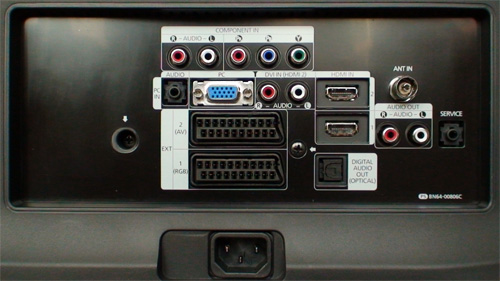
| Rear: 2 x HDMI, VGA, component, 2 x Scarts, aerial, digital and analogue audio outs |
![]() |
![]() |
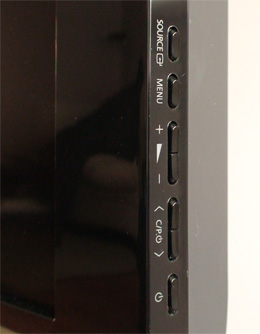
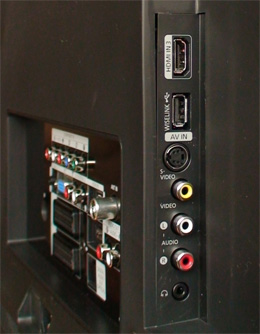
| HDMI, USB, Svideo, comp, headphone | Control buttons on right side of TV |
Operation
The on-screen user menu on the Samsung LE40A558 LCD television is essentially the same as that on the A656, except for the perfectly understandable replacement of [100Hz Motion Plus] with [Movie Plus] in the [Picture Options] submenu:
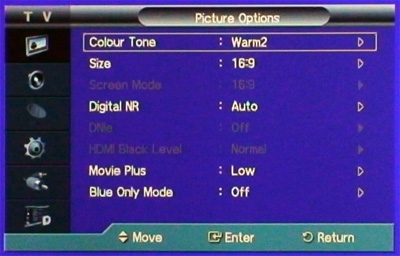
Just like the A656, navigation of the user menu and EPG on the Samsung LE40A558 HDTV is quicker and more responsive, which is a welcome improvement over last year’s models.
Remote Control

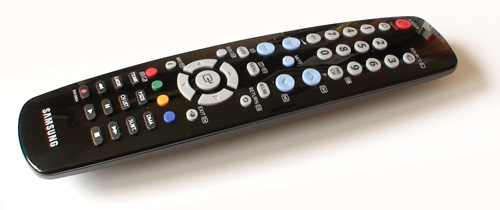
While its front surface is similarly coated by polished black finish, the infrared remote control for Samsung LE40A558 is not backlit, and feels marginally lighter in the hand compared to that bundled with the A656. Its back part is tapered towards the top and bottom of the remote, giving it a boat-like shape when viewed from the side. There is ample space between the rubbery buttons which thankfully still return decent tactile feedback.
Calibration
Greyscale
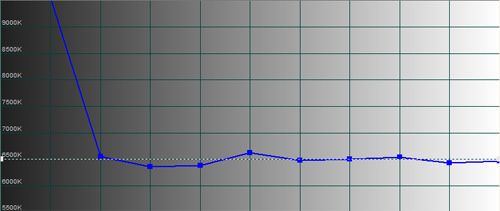
Out-of-the-box, switching to “Movie” [Picture Mode] with its default “Warm2” [Colour Tone] produced a greyscale nearest to the D65 standard on the Samsung LE40A558:
![]() |
| Pre-calibration CCT with [Picture Mode] “Movie” & [Colour Tone] “Warm2″ |
![]() |
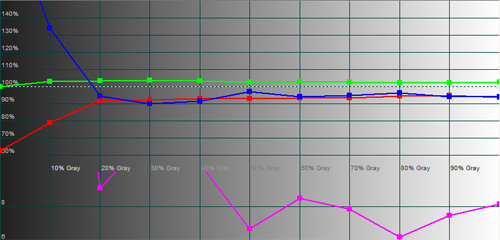
| Pre-calibration RGB tracking and delta errors (dEs) |
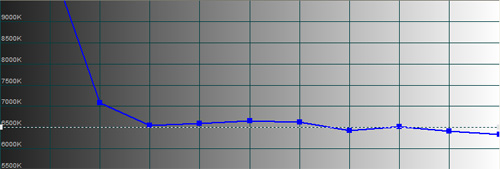
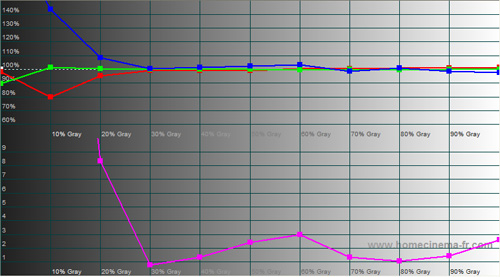
Analysing the RGB tracking graph however revealed that both red and blue components were lower than ideal, which meant that delta errors (dEs) were not contained within the perceptible limit of less than 4. Adjusting the RGB offset and gain controls in the [White Balance] submenu allowed us to rectify this:
![]() |
| CCT after greyscale calibration in “Movie” [Picture Mode] |
![]() |
| RGB tracking and delta errors (dEs) after greyscale calibration |
Colour
![]() |
![]() |
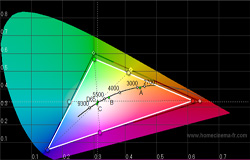
| Pre-calibration CIE chart | Post-calibration CIE chart |
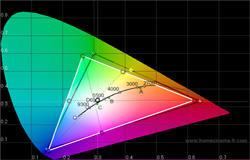
Even though we managed to align the colour hues and decoding on the Samsung LE40A558 using the inbuilt colour management system, colour saturation – especially in the region of 0% to 75% – was deficient. Unfortunately the easiest way we discovered that could restore colour saturation to an acceptable level whilst in “Movie” [Picture Mode] was to throw colour accuracy and decoding to the wind, and engage [xvyCC] with [Colour Space] set to its default value of “Native“.
Benchmark Test Results
| Dead/ stuck pixels | 1 stuck green subpixel 12 o’clock |
| Screen uniformity | Very good |
| Overscanning on HDMI | 0% with [Size] set to “Just Scan“ |
| Blacker than black | Passed |
| Black level | Very good |
| Black level retention | Stable |
| Primary chromaticity | Above average post-calibration with “Custom” [Colour Space] |
| Scaling | Above average |
| Video mode deinterlacing | Very good; effective jaggies reduction |
| Film mode deinterlacing | Passed 2:2 cadence in 576i, and 3:2 in 480i |
| Viewing angle | Good for an LCD TV (90°) |
| Static resolution | Fully resolved 1920×1080 over HDMI & component (noisier) |
| Motion resolution | 300 regardless of whether [Movie Plus] was engaged or not |
| Digital noise reduction | Acceptable at baseline |
| Sharpness | Defeatable edge enhancement |
| 1080p/24 capability (PS3) | Accepts 1080p/24 video signal, but judders |
| Input lag (rel. to Samsung F96) | On par in [Game] mode or over VGA; 30ms slower otherwise |
Power Consumption
| Default | 182 watts |
| Calibrated | 90 watts |
| Standby | 1 watt |
Picture Quality
High Definition (Blu-Ray)
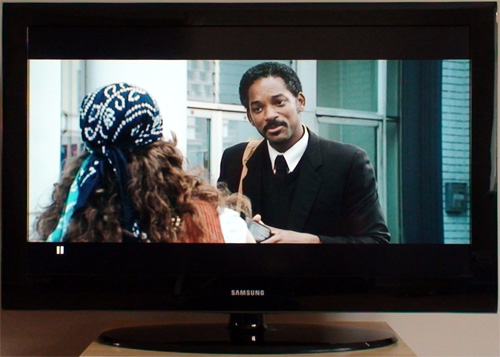
The Samsung LE40A558 accepted 1080p/24 video signal from our Sony PS3, but in doing so the LCD television exhibited a type of ultra-jerky judder that was much more prominent that your usual telecine effect. Largely present throughout The Pursuit Of Happyness, our Blu-ray film choice on this occasion, the judder was most noticeable during slow pans, for example that across Chris Gardner (Will Smith) under the shower (10:36), and the one down the Dean Witter building (12:36), not to mention the scrolling end credits.
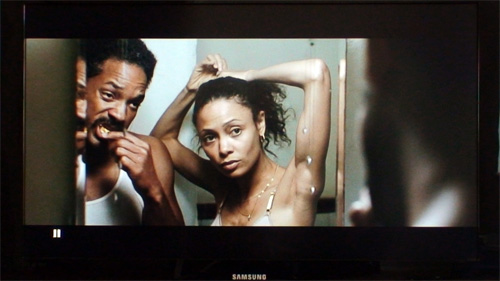
Because these “jerks” was quite distracting, we had no choice but to revert to 1080p/60 output from the PS3: the resultant telecine judder was much more subtle and tolerable. The [Movie Plus] option is greyed out for 1080p/24 source, but could potentially be engaged for 1080i/60 or 1080p/60 film-based material to eliminate telecine judder. However, after experimenting with it for some time we decided not to apply [Movie Plus] to movies for several reasons: it introduced some “video effect” (albeit mild) into movies; we detected low-grade motion smearing; and it seemed to be hit-and-miss… some movies/ sources would be totally smooth while others would become jerky as hell.
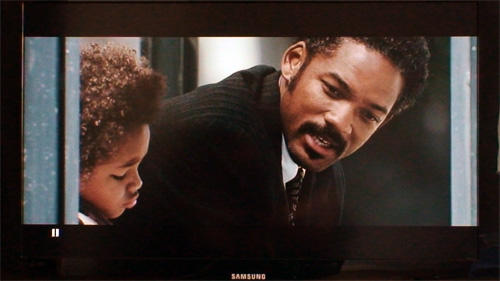
The Samsung LE40A558’s calibrated black level was not as deep as that on the A656, but still ranked very good for an LCD TV. Shadow detail on the LE40A558 was also a touch less distinct compared to the A656, though nowhere near as muddied as last year’s models. The near-D65 greyscale achieved after calibration lent a substantial degree of authenticity to the many outdoor daylight scenes of San Francisco inside the movie.
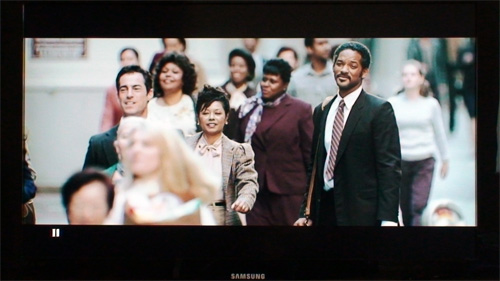
When it came to colours, it was a case of choosing between saturation and accuracy. If we adhered to accurate hues and decoding, the blue sky and flesh tones would look somewhat pale, and the overall image appeared flat. To our eyes, the better option was to go for a more well-saturated picture (by boosting [Colour], engaging [xvyCC] or setting [Colour Space] to “Native“) at the expense of introducing mild red push which led to ruddier-than-usual skin tones.
Standard Definition
Even with [Movie Plus] disabled, the Samsung LE40A558 successfully detected 2:2 cadence in 576i (and 3:2 in 480i), and correctly administered the relevant pulldown to film-based material. Coupled with above average scaling and effective jaggies smoothening, Freeview digital TV looked as good as that on the A656 bar a lighter shade of black and slightly inaccurate colours (a necessary sacrifice to restore saturation). As long as we adopted a sensible viewing distance, and the transmission bit-rate was up to scratch, the Samsung LE40A558 acquitted itself very well in standard-def handling.
HD Console Gaming (Sony PS3)
The Samsung LE40A558 manifested the same amount of input lag as the A656 (i.e. 30ms slower than a Samsung F96), which could be reduced by engaging “Game” [Entertainment Mode] or using VGA connection. Whether or not this input lag will affect your gaming performance depends on your individual sensitivity, and the reflexes demanded by the particular game.
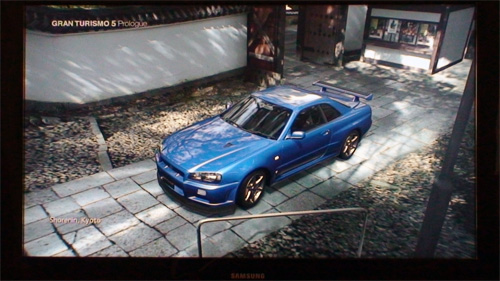
With [Aspect Ratio] set to “Just Scan” for 1:1 pixel mapping, and [Sharpness] to “0″ to avoid excessive edge enhancement, the Samsung LE40A558 HDTV retrieved and presented the delicate detail in Gran Turismo 5: Prologue with precise aplomb. Because console games are seldom mastered in accordance with D65 standard, there’s nothing stopping you from embracing “Standard” or even “Dynamic” [Picture Mode] to obtain a bright and vibrant image for a captivating gaming experience.
Conclusion
Blessed with black-level performance, connectivity and video processing that are very good but not quite best-in-class, the Samsung LE40A558 nevertheless represents an attractive proposition due to its bargain-basement price, especially if you’re willing to take its technically-identical siblings LE40A559P and LE40A556P into consideration when shopping around. That said, if you can spare an extra £200, we highly recommend going for the LE40A656 which does quite a few things (blacks, colours, motion resolution, native 24fps playback) better.



Thanks for the review vincent. Please post your calibration settings.
Nice review with this TV set. I’m interesting for your calibration settings too.
Hey great reveiw. Please post your calibration settings.
Also id like to see a review of the 32″ 4 series samsung to finish off this years line up.
cheers
Thanks for the review. I’m considering this set along with the A656. You said about SD, ‘ As long as we adopted a sensible viewing distance, and the transmission bit-rate was up to scratch, the Samsung LE40A558 acquitted itself very well in standard-def handling’. What do you consider a sensible viewing distance for SD on this TV? I’ve read so many conflicting size vs distance calculations, I’m keen for some actual human insight from someone like yourself, that knows what they are talking about! By the way my viewing distance from the TV wil be about 2.8m.
To Rik Barnes: I have my 45A558 at ~5 metres and SD looks very good.
I suppose around 1 meter per 10″ is a good ratio for SD.
HD is a different story, i can watch a Full HD (1080) movie from 2 metres.
Please do me a favour Vincent. Check on the back there is a sticker with the serial number, date of manufacture, country etc.
After the serial number there should be a space then a character: S or A. A is for AUO panel and S for S-LCD. I know some set’s got AUO and others S-LCD. If yours is with the AUO panel it explains the different black levels from the 40A656.
Hi Vincent,
Excellent review,I particularly liked the “finale”,recommending the LEA656 if you are prepared to spend an extra £200.
This is the kind of review that a “not so knowledgeable” TV person like myself NEEDS.
Well Done.
Davy.
ps,I,m “stuck” between,Panasonic TH37PX80B/Samsung LE40A656,I prefer plasma to lcd,but,I must admit,the LEA656 looks,and sounds,mouthwatering,”black” level will probably decide for me.
Hi,
Any chances for your calibration values?
Thanks in advance.
Why the graphs of the gamma there are not?
Why is not there even his value pre and post calibration?
How does it do him to deduce a calibrazione without the gamma?
Great review ! But please post Your calibration settings
SD - What a disappointment! My son just bought one of these and i was so looking foreward to following him but sd quality is awful. We calibrated the tv to the a656 review (a good starting point i would say?), but the bbc euros hi-lights looked pixelated beyond belief - how do people watch this? Would anyone know if the 100hz on the a656 can control this to an acceptable picture or is it a lcd thing? Connection was to a sky box through rgb scart, sky contrast set to low. I myself have a panasonic 36″ crt and was looking to go “bigger”, maybe a plasma or a non hi-def screen-ant thoughts?
I have just bought this tv today and I have been searching for the calibration settings but no luck, PLEASE can you post yours?
To Russell Dilnot >>> You could try these:
(This with the mode at movie)
Backlight = 6
Contrast = 85
Brightness = 49
Sharpness = 0
Color = 50
Tint = G50/R50
DETAILED SETTINGS
Black Adjust = Off
Dynamic Contrast = Off
Gamma = 0
Color Space = Custom
Red: R33 - G0 - B0
Green: R18 - G52 - B0
Blue: R11 - G0 - B51
Yellow: R49 - G53 - B0
Cyan: R22 - G46 - B56
Magenta: R37 - G0 - B43
Flesh Tone = 0
Edge Enhancement = Off
Xycc = Off
WHITE BALANCE
R-Offset = 26
G-Offset = 25
B-Offset = 22
R-Gain = 30
G-Gain = 25
B-Gain = 25
PICTURE OPTIONS
Color Tone = Warm 2
Digital N/R = Off
HDMI Black Level = Low
Movie Mode = off
Blue Mode = Off
Energy Saving = Medium
Entertainment modes = Off
Quote: “The Samsung LE40A558 accepted 1080p/24 video signal from our Sony PS3, but in doing so the LCD television exhibited a type of ultra-jerky judder”
I am really concerened about this, as smooth 24fps playback from a PS3 is essential for me.
Other review site mentions that the 24fps is wonderfullt smooth. So I am confused as well as concerened.
Can anyone enlighten me?
Thanks
Many thanks Dimitris - I will try your settings out as soon as possible.
I just purchased this TV and I’ve been trying to use it’s 24p capabilities. I’m using a PS3 as my Blu-ray player. When ever I set the 24p playback in my PS3 to Automatic or ON, The movie will be wavy (sorry…don’t know the technical term for this) It looks like there is some interference or the frequency setting is incorrect. When I press the info button in the remote, it would show 1920×1080/60. Shouldn’t it be 1920×1080/24?? So sorry for this question if seem quite stupid. I’m a newbie with LCD TVs. Please help explain this wavy thing and how can I fix it. Thank you so much for anybody who can help!
Hi Dimitri
Have just tried your settings and they seem really good - only issue I have is clarity seemed not very sharp. Bit confused as to the detailed settings above re color space custom settings eg: Magenta: R37 - G0 - B43. When I go to Magenta like all other settings it gives you option of 1-100 for that given colour so not sure why you have R - G - B, do you see what I mean?
Can you help?
Many thanks
Russ
Does anyone have any good calibration settings for TV mode as I am watching tv through SKY (not SKY HD) and the picture isn’t that good - thanks!!
[...] om at det er et bedre kjøp enn F6, som sagt er 100Hz nærmest ubrukelig ut i fra tester på nettet. Her har du en skikkelig test av A558. __________________ TV: Samsung LE40A558 Receiver: Yamaha [...]
sticazzi an extra of 200 £ = + 300 eur
they are not few, plus the a656 has an horrible “cornice”
this fucking 100hz what the fuck does it serve ???????
what is the improvement of it ?????
son of flowers, ho come l’impressione che tu sia italiano!
IO ho preso il 557. L’unico difetto grave che ho riscontrato è che è inclinato di 1.5 cm a sinistra! In compenso non ha pixel bruciati…quando ho voglia me lo faccio cambiare, per ora me lo tengo cosi. Un’altra porcata che hanno fatto è che non supporta la risoluzione 1280*720 in vga (forse anche in hdmi, non ho ancora provato…)
I dont know where everyone has the information from, that the tv doesnt support full hd resolution over vga?
My notebook is connected to the TV (LE37A559) and the resolution is set to 1920*1080 without any problems except that the image isnt so sharp as over HDMI. But it works.
I confirm that tv looks amazing at 1920*1080 over vga
but it doesn’t supports 1280*720 over vga.
[...] Klik her for at læse hele artiklen på HDTVtest.co.uk [...]
How can you delete stored channels, you dont want. after auto search.
do i have to tune manualy ?
I just got a new A5xx firmware…
They finaly fixed all 1080/24p problems !!!!
Download it here :
http://rapidshare.de/files/39939312/T-PRLPEUMD-1011.2.bin.zip.html
@Vincent: It will be great if you can test this new FW and compare 24p motion with other TV sets for example A656 or W4000. It should be nice if we were sure that the 24p problem is completely solved.
hi darkvamp,where the firmware come from?it doesn’t exist on samsung.com
I got this firmware direct from samsung technical service
thanks,you update firmware by usb?sorry for my english
what is your tv model, for me firmware not recognized on 32a568
As far as I know 1011.2 is making judder a little different and for sure is not solving any problems - it makes them look different.
Where can you find out the latest firmware on the TV?
Also, does anyone know why the Picture in Picture is greyed out? I have connections to Sky+ & dvd player via Scart & Wii via the Y/R/W connections(underneath the S-video) Yet its still greyed out??
I have the 559P model of this TV, whenever I try PC: 1920*1080 over VGA, the TV displays the PC picture in a format that looks similar to 4:3 with vertical black bars either side of the picture. Does anybody know what I’m doing wrong and how to get it to display the resolution correctly?
Dave: I’d check the settings on your PC’s VGA output. Just bought 46A552 yesterday here in Belgium, plugged in VGA from a linux machine (Mythbuntu with original NVidia driver set automatically to 1280*1024 from previous LCD 17″ monitor). The driver autodetected the TV’s max resolution properly as “Samsung CRT (sic) 1920*1080. No problem, clear and sharp, full 16:9.
So I think it has to do with the driver for your graphics. It may not autodetect as nicely - check what it’s sending out.
firmware 1008.1 not solving 24p problem for my 32a568.i have always judder,it’s a shame.samsung isn’t pro
DAVE:
we had this problem in work with our DELL 23″ widescreen monitors. - The digital output maxed out at 1600×1200 and we had to use the analogue output from the graphics card to get a higher widescreen resolution. We were using the onboard graphics card.
I’m looking to get this TV for my Xbox 360. I have an early model 360 with no HDMI connection, so I’ll be using VGA….will it display correctly at 1920×1080? I saw someone posted that the telly doesn’t output at 1280×720 over VGA.
to Tim
The tv doesn’t output at 1280*720 but you can use better resolution, 1920*1080
Best resolution is usually the one that best matches the input resolution, not the biggest one.
Ray
I think i figured out why the PIP is greyed out.
You can’t import an HDMI source onto TV or Scart.
You can only import TV and Scart over HDMI.
Maybe there is a way to do it the other way, but if you use as HDMI source, your PIP shouldn’t be greyed out. Hope that helps.
A beautiful TV at a really good price if you shop about. I found that Richer Sounds in Glasgow were selling this set at an amazing £599.99 compared to many others at over £800
Vincent,
thx for the review, but I am still waiting for the calibration settings. I just downloaded the firmware update now, and I will check if the judders were fixed…
Which should i go for this or the Sony KDL40V3000 , both the same price in Richer sounds (£599.99)
TIA