Top

Samsung UE40B7020 / UE40B7000 Review

By Vincent Teoh • Saturday, 2 May 2009, 1:45 am GMT  

Even though Samsung has produced and sold LED-backlit flat screen HDTVs for some time now, 2009 marks the year when the world’s largest electronics manufacturer starts marketing them under a new “LED TV” moniker to distinguish them from conventional CCFL-backlit LCD televisions. Here’s the scheduled lineup of Samsung LED-backlit LCD TVs (otherwise referred to as “LED TVs” in this article for the sake of simplicity) for 2009:

  • B6000 Series: Entry-level edge-LED TV with 100Hz Motion Plus technology. Available now in 40-inch (UE40B6000/ UE40B6000VW) and 46-inch (UE46B6000/ UE46B6000VW) screen sizes.
  • B7000/B7020 Series: Mid-range edge-LED TV with 100Hz Motion Plus technology and enhanced interactive functionalities such as [Internet@TV], [Wireless DLNA] and [Content Library]. Available now in 40-inch (UE40B7000/ UE40B7000WW or UE40B7020/ UE40B7020WW), 46-inch (UE46B7000/ UE46B7000WW or UE46B7020/ UE46B7020WW) and 55-inch (UE55B7000/ UE55B7000WW or UE55B7020/ UE55B7020WW) screen sizes.
  • B8000 Series: High-end edge-LED TV with 200Hz motion technology. Expected to be available for sale from May 2009.

The Samsung UE40B7000 LED TV we are reviewing today employs the “Edge LED” technology which is quite different from the local-dimming LED backlighting system we have previously seen on the Samsung F96, A786 and A956 series. In “Edge LED” HDTVs, white LEDs are mounted along the edges of the screen to illuminate a cleverly arranged array of reflective plates which then steers the light forward and out of the screen.

As you can imagine, this “Edge LED” technology allows for breathtakingly slim panel depth and purportedly lower energy consumption (because less LED bulbs are used). Without further ado, let’s see how the Samsung UE40B7000 HDTV fares in our tests…

Note: The Samsung UE40B7020 and the Samsung UE40B7000 differ only in their cosmetic styling (the UE40B7020 has a “Platinum Black” all black bezel; whereas the UE40B7000 has a “Rose Black” bezel), so for all intents and purposes, the findings in this UE40B7000 review can also be applied to the UE40B7020.

Design

Measuring only 3cm in depth, it’s not far-fetched at all to describe the Samsung UE40B7000 as wafer-thin. Its mildly reflective “Ultra Clear Panel” is framed by a polished black bezel infused with red accent towards its outer edges, which is further encased by a thin strip of see-through plastic extending beyond the borders. Beneath the Samsung logo along the bottom border of the bezel, you’ll find a smiling red-orange LED indicator light which would blink in response to any remote keypress even if you elected to switch it off in the user menu.
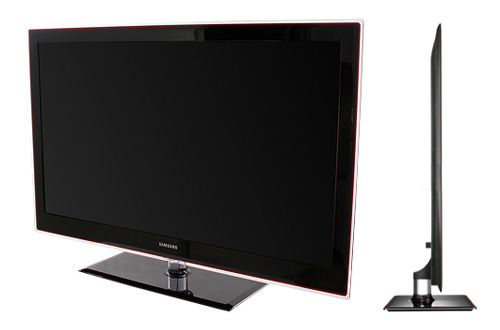
Samsung UE40B7000

Designed to match the bezel, the black rectangular base of the swivelling pedestal stand also sports red borders with transparent fringe. The translucent pedestal stem allows you to vaguely spot your cables running down the back of the Samsung UE40B7000 HDTV. All in all, even when switched off the Samsung UE40B7000 is a stunning looker… its size-zero slenderness really wouldn’t look out of place in a Valentino fashion show.

Connections

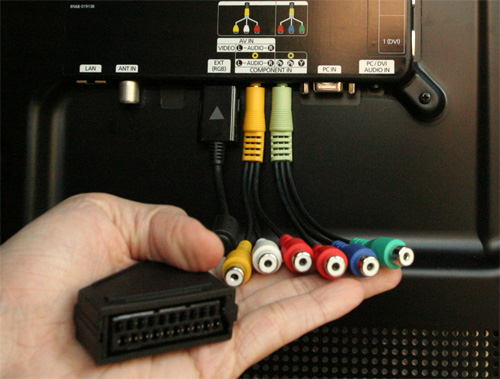
Amazingly, Samsung has managed to cram 4 HDMI inputs, 2 USB ports and even a TV tuner into the rear of the Samsung UE40B7000 without compromising its slimness, although the shallowness of the recessed connection bay may prevent thicker cables from fitting the input sockets snugly. If you wish to connect your devices to the Samsung UE40B7000 via Scart, component or composite, three breakout cables are supplied though their relatively cheap quality may not sit well with owners of high-end equipments.
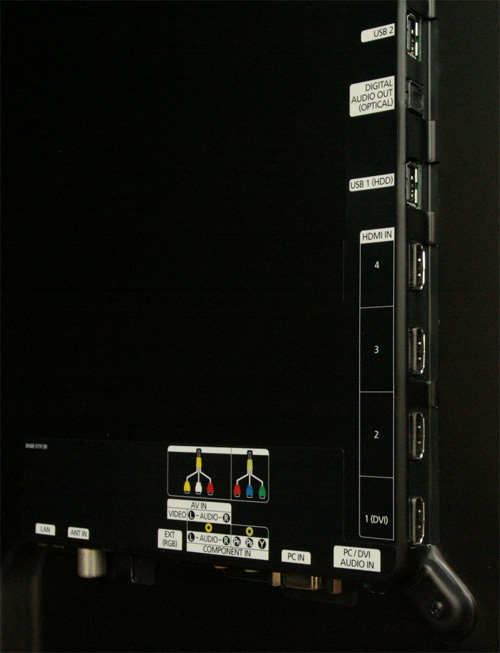
Rear connections on Samsung UE40B7000
Rear: 4 x HDMI, 2 x USB, VGA, ethernet, aerial, digital audio out, CI slot (not shown)
Breakout cables on Samsung UE40B7000
Breakout cables for Scart, composite and component connections

Operation

The on-screen user menu, EPG and multimedia interactive functionalities (such as [Internet@TV], [Media Play] and [Content Library]) on the Samsung UE40B7000 are essentially the same as those found on the LE40B650 which we have reviewed in depth last month, so please refer to the relevant sections if you need more detail.

Infrared Remote Control(s)

The Samsung UE40B7000 comes with not one, but two remote controls. Featuring a gloss black coating and user-friendly, backlit buttons, the first one is no different from that bundled with the LE40B650 apart from a peculiar hook-shaped appendage which curves backwards at the bottom of the remote.
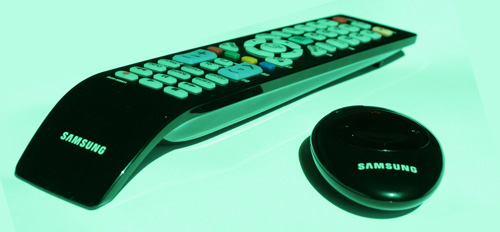
Remote controls on Samsung UE40B7000
Left: Main remote; Right: Baby remote

The second, smaller remote looks like a supersized key fob, and lets you power the Samsung UE40B7000 on and off, as well as change volume and channels. We doubt this baby remote will be used much, if at all.

Calibration

Greyscale

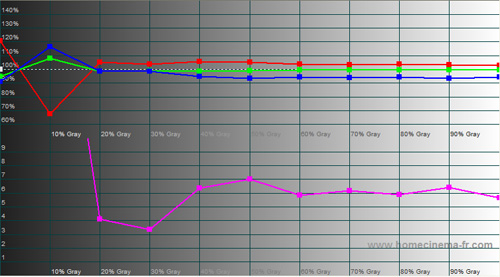
Just like the LE40B650, out of the box “Movie” [Mode] with its default “Warm2” [Colour Tone] provided the greyscale closest to D65 standard on the Samsung UE40B7000:
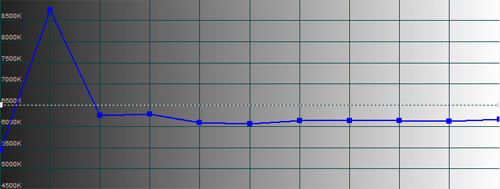
Pre-calibration CCT
Pre-calibration CCT with “Movie” [Mode] & “Warm2″ [Colour Tone]
Pre-calibration RGB Tracking
Pre-calibration RGB tracking and delta errors (dEs)

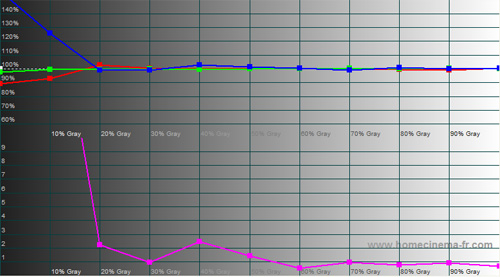
We performed our initial run of greyscale calibration on the Samsung UE40B7000 by adjusting the RGB offset and gain controls in the [White Balance] submenu. Here are the results:
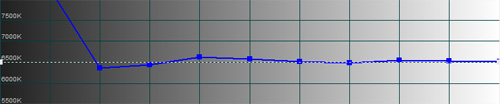
Post-calibration CCT
CCT after greyscale calibration in “Movie” [Mode]
Post-calibration RGB Tracking
RGB tracking and delta errors (dEs) after greyscale calibration

At first glance a good job was done: delta errors (dEs) were curbed below 3 from 20% stimulus onwards. However, these CCT and RGB tracking graphs do not tell the full story… here’s why.

Samsung has by default implemented auto-dimming on the UE40B7000, presumably to achieve the very deep blacks that edge-lit LED backlighting technology is capable of. What this means is, when the content on screen falls below a pre-defined Average Picture Level (APL) threshold, the light output on the Samsung UE40B7000 would dim down automatically.

And because the dimming effect on the Samsung UE40B7000 is of the global (again an unavoidable characteristic of edge-LED backlight) rather than local (i.e. individual LED arrays can be activated and deactivated separately) variant, once the auto-dimming is triggered there would be a corresponding drop in the luminance of even the brighter elements within the image on screen, resulting in reduced contrast (and, to a lesser extent, diminished colour saturation and intensity).

In other words, greyscale and point gamma could shift dynamically from frame to frame, particularly affecting darker scenes with lower APLs which would trigger the auto-dimming.

The auto-dimming/ black level fluctuation on the Samsung UE40B7000 can be defeated by engaging [Game Mode] and then setting [Dynamic Contrast] to “Off” (many thanks to Mr Laurent Grimal and Mr Seow who independently verified that this worked on their sets), though this solution is less than satisfactory as it entails some compromises in video processing (will be explained in a later section). Nevertheless, to remove low-APL greyscale and gamma fluctuation from the equation, we proceeded to calibrate the Samsung UE40B7000 in [Game Mode]:

Post-calibration CCT in [Game Mode]
CCT after greyscale calibration in [Game Mode]
Post-calibration RGB Tracking in [Game Mode]
RGB tracking and delta errors (dEs) after greyscale calibration in [Game Mode]

Because [Game Mode] limits us to [Picture Mode] “Standard” and [Colour Tone] “Normal” (which yielded a pre-calibration colour temperature in excess of 8500K), the calibrated greyscale in [Game Mode] did not track as well as that in “Movie” [Mode]. Still, we managed to keep delta errors (dEs) below 4 from 30% stimulus onwards… not a bad result at all.

Colour

[Colour Space] “Auto” was faithful to HD Rec. 709 specifications, while [Colour Space] “Native” was oversaturated (especially green):

[Colour Space] Auto [Colour Space] Native
[Colour Space] “Auto” [Colour Space] “Native”

By setting [Colour Space] to “Custom” on the Samsung UE40B7000 to access its colour management system, we had no problems mapping the x, y coordinates of all the primary (except blue) and secondary colour points to obtain accurate hues and saturation, but aligning colour decoding proved to be far more difficult because the colour intensities are heavily influenced by the aforementioned APL-dependent auto-dimming.

We advise sticking to [Colour Space] “Auto“, unless you wish to calibrate the colours in [Game Mode] which of course disables the auto-dimming, making it possible to achieve supremely accurate hue, saturation and colour decoding:

Post-calibration CIE chart in [Game Mode]
Post-calibration CIE chart in [Game Mode] with reference to HD Rec. 709

Benchmark Test Results

Dead pixels None
Screen uniformity Mild clouding and backlight bleed
Overscanning on HDMI 0% with [Size] set to “Screen Fit
Blacker than black Passed
Black level 0.01 cd/m2 when auto-dimmed
Black level retention Stable only in [Game Mode] with [Dynamic Contrast] “Off
Primary chromaticity Excellent in “Auto” [Colour Space]
Scaling Good
Video mode deinterlacing Excellent
Film mode deinterlacing Passed 3:2 cadence in 480i and 1080i; and 2:2 in 576i
Viewing angle 90°
Motion resolution [100Hz Motion Plus] engaged: 550; “Off”: 300
Digital noise reduction Acceptable at baseline
Sharpness Defeatable edge enhancement
1080p/24 capability (PS3) Accepts 1080p/24 video signal; no telecine judder
Input lag (rel. to Samsung F96) 22ms in [Game Mode] or over VGA; 85ms otherwise

Power Consumption

Default “Dynamic” [Mode] 104 watts
Calibrated “Movie” [Mode] 78 watts
Standby <1 watt

Picture Performance

Black Level

Because of the presence of auto-dimming, it’s only fair that we qualify our black level figures with the Average Picture Levels (APLs) under which they are measured. On a totally black screen (video black), the Samsung UE40B7000’s calibrated black level – enhanced by auto-dimming – was measured at 0.01 cd/m2, a superb figure that is beaten only by 9G Pioneer Kuro plasmas (e.g. the PDP-LX5090) and Samsung local-dimming LED-backlit LCD TVs like the F96, A786 and A956 series. On an ANSI checkerboard test pattern, we recorded a still excellent 0.06 cd/m2.

In [Game Mode] where auto-dimming is disabled by switching off [Dynamic Contrast], calibrated black level was 0.04 cd/m2, matching that measured on the CCFL-backlit LE40B650 LCD TV.

Screen Uniformity

Even after calibration, and even with the aid of auto-dimming, the Samsung UE40B7000 exhibited slightly worse screen uniformity than the latest conventional CCFL-backlit LCD televisions such as the Samsung B650 and Sony W5500 series. On a totally black screen (video black), we observed mild backlight bleed on all 4 corners of the screen, as well as several patches of clouding.

However, these screen uniformity issues probably fall within our expectations for non-plasma flat screen HDTVs, and to be fair were quite subtle and not really noticeable in real-life viewing (especially in brighter ambient lighting conditions).

Video Processing

As was the case with the LE40B650, standard-definition video processing was overall very good on the Samsung UE40B7000 LED TV. Because we’re interested in using [Game Mode] for critical viewing due to the lack of auto-dimming/ black level fluctuation, we also investigated its video processing properties.

With [Game Mode] engaged, video processing on the Samsung UE40B7000 took a hit in the following manner:

  • Slightly worse video-mode deinterlacing (more jaggies seen);
  • No film-mode deinterlacing;
  • Marginally worse digital noise suppression at baseline;
  • [100Hz Motion Plus] greyed out and therefore cannot be activated; and
  • Subtle telecine judder witnessed with 1080p/24 material.

Points 1 and 2 can easily be circumvented by outsourcing the deinterlacing process to a competent external device (i.e. send a progressive video signal from your DVD player/ set-top box/ external video processor); and point 3 is basically a non-issue. As far as we’re concerned, the 2 significant downsides to engaging [Game Mode] is lower motion resolution, and the introduction of subtle telecine judder when the UE40B7000 is fed with 1080p/24 signal.

Standard Definition (Freeview Digital TV)

Just like the B650 series, the Samsung UE40B7000 is blessed with high-quality upscaling and excellent deinterlacing (both video- and film-based), which makes standard-def material extremely watchable. We did witness some low-grade motion smear on slow-medium pans, but engaging [100Hz Motion Plus] – we liked a “Custom” setting of [Blur Reduction] “8” and [Judder Reduction] “0” – quickly rectified this.
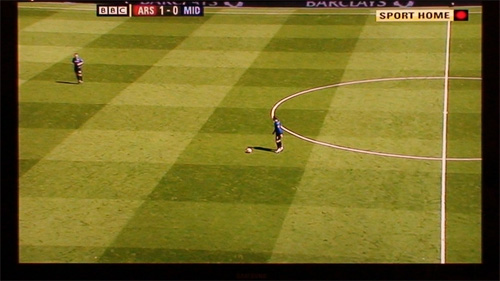
Match of the Day football

[Game Mode] is greyed out and hence not available when watching TV programmes through the internal tuner. Fortunately, most sports programmes – for instance football and snooker which were on TV all week – are usually shot in well-lit environments, delivering sufficiently high Average Picture Levels (APLs) to avoid eliciting auto-dimming/ black level fluctuation on the Samsung UE40B7000. In these brighter scenes, the combination of D65 greyscale and almost spot-on primary and secondary chromaticities resulted in beautifully accurate green hues on the football pitch and the snooker table, not to mention suitably convincing flesh tones. The aforementioned “Custom” [100Hz Motion Plus] settings did not introduce any significant interpolation artefacts.

High Definition (Blu-Ray)

With [Size] set to “Screen Fit” to attain 1:1 pixel mapping, the Samsung UE40B7000 portrayed the fine details in the spy thriller Body of Lies on Blu-ray – be it the grains of sand in the desert, or Roger Ferris’ (Leonardo DiCaprio) facial hair, pores and scars – with impeccable sharpness and crisp definition. Along with the deep canvas of blacks, this appreciable sharpness contributed immensely to the sense of depth and dimensionality we so crave from high-definition material.
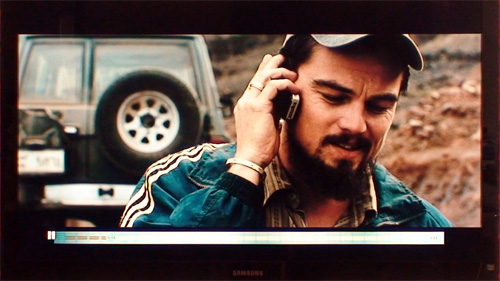
Leonardo DiCaprio in Body of Lies

In brighter sequences (for example those filmed in sun-drenched deserts), colours looked wonderfully realistic judging from the skin tones and whatever little foliage there was on display, thanks to D65 greyscale (achieved with calibration), and mostly accurate primary and secondary colour points.

However, because the light output on the Samsung UE40B7000 was globally reduced once the Average Picture Level (APL) of the content being displayed on screen dropped below a certain threshold, predominantly dark scenes would appear a touch lifeless and desaturated. Needless to say, in these darker scenes shadow detail suffered a bit as well due to the drop in overall luminance.
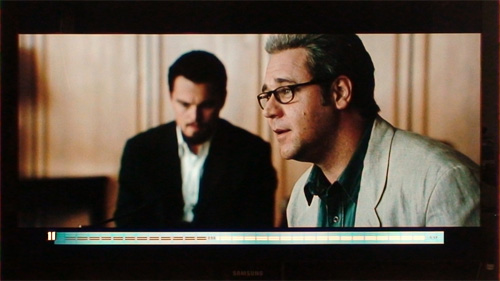
Russell Crowe in Body of Lies

Our main bugbear with the auto-dimming/ black level fluctuation on the Samsung UE40B7000 is not so much the black level fluctuation itself (we really do think that the actual dimming process is for the most part reasonably subtle and not distracting), but the depressed luminance of the brighter elements within a mostly dark scene resulting in poorer perceived contrast.

The most obvious examples in Body of Lies are the numerous insertions of faded-in white text on a black background stating the location of the next scene. In spite of inkier blacks, the lower overall luminance on the Samsung UE40B7000 (brought about by global auto-dimming) meant that the white text was not delivered with the desired impact. This was especially obvious during the daytime (not that we’re recommending this for critical viewing… just trying to make a point): stronger competing ambient light made the dip in perceived contrast even more noticeable when it came to displaying predominantly dark content.
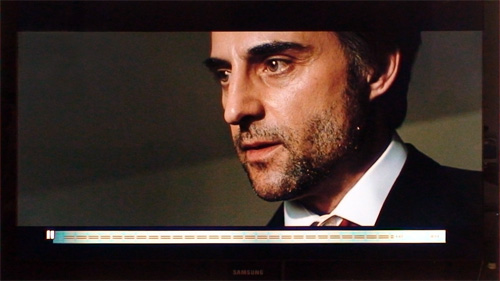
Mark Strong in Body of Lies

Engaging [Game Mode] and then disabling [Dynamic Contrast] eliminated any black level fluctuation while still maintaining deep blacks, exquisite detail, D65 greyscale and accurate colours, but introduced a subtle telecine judder to slow panning shots, for example the many high-resolution surveillance satellite tracking footages in Body of Lies. Whether or not this telecine judder will bother you depends on your individual sensitivity and whether you recognise it in the first place; to us, it was largely tolerable.

Sound Quality

As you can expect from the acoustic limitations imposed by the Samsung UE40B7000’s super-slim chassis, its internal speakers sounded hollow and bereft of any meaningful imaging. It can go fairly loud without distorting, and dialogue is reasonably clear, but for critical viewing/ listening, we would go with external home theatre systems.

Our Samsung UE40B7000 review sample did not emit any significant background noise either in use or in standby.

Conclusion

Pros

  • Accurate colour chromaticities and decoding
  • Capable of 0.01 cd/m2 blacks (though with auto-dimming; see Cons)
  • Impressive SD video processing
  • Custom” [100Hz Motion Plus] setting allows for blur reduction independent from dejudder processing
  • Stunning super-slim styling
  • Extensive networking and media playback versatility (Internet@TV, Media Play, DLNA, etc.)
  • Consumes less power than LCD televisions of similar size

Cons

  • Auto-dimming/ black level fluctuation at low Average Picture Level (APL), unless [Game Mode] engaged and [Dynamic Contrast] set to “Off
  • Mild clouding and backlight bleeding
  • Input lag may affect sensitive gamers

Summary

The UE40B7000 is the fruit of Samsung’s commendable maiden effort at implementing edge-lit LED backlighting technology on a flat screen HDTV. Not surprisingly, this first-generation product is not problem-free. For starters, the edge LED system can contribute to some backlight uniformity issues though the severity varies from unit to unit. Our review sample exhibited some mild clouding and backlight bleed, but these were barely noticeable in real-life viewing after proper calibration and ambient light setting.

To artificially generate deeper blacks and live up to its marketed contrast ratio (and perhaps even mask the uniformity issues), unfortunately Samsung has also introduced low-APL auto-dimming which can adversely affect the image quality of darker scenes. The auto-dimming can be thwarted by engaging [Game Mode] and then disabling [Dynamic Contrast], but this entails some heavy sacrifices in video processing, motion resolution and 1080p/24 handling… truly a case of being caught between a rock and a hard place.

Nevertheless, the Samsung UE40B7000 LED TV is not without its merits. The television set’s stunning design, deep blacks, accurate colours, advanced motion-compensated frame interpolation (MCFI) technology, impressive video processing, superior energy efficiency and extensive networking/ media-playing functionalities did enough to earn the Samsung UE40B7000 a well-deserved recommendation from us here at HDTVTest.

Recommended

149 Comments So Far... Add Yours

  1. Samsung 7020 Reviews anywhere? - Page 12 - AVForums.com on 2 May 2009 8:06 am

    [...] Re: Samsung 7020 Reviews anywhere? HDTVTest.co.uk 7000/7020 review now up… Samsung UE40B7020 / UE40B7020WW / UE40B7000 Review [...]

  2. HDTVTest Reader on 2 May 2009 10:29 am

    Good read. I recently got this TV, very happy and the picture is wonderful at times. Sadly, there is some slight clouding. I wish I hadn’t read this as I may not have noticed it origionally! :( That said, HDTVTest are right that its only rare this happens in dark scenes - mainly around the letter-box black areas, and you really have to be in pitch black environment to see it. Other than that its usable, clear and normal tv viewing is a charm.

  3. Mello01 on 2 May 2009 12:27 pm

    Like always, spot on review…

    You are the man Vincent…

    Congratulations

  4. Mello01 on 2 May 2009 1:00 pm

    Dear Vincent,

    I don´t know if is possible for you to you send me your calibration settings (both, movie and game mode) to my e-mail? I so you make me a very happy man.
    Thanks for your time

  5. Samsung Luxia IPTV e New B Series CCFL [Thread Ufficiale] - Page 20 - Videogiochi Forum su Multiplayer.it on 2 May 2009 4:48 pm

    [...] sensitive gamers Aggiornamento recensioni Samsung B7000, aggiunta quella di HDTVtest !!! Samsung UE40B7020 / UE40B7020WW / UE40B7000 Review Samsung UE40B7020 TV review - from the experts at whathifi.com http://www.flatpanelshd.com - Your guide [...]

  6. tolou on 3 May 2009 9:15 am

    I changed a bit in the Service menu. Under Advanced (with code 0000) you can change the ‘CE Dimming “for” Standard “&” Movie “to” OFF “. Now it works as we expected it to do in the first place! Being able to turn off dynamic contrast, when you want both in the Standard & Movie mode. Seems to be set separately for each input, so change each at a time!

  7. disorganizer on 3 May 2009 3:10 pm

    i would also be happy to receive the used settings.
    anyways, imho it needs to be mentioned that this year again you get a panel lottery regarding clouding.
    i had 2 7090’s here and both had severe clouding from the corners.

  8. Psychotext on 3 May 2009 7:05 pm

    Great review, very helpful. I was wondering if I should pay the extra for this screen vs the LE40B650 but I think I’ll go for the latter and let LED backlit tech move on a bit before I jump in.

  9. Samsung Luxia IPTV e New B Series CCFL [Thread Ufficiale] - Page 21 - Videogiochi Forum su Multiplayer.it on 4 May 2009 8:53 am

    [...] da AF Digitale (”non soddisfacente”) ad AVForum, dove la tv viene stroncata di netto, passando per HDTV test, sino a giungere ai possessori in questione, che l’hanno RESTITUITA per la disperazione! [...]

  10. jasgg on 4 May 2009 11:08 am

    Thanks for the review.
    I own the 40B6000, and also I’m playing with this settings for almost 2 weeks.
    Could you sent the calibrations settings you achieved during the tests? I do know they can vary for the sets, but nevertheless they will be nice to have.
    Regards.

  11. olivier on 4 May 2009 4:04 pm

    Thanks for your review.

    +1
    “Could you sent the calibrations sttings you achieved during the test”
    Please

  12. HDTVTest Reader on 4 May 2009 6:35 pm

    Hi - Would be greatful for the settings also.

    Rgds

  13. Peter on 4 May 2009 8:07 pm

    Hey

    Would be very grateful if you can send or put out the calibration on ths tv.

    Thx for a good job

  14. Robbie on 4 May 2009 10:24 pm

    Hi Vince - top review, I’m thinking of buying this TV but not too sure about the whole auto dimming issue. What do you think about the comments on how to turn off auto dimming below, not sure about digging into the service menu, is it a straightforward procedure and does it truly resolve all the dimming issues…

    tolou on 3 May 2009 9:15 am
    I changed a bit in the Service menu. Under Advanced (with code 0000) you can change the ‘CE Dimming “for” Standard “&” Movie “to” OFF “. Now it works as we expected it to do in the first place! Being able to turn off dynamic contrast, when you want both in the Standard & Movie mode. Seems to be set separately for each input, so change each at a time!

    Many thanks for you help, Robbie

  15. Legrand on 5 May 2009 8:14 am

    Hey dude,

    Excellent review, I’m thinking of buying this TV. However, the whole auto dimming issue worries me.

    I would be very grateful if you can mail me the calibration on this tv, or put it out.

    Thank you very much for a TOP job

  16. HDTVTest Reader on 5 May 2009 9:09 am

    Hi

    I’d be really interested in other peoples opinion on the clouding of this TV. I’ve not had much to compare it to so cant work out if its drastic or just a typical, low artifect of current LED tech. I’ve yet to try the TV with the calobration Vincent used mind …

    Cheers

  17. Samsung Luxia IPTV e New B Series CCFL [Thread Ufficiale] - Page 27 - Videogiochi Forum su Multiplayer.it on 5 May 2009 2:03 pm

    [...] Your guide to flat panel monitors and TVs - Reviews http://www.flatpanels.dk - Din guide til fladskrme Samsung UE40B7020 / UE40B7020WW / UE40B7000 Review Samsung UE40B7000WW Full Review, Television Reviews on CNET UK Others :: Samsung B7000 Full-HD [...]

  18. Alex on 5 May 2009 4:16 pm

    Great review! I bought this set and I am very satisfied (aside for the terrible sound quality!). Great blacks, stunning clarity and some clouding/smearing on SD material in slow pans. Not an issue though if you don’t look for them - these go unnoticed if you watch from a distance - say 3-4 meters.

    Just like other people have commented before me, would you mind sharing the calibration settings you used?

    Thanks in advance,
    Alex.

  19. Wladimir on 5 May 2009 5:41 pm

    Thank you very much for an excellent review!

    Question: You’ve compared (LED based) B7000 with (LCD based) B650. The last one is about 50% cheaper, but has some similar features. Which pros / cons would you see at B7000 in comparison with B650? Is there a difference in a picture quality that comes true with the price difference?

  20. Destruction on 5 May 2009 9:01 pm

    You can turn Dynamic Contrast off in both Movie and Standard Mode.

  21. Space on 6 May 2009 11:49 am

    Milyen panel van benne? wazze…

  22. KBB on 6 May 2009 11:51 am

    S-PVA

  23. Sergio on 6 May 2009 3:40 pm

    1 Measuring Game lag relative to another arbitrary lcd set with uspecified lag of its own, just doesn’t cut it .. get an old crt already!

    2 You see, it’s not just ’sensitive’ gamers. Anyones performance on Guitar Hero/Call of Duty/Street Fighter 4/Insert Generic Action Game Here will objectively suffer when dealing with 20 odd ms + F96 ‘unknown quantity’ lag, whether they notice and care about it or not.

    3 Not even a separate Gaming/Pc mode performance analysis anymore?

    this site is quickly losing interest as all you seem to care about is rushing ‘high recommendations’ for every single lcd manufacturer who calls at your door.

  24. HDTVTest Reader on 6 May 2009 11:26 pm

    Hi Vincent

    Would you mind posting the calibration you used please?

    Thanks

  25. Top 40" LCD TV's around the 1 - 1.5 Lac Range - Consumer Electronics - TechEnclave on 7 May 2009 1:32 pm

    [...] permalink Review of the Samsung B: Samsung UE40B7020 / UE40B7020WW / UE40B7000 Review [...]

  26. carlos rebocho on 7 May 2009 9:21 pm

    can you explain me how it works the bd wise? if i connect an external hard disk with amkv file will him read it? apolagises for my english. thank you

  27. disorganizer on 8 May 2009 1:23 pm

    nice and unbiased review. the settings you used would be highly apreciated, as well as maybe a review with disabled global dimming and the impact on the resulting settings :-)

  28. HDTVTest Reader on 8 May 2009 6:30 pm

    disorganizer - I agree.

  29. Another HDTVTest Reader on 9 May 2009 1:01 pm

    HDTVTest Reader - I agree with your agreement.

  30. Stu on 11 May 2009 1:25 pm

    Great review, again, thanks!
    Am I correct in assuming then that these ‘edge lit’ displays are not capable of switching off the backlighting in certain dark parts of the picture, hence giving you totally black blacks instead of 0.01 cd/m2 throughout?
    I understand its called ‘multi zone LED backlighting’.
    This is strange if it is, because I would have thought this latest release of sets from Samsung would only be doing multizoned LED sets from here on out.
    But then I suppose doing so would bump the prices up by £500.
    .
    Okay, so which of their latest gen sets do the multi-zoned backlighting trick?
    I’m looking forward to this tech becoming the norm, because it would likely mitigate the ‘need’ to move towards potentially expensive AMOLED screens for totally black blacks.
    I must say I was quite disappointed when watching the Blade Runner BluRay on my Samsung LE40A656A at night time, because its such a dark film. If you watch the film at night time, lights off, the backlighting is terrible above about 2 or 3 on the backlight brightness setting, and below 3 you lose picture quality a bit.
    .
    Also have you noticed Samsungs advertisers are going to confuse the normal buying public when they get round to releasing true OLED screens? Because they’re calling these screens LED instead what should be “LED backlit LCD”.
    People are going to look at OLED and think its just some small-time upgrade to LCD!

  31. Cake on 12 May 2009 9:08 am

    Stu…..

    I think what your referring to is Local Dimming LED sets, this in the past was the Samsung F96, The Samsung A756 & A956 and I believe it will be the Samsung 9000 series (not out yet) that will be local dimming in the new range of sets!, all these can turn off LED’s in different parts of the screen that are dark, although perfection will only come when we have an array of 1920×1080 LED’s (which I can’t ever see happening!) which can all be controlled independently!……….hope this helps!

    Vincent…..

    Can you please do another review with auto-dimming turned off in the service menu and the set calibrated using movie mode! PLEASEEEEE!

  32. Loris on 12 May 2009 12:26 pm

    …where is the PS3 section of the review ???
    I wish B7000 does not introduce heavy game lag…so I think to wait B8000 with 200Hz panel
    Do you think is a good idea?

    thx

  33. Mello01 on 12 May 2009 5:10 pm

    After reading both reviews, how can the KDL W5500 deserve a better score than the B7000?!?!?!?!?!?!?! A mystery as born…

  34. Sony KDL-W5500 SERIES *Part 2* - Page 49 - AVForums.com on 12 May 2009 9:12 pm

    [...] opinions welcome Chris Chris - yes good Sd picture but still got backlight problems - get out this review of it, they mention the issue. __________________ [...]

  35. HDTVTest Reader on 13 May 2009 9:19 am

    Hi Vincent,

    Are you able to comment on any of these requests? It would be great to know if you are reading these as the calibration you used would be a welcome piece of info for us regular readers.

    Thanks

  36. zip on 14 May 2009 7:58 pm

    Another Great review

    When’s the Panasonic TX-P42X10B review going to come out?

    Thanks

  37. Steve on 16 May 2009 10:24 am

    HDTV you’re incompetent, which penalizes bad review a TV of rare excellence (B7000)
    use game mode demonstrates all the limitations of your ability, very scarce, CHAD tencico ISF renowned nondiale like other tencici, were able to enhance this TV that offers almost infinite adjustments ……
    you suffer a TV reference level
    are the usual plasmisti, idiots and sutpidi !!!!!!!

  38. Steve on 16 May 2009 10:26 am

    Sam B7000 è un TV refrence level…..
    use game mode demonstrates all the limitations of your ability

    bad bad bad techics, bad bad bad review HDTVtest

    ah, kuro mind and mito kuro Pioneer……

    smile LOL !!!!!!

  39. Daimon on 16 May 2009 12:20 pm

    Wow! Steve has lost it apparently. I really feel that good reviews deserve to be defended. Just FYI Steve, Chad is the only person who says that the b7000 is an excellent tv and places it over the panasonic 2009 plasma tvs. He even says that although the samsung didn’t score as well in tests he still thought it was better (blacks, ansi contrast etc). So, forgive me if I am not going to take his “review” for granted when there are excellent reviewers such as hdtvtest, avforums and many others who agree that even the seriousky cheaper b650 was a better tv than the b7000 in pq.

    Excellent review hdtvtest people I mostly agree, although I still think you are being a bit lenient.

    And just wanted to say, the european version of the panny G10 is miles better than any edge lit lcd that samsung produced. Although I expect it to be surpassed by the b9000 local-dimming.

    Wake up people! Don’t buy what they want you to buy. This tv was designed having in mind a cheap(for the manufacturers) slim wall hanged set with eco-friendly characteristics. Were does picture quality fit into this? Simply, it doesn’t. Huge uniformity issues and a “cheating” dimming system

    ps: Stevie learn some english if you are going to post in an english web site. No one is going to try hard to decipher your peculiar hybrid language and check your non-existent website. Italians who think they are the only people in the world…

  40. ponello on 19 May 2009 12:39 pm

    @Daimon
    I’m italian.
    I speak good english.
    I don’t think italians are the only people in the world.
    I think this site rocks and reviews are great (even if we still lack Philips tv tests).
    Maybe you could revise your last words…. ;-)

  41. Daimon on 20 May 2009 1:06 pm

    Yeah sure.You ‘re alright. But, still, this is a mediocre tv.

  42. ponello on 21 May 2009 11:03 pm

    I agree with you !!! :-)

  43. Samsung LE40A786 Review on 21 May 2009 11:46 pm

    [...] Samsung UE40B7020 [...]

  44. Samsung LE55A956 Review on 21 May 2009 11:55 pm

    [...] Samsung UE40B7020 [...]

  45. Led. !! What else apart from samsung - AVForums.com on 22 May 2009 2:56 pm

    [...] 7000 screens are not the same, see reviews: Samsung UE40B6000VW LED LCD TV Review at AVForums.com Samsung UE40B7020 / UE40B7020WW / UE40B7000 Review I had decided upon a 7000 or 8000 series Samsung set until I read a couple of issues that spooked [...]

  46. choices choices choices - AVForums.com on 22 May 2009 7:46 pm

    [...] choices choices choices heres a good read for you about your question Samsung UE40B7020 / UE40B7020WW / UE40B7000 Review hope this helps __________________ samsung 40" m87, skyhd , ps3(60gb) , sony str-dg820, [...]

  47. ash on 22 May 2009 8:49 pm

    brilliant review for people like me who are no technocrats . also gives you good independent insight into the product without any bias.

    thank you and keep up good work.

  48. Peter (again) on 23 May 2009 12:47 pm

    Hey again

    Have someone got the configuration yet or what is the deal?
    Would be very grateful if you could send it or mby post it here on the website?

    thx….

  49. AVforum.no - Offisiell trd for Samsungs 2009 LED-TVer (B6000, 7000, 8000 og 9000) on 23 May 2009 3:04 pm

    [...] Jeg mente Samsung B755 serien, men noen direkte sammeligning mot Edge LEDne har jeg ikke. I linken jeg la ved kan du bare bruke rullemeny s ser du sammenligningen i kontrast og sortniv mellom de to. Ellers har jeg en side her som har testet bde B7000 og Sony W5500, s det er bare bla mellom de to testene s finner du forskjellene. For all del det er begge glimrende tver. Samsung UE40B7020 / UE40B7020WW / UE40B7000 Review [...]

  50. Ioannis Nikolopoulos on 24 May 2009 10:59 am

    Dear Vincent,

    I don´t know if is possible for you to you send me your calibration settings (both, movie and game mode) to my e-mail? I so you make me a very happy man.
    Thanks for your time

  51. Ioannis Nikolopoulos on 24 May 2009 11:06 am

    Dear Vincent,

    I noticed that in some 1080p movies (*.mkv files) have no sound at all! The error message was, “Sound codec not supported”. Do you have any idea how to solve this problem?
    Thanks for your time

  52. Vincent Teoh on 24 May 2009 9:07 pm

    @Peter: I have published the calibrated settings at http://www.hdtvtest.co.uk/news/samsung-ue40b7020-settings-20090522149.htm

    @Ioannis: At this time of writing, the Samsung UE40B7020/ UE40B7000 still cannot decode DTS soundtracks.

    Warmest regards
    Vincent

  53. What do people think of the Samsung Series 7 LED tvs? - AVForums.com on 24 May 2009 9:53 pm

    [...] What do people think of the Samsung Series 7 LED tvs? heres a link that might help a bit Samsung UE40B7020 / UE40B7020WW / UE40B7000 Review i havent got one but im going to get one and im heading for the 7 series. dont know if it will be [...]

  54. Michael on 28 May 2009 2:09 pm

    Bought the new LED tv samsung UE40B7000 not even a week ago.

    First disappointment: it looses picture after (between) 1/2 hr to 2 hrs playing (sound remains on).

    Any ideas pls ? (unless I bought a bad product…)

  55. Ioannis Nikolopoulos on 29 May 2009 6:23 pm

    Dear Vincent,

    I noticed that in some 1080p movies (*.mkv files) have no sound at all! The error message was, “Sound codec not supported”.

    In case I connect the tv set with a dts amplifier will the sound work or not?

    Thanks a lot for your help!

  56. Matthias on 30 May 2009 10:19 am

    just bought the 6000, which is identical to the 7 series in terms of hardware. The picture is great, but auto dimming is really a problem in dark scenes (the contrast drops significantly).

    The bigger issue for me though is the “flashlight” effect caused by the edge LEDs. A cone of light appears in the lower right corner, and to some lesser extend in the other 3 corners, and becomes quite noticeable in dark scenes. I’m not quite sure if this is something you get used to after a while, but it’s definitely a bit odd.

    If stuff like this distracts you a lot, don’t buy this TV.

    Say, some said you can turn off auto dimming in the “service” menu with some code 0000. To be frank, I have no idea what you are talking about :-) Is this some kind of hidden option? I don’t see a service menu on my TV, and I cannot find this setting anywhere.

    Thanks.

  57. Abdul Wan on 30 May 2009 7:21 pm

    That is a very good review,

    Please can I get possibly get the calibration too?

    Thanks.

  58. MarkW on 1 June 2009 11:43 am

    So all and all; assummimng the picture quality (and frankly that is pretty much all I care about) is the same on the UE46B7020 as is on the 40″ version; whcih of the following is the best TV TH-P46G15, UE46B7020 or the KDL-46Z5500. Any suggestions?

  59. MarkW on 1 June 2009 12:43 pm

    Sorry re last comment clearly the I menat TX-P46G15 not TH.

  60. Eric on 1 June 2009 9:40 pm

    Hope that there will be a review on the UE40B8000 because of the €300- cash back option at the moment.

  61. seanyb on 3 June 2009 1:12 am

    Can anyone advise on how you access the service menu to disable the CE Dimming as mentioned in this thread >>> “I changed a bit in the Service menu. Under Advanced (with code 0000) you can change the ‘CE Dimming “for” Standard “&” Movie “to” OFF “.

    I have only had this set for 5 days but it is mint - Blue Ray is fantastic and the SD picture is far better than many sets - turning off the dimming feature would be a huge plus though!!

  62. Mark H on 4 June 2009 9:09 am

    Would also be interested in the CE Dimming option in the service menu. I have accessed the service menu but cannot find the option… ADVANCED menu option has no items for me to use…?

  63. Mark H on 4 June 2009 10:55 pm

    Is it possible to remove the bezel from the display?

  64. Matthew on 5 June 2009 1:37 pm

    Hi there

    I cannot find the service menu … Perhaps being a complete fool. Can someone please take the time to tell me where it is?

    Mark H .. you seemed to have found it - can you please give me an idiot guide - I just cannot find it

    thanks

  65. sales on 5 June 2009 3:26 pm

    Put the tv in standby mode, then press on the remote: INFO then MENU then MUTE and then POWER to put the TV on again. The TV will now start up and the service menu will apear on the left.

    Scroll down to Advanced then press the numerals 0000 on the remote.
    You will see a box with CE DIMMING in the second or third column along (there are lots of boxes), scroll (you cannot jump to it) to it then click ENTER (on the remote).
    Then click on Standard or Movie then go left or right to select on or off.

    Then power off the tv. When you start it up again, the picture settings will revert to default, so you’ll need to record your settings before attempting this.

    And there you have it, no auto-dimming. Beware messing around in the service menu though; unless you know what you’re doing just jump in and out following the instructions above.

    Hope that helps.

    It’d be cool if the initial reviews could recognise the the existence of this option now that its been found and proven to disable CE Dimming.

  66. Matthew on 6 June 2009 10:50 am

    THANK YOU!! WORKED LIKE A CHARM!!

  67. Freq on 7 June 2009 2:31 am

    Can someone send me a movie settings? And what is default (from factory) settings to CE DIMMING menu (Service Menu)

  68. Freq on 7 June 2009 4:38 am

    Is Contrast dimming ON or OFF when tv coming from factory(Service Mode)? i cant remember what is it :)

  69. Dan on 9 June 2009 7:26 pm

    Hi,

    I would like to know if the Samsung has a RCA stereo output to connect to an amp. I know it has an optical audio output, but I’m keen to know if you can use a RCA stereo output to connect to a SurroundBar I have.

    And can you get audio out using RCA for TV, DTV and HDMI inputs?

    Thanks

    Dan

  70. HDTVTest Reader on 11 June 2009 2:04 pm

    The only sound output is has is an Otpical Out.

  71. Matthias on 13 June 2009 9:10 am

    weird, even tho I turned off Dimming for Standard and Movie modes, it’s still active for all modes except Movie (you can easily tell, because every time you change the channel, the OSD will fade out because of the dimming).

    how about you guys?

    I’m not so sure about turning it off altogether anyway, because without dimming, the terrible backlight bleed of this set becomes even more apparent… you basically lose what let’s this set stand out: the good black levels.

  72. Matthias on 13 June 2009 9:11 am

    also, it didn’t reset any color settings when screwing around with the service menu and then rebooting.

  73. evaldas84 on 15 June 2009 9:39 am

    hi my 46″ 7020 and PS3 is working in 1920×1080 in 60HZ not in 100HZ? how i can change to 100HZ? I am using HDMI cable from comet worth 60pounds.

    The tv is briliant comparing with my previous samsung 32″LCD. Stle of tv and picture quality is really the best advantages, i also like 2 USB, on 1st i connected my portable HDD 120GB full of movies and mp3. and it works fine. subtyles working fine. having problem with mkv files tv shows the video but no sound.
    I hope samsung will fix it and will release new software update for a tv. (I notice you can update it in menu.

  74. balvolkan on 18 June 2009 1:32 pm

    I just bought samsung 46b7000 for replacement of SONY V HS34 HD-CRT TV (85 kgs) a week ago.
    I know I should not compare any led Lcd with CRT they need long way to reach same quality of view.

    My initial disappoitment was viewing TV right in front of the panel is great however from getting closer to sides contrast increasing heavily and blacks are ligthened. view angle is about 90 degrees only.

    I have plugged in my 1 terrabyte WD external hardisk to TV without problem, you can browse mp3/photo/vidoe files quite fast. Good work Samsung!

    it plays MKV 1080p movies without problem and gives 5.1 channel audio out to my receiver for the movies AC3 codecs. However when movie is DTS codec it gives audio error and you watch movie without sound.

    I bought this TV because of its ability to play MKV files and I paid a lot money. I could buy cheaper product without mkv play ability. However it DOES play MKV files with DTS sound codec WITHOUT sound. This is really disappointment for me.

    Nearly half of my movies have DTS codec (This I learned after purchasing this product ) I read some owners found ways to convert their files’ codecs from DTS to AC3 to watch them in their B7000, however DTS is far much better than Dolby Digital 5.1 codec. It is like converting HD video and watch them in SD.

    If I need external source to play my MKV files with DTS codec why do I have bought this TV ???

    I hope Samsung is not intending to use DTS codec as a marketing tactic and bring upper new model with DTS codecs only. I hope Samsung support their customers by providing DTS codecs for the present models.

    If you intend to watch MKV video, B7000 is not worth to buy. Buy cheaper model and use external sources for watching your mkv as in any case you will need external source with B7000 model

    regards

  75. Maria Castro on 19 June 2009 12:44 am

    We just bought a Samsung LED TV series 7100. Question: Is that normal that the on and off light (on the bottom of the TV) blinks three times before staying on every time we turn the TV on?

  76. C Trafalgar on 22 June 2009 11:31 pm

    Hmm .. I would have been partucularly interested in the GAMING LAG figures since this was highlighted as being poor in some of your other reviews on Samsung LCD’s
    Will you be adding these figures so we can make a comaprison or was your review conditional on not releasing your results for this apparent problem?

  77. Miguel on 23 June 2009 9:18 am

    Hi.
    I have a UE40B7000 since last Friday, and I have the following probleM: sit shuts down and re-start again every few minutes. I am waiting for the Samsung Technical service to come, but I wonder if anyone has had the same problem.
    Thank you very much in advance.
    Regards,
    Miguel
    (Spain)

  78. LED tvs -SAMSUNG - AVForums.com on 29 June 2009 2:12 pm

    [...] LED tvs -SAMSUNG Review on HDTVtest.co.uk You can view it here Hope I’m allowed to post links, if not then sorry. __________________ Samsung LE46B652T4WXXU [...]

  79. New TV - 1000 to Spend - AVForums.com on 2 July 2009 10:07 pm

    [...] larger screens of this model have been showing signs of backlight bleed. check out good review here happy hunting - if its just you’re room and you’re only going to be viewing HD i’d get a 42" [...]

  80. Johnno on 3 July 2009 9:48 am

    Good review. I should have read it more thoroughly before buying the UE40B7020. Mine has just a little too much backlight bleed in the bottom left corner, which means watching films in a higher ratio than 16:9 (e.g in letterbox) with no ambient light can cause your eye to be led to the light in the bottom left corner. When a dark picture is present there it is less noticeable and completely unnoticeable for most pictures.

    For most content the set is fine, and I think I’m still in the stage of deliberately looking for faults rather than just watching TV. The unit otherwise is great and looks really nice.

  81. Dave on 4 July 2009 1:38 pm

    A week ago I bought a UE40B6000 to replace a failed LCD TV. The performance on Blu-Ray and HD satellite is amazing, well worth the significant extra cost.

    Maybe it’s just me, but I find it hard to set the lip sync easily. Around 20mS seems to be the right area, but even after calibration with specific “flash/click” test transmissions on satellite I am not convinced it’s quite right. Could it be the delay varies depending on the amount of processing and backlight adjustment the TV does?

  82. james on 7 July 2009 10:24 pm

    recently brought ue40b7000 love the tele but not sure if its in a 100hz as the display tells me its in 1920 x 1080i @ 50hz not 1080p or 100hz ??????? is this correct and how can i get the best possible picture

  83. Samsung UE - B7020 owner's thread - Page 39 - AVForums.com on 8 July 2009 7:31 pm

    [...] hasn’t read the HDTV test I would suggest giving it a read if you are un-sure. Here is the link; Samsung UE40B7020/ UE40B7020WW/ UE40B7000 LED TV Review Here is a snippet on Panel uniformity; [...]

  84. Peter on 13 July 2009 10:59 pm

    Does anyone know (on the UE40B6000) how to remove the floating on screen mute icon when I have pressed the mute button on the remote? When I play DVD’s using an optic cable for sound I don’t want to hear it from the tv as well. I now have to turn the volume down to zero, instead of pressing mute and getting stuck with this onscreen icon.

  85. Ray on 24 July 2009 12:30 pm

    I have had this TV for two weeks now and ,though I am not a particularly critical TV viewer, I am driving my wife crazy through my attempts to fine tuume the colour, saturation and contrast.

    Is it possible for you to email me or publish publish the cailibration settings you used.

    Having bought the TV I would agree with your review and wish I had read it before buying the TV.

  86. minotavrs on 30 July 2009 8:47 am

    Could you post the calibration settings please…

  87. 48 Stunden Aktion: 30% Rabatt auf alle TVs und TV-Zubehör bei myby : SparBlog.com Da spart sogar das Sparschwein! on 2 August 2009 2:16 am

    [...] HD Samsung UE40B7000 für 1010,8 + 30€ VSK (Internetpreis: 1320€) – Testberichte: cNet, hdtvtest und cnet UK – Amazon: 4 von 5 Sternen -  Ersparnis [...]

  88. Hammer: 30% (!) Rabatt auf alle TVs bei MyBy » mein-deal.com on 2 August 2009 2:00 pm

    [...] schönes Gerät und nur unglaubliche 3cm dick , laut Testberichten ein Spitzengerät : Cnet, HDTVTest … Ein Gerät was sich lohnt für den Preis, im Netz teilweise über 1800€ und er wird [...]

  89. Jur on 3 August 2009 6:03 pm

    First of all. Great Review. Although like many others here I will like to see it edited to check the service menu patch descrived above (thans thans thans for that!!) and also ask for the customized configurations to achieve the best image quality!! please!!!!

    I love the TV. I see some people that don’t like it, and others that even advice against its buy… I sure dissagree with them.

    For me (maybe I had luck with my set) there are not light torchs in low light conditions (lucky me).

    Others, It’s my opinion, bought this model for the wrong reasons… Specially that guy that says that bought it because it reproduced mkvs!! Please man!! you don’t spend 1700€ for a set just for the mkv!!
    I agree with you that DTS must work with it but your arguments?? please! I agree that you are not going to convert your mkvs just to see them in the tv, but comparing DTS->DD to HD->SD???? Come on man… even yourself says that you didn’t know your mkvs were DTS!! jajaja (and by the way that also means you don’t create your, but download them from some where… so go as Samgsung help you see your ilegaly obtained movies)

    Anyway, I do recomend the set. If you have, like me, problems to play your xbox games during the day because your tv is in a direct sun lit room… this tv has all the contrast you need…

    Jur.

  90. Ashy on 13 August 2009 2:26 pm

    Great Review HDTV !!!—Can you please send me the calibration settings. And If possible the optimum settings for watching footy on HD.

    Thanks

  91. Daniel on 19 August 2009 2:29 pm

    For every one that have problems wilth mkv files have you tride to work with samsung pc share manager?
    I have tride it an my mkv files work wilth sound.
    If you play a mkv file from a media drive or of somthing else it doesn’t work.
    Every other media file works when you play it form a external media drive.
    I’m still looking for a solution for the mkv problem form a external media drive.

  92. yigit on 25 August 2009 1:26 pm

    I have the UE55B7000 model , but I can not seem to activate the ADVANCED MENU by 0000 under the SERVICE MENU …

    Any idea what numbers would turn on the ADVANCED MENU tab in Service Menu ?

  93. jon broadhurst on 4 September 2009 7:39 pm

    Someone make a decide for me.
    I’m about to part with my cash on a big tv. I’m stuck between the lovely looking samsung ueb407000 and a panasonic txp42v10.
    I will be connecting a ps3 and sky hd. The mrs loves the look of the led but the panny is similar money and seems to be pretty high end. HELP

  94. Steve Page on 16 September 2009 10:53 am

    For all those moaning about the lack of DTS support in their .mkv files just grab the popcorn hour audio converter, it muxes the DTS to AC3 which IS supported and does it very fast.
    I know it’s not ideal but what can you do?

    Latest: The latest Samsung update supposedly has REMOVED .mkv support due to concerns over ‘piracy’.

    tb

  95. Andy on 21 September 2009 2:13 am

    Hi,

    Just purchased the 6000. Like everyone else would be fantastic to get your calibration specs.

    What do you recommend Auto dim on or off

    Thanks

  96. John R on 24 September 2009 2:43 pm

    Still alot of readers are asking for it, so here’s the url to the calibration specs - which I’ve looked around for myself - they was right under my nose ;)

    http://www.hdtvtest.co.uk/news/samsung-ue40b7020-settings-20090522149.htm

  97. wagner on 29 September 2009 8:54 pm

    comprei 01 tv sansumg 40 polegadas. trouxe para o brazil, mais ela nao quer ficar colorida de jeito nenhum o que devo fazer para configurar a mesma?

  98. Tommi on 1 October 2009 7:24 am

    Before I did firmware update, I could access the Advanced menu with 0000, but after update I can’t. Maybe they have canged it? Or maybe I managed to lock it by testing all kinds of combinations before I remembered the 0000.

    Someone said that this unit has only optical audio out, but it does have RCA out with the provided scart cable. You need of course also a scart adapter with RCA connectors.

    And the optical out does not pass through the 5.1 from hdmi sources, only stereo.

  99. Tommi on 1 October 2009 7:35 am

    Well I just had to put 00000 and I got in to the Advanced menu.

  100. Clive Whiting on 13 October 2009 8:21 pm

    I have purchased a Series 7 7020 55 inch
    Suffered badley on the tourch light effect sent back for a refund.
    I could not watch this tv samsung said they have not had this compaint and the dealership said it was normal. I emailed photos, 30 mins later I got a refund
    Parents have same tv all ok.
    Only purchase this set if you see it working.
    What happends 6 months after purchase?

  101. Philip Ellson on 14 October 2009 3:28 pm

    Hi Vincent

    Spot on review.

    Could I be cheeky and ask for you to mail me the calibration on this tv, as it would be greatly appreciated.

    Thank you very much job well done agaian.

    Phil

  102. Adrian on 19 October 2009 4:57 pm

    Hi.Is this TV good for gaming? Does 6000 have the same conf? Thanks

  103. dell on 22 October 2009 4:38 am

    hi can eny one help ive been reading distinctions and cant find if its safe to plug a external drive in to the usb port and all so ime a bit worried that i could cause damage i have got the Samsung UE40B7020 me and manuals are hard work , thanks for reading ;-)

  104. Shash on 23 October 2009 12:51 pm

    I am struggling connecting the sky plus to TV via RGB connection. I bought a scart to RGB but it says no signal. However scart to scart works. But I need to connect DVD player as well (SCART to scart works). I tried connecting my laptop to TV using VGA to RGB, again no signal. Is this a problem with the cable or is it the TV?

    Is there anyway you can get audio to home cinema(no optical in)?

    Appreiciate your advise.

    Thx
    Shash

  105. leo majinal on 27 October 2009 4:07 am

    I just bought a Samsung LED Series 7.
    The problem is the audio,
    sometimes it get softer, right in the middle of viewing,
    then i have to increase the audio volumn.

    What is the problem ?

    Tks
    Leo

  106. John Cook on 2 November 2009 8:36 pm

    I have recently purchassed a 7000 series Samsung and whilst I am very happy with the picture quality I am very dissapointed with the sound quality as your review indicates. Can you advise me if and where I can plug in a single audio socket between the TV and a decent set of speakers or a Bose speaker (in a similar fasion to a PC output). I don’t really want to go the suround sound in a bedroon environment if I can help it.

    Thanks for your help, great review by the way

  107. Shash on 3 November 2009 5:43 pm

    Hi John,

    If youa re worried about the space in the bedroom then you can go for 2.1 channel sound system (3speakers instead of 5). You got to have the sound system to enjoy this telly.

  108. freewillydie1 on 11 November 2009 1:18 am

    Geachte
    Waarom heeft het model UE40B7000 ongeveer 75 Watt/uur nodig ,Terwijl het model
    UE40B7020 er 140 Watt/uur nodig heeft;Heb ik toch gelezen op de Belgische site van Samsung;
    Ik las nochthans dat beide modellen gelijk zijn op het uitzicht na

  109. Pedro Ribeiro on 14 November 2009 8:42 pm

    Hi,
    What If I record a movie in 1080p 60p (progressive)?
    Does this Lcd screen shows realy the progressive movie or just interlaced!
    I mean, is this screen progressive or interlaced at 1080?
    Hope you understand my question

  110. Andy Coyne on 18 November 2009 12:48 pm

    Just bought the 46″ 6000. My wife saw the tv in a store it stood ouyt against all of the other TVs by a mile so we went down to Comet and( I used my UWclub card to get an extra 5% off) bought one. Plugged everything in switched on auto tuned it and connected my Sky HD box and my home cinema system and everything worked perfectly. Stunning picture from any source just using the default settings. I think people get far to critical about subtelties. I have tweaked the settings a bit but nothing drastic and I’m totally delighted with it

  111. bob2727 on 18 November 2009 8:36 pm

    Hi
    Just went to the Service Mode to remove auto screen dimming and pressed the factory reset by mistake have i damaged my UE40B7020 :(

  112. Piotrek on 19 November 2009 11:31 am

    Hi all,
    I am just about to buy either Samsung UE40B7000 or LG 42SL9000 - any advice? It will be hang on the wall so the location of the inputs & outputs is crucial(positionning LG’s as the 2nd choice).
    I’ve read somewhere that there is no possibility to connect UE40B7000 with Amplifier via HDMI - is it true?
    Many thanks for your help!

  113. Samsung Le32b450c4 on 19 November 2009 7:00 pm

    Hi guys,
    I Just about to buy Samsung UE40B7000 I’ve read somewhere that there is no possibility to connect UE40B7000 with Amplifier via HDMI - is it true?

    I think so meantion it before not sure what the answers was

    Thank you for your help guys in advance

  114. rich101 on 19 November 2009 7:15 pm

    Hi All

    If you reset the ue40b7020ww in the Service Mode does it go back to when you take it out of the box (first Switch it on)

    Many thanks
    Rich

  115. daniel on 17 December 2009 7:10 am

    is there anybody know what kind of the EXT Scart cable is?

    or is there any clear photos which plug in the EXT port?

  116. Bert on 17 December 2009 1:33 pm

    Hi all,

    After reading the 40B7000 review I bought a 46B7020. Color, contrast and black values are excellent, however I do have an issue with the backlight. The ‘normal’ clouding is acceptable, but there are triangle shaped darker areas especially on the top and bottom of the screen. A Samsung service person had a look and told me it was a ‘design feature’ - I would say this is a design flaw.
    Here’s a photo of the TV displaying an evenly colored image

    http://rootweb.nl/samsung-ledtv/UE47B7020-backlight.jpg

    Anybody else seeing this issue?

  117. Alex on 19 December 2009 12:41 pm

    Hello people

    just wandered if anyone gets what is meant by “Input lag may affect sensitive gamers,” as i am planning to buy this tv and also game alot. Ta

  118. Rob Eyres on 23 December 2009 5:58 pm

    Yes.. its a nice TV, lots of features and very good picture. BUT, for me, its missing one very important feature, a headphone socket.

    At the back of the TV there are many connectors but most of them are inputs, there is no analog RCA type audio out connector so you can’t just plug this TV into your home cinema system or audio amplifier. And there is no headphone socket on the set so forget about listening to the TV in private or late at night, its not going to happen.

    After contacting Samsung UK about the lack of an analog audio output, they suggest that the only way to get an audio output is to use the optical audio output on the back of the set. But they go on to say that they don’t guarantee that it will be compatible with any device that you connect to it. They also told me that I should look at the specification before purchasing the set. Nice!… thats just the kind of destructive comment I don’t need.

    So if you want this TV and want a headphone socket (as I do) then its going to cost you at least another £200 to find an amplifier system that has an optical audio input and headphone socket to give you a system will provide a basic function that should have been designed into the set in the first place

  119. ashok on 25 December 2009 4:58 pm

    Hai,
    I purchased Samsung LED TV-Series 7. I have some problemes in playing DVDs under following modes”
    1. Under AV mode- I do not get the color picture and gets the sound.
    2. Under HDMI mode - I get the color picture but no sound comes.
    I would like to know the problem is with DVD or with cables?
    Appreciate your guidance on my problem.
    regards
    ashok

  120. John Higgins on 26 December 2009 1:57 pm

    I use headphones whilst listening to TV. There does not appear to be a connection for head phones to plug into on the 7020.
    Is there?

    Regards

    John

  121. RONEN on 28 December 2009 11:29 pm

    when switching the tv off it makes loud “turn off sound” , is there a way to shut this sound off so i can turn the tv on and off late at night without waking everyone?

  122. Michael on 29 December 2009 7:16 pm

    Well it’s the first time I have read a whole review and I must say I will be adding this website to my favourites well done. I am looking to buy a new TV and I really want to go for something which will last for a few years before it is obsolete! Samsung looks like a good safe bet. I like the LED 8 series have you any thoughts on this model.

    Michael

    Specialist-Gifts.Biz

    World Of Gifts For All Occasions

  123. Howard on 2 January 2010 7:16 pm

    I got my 407020 just after Xmas and I love it so far. Black levels are fantastic, as are the picture options (plus Game Mode manages to not disable all other picture settings, unlike my other Sammy, the otherwise excellent A656). Being able to disable auto dimming really makes the TV come alive. The weight of the 40 inch (only 20kgs) isn’t something people mention in reviews, but seeing as it has to sit on my chest of draws this and power consumption are vitally important (so it was this rather than a a Sony Z4500!) I just wish the connections weren’t all weighted on the left-hand side of the unit.

  124. Howard on 2 January 2010 7:23 pm

    By the way, I’ve been reading the comments above and the lack of a headphones socket irritates me as well! I’ve ordered this from Amazon, but I’m unsure whether this is what we need (hopefully it converts the optical out to a 3.5mm headphone socket after switching the sound from TV speaker to external output in the menu…) Guess I’ll find out when it comes!

    http://www.amazon.co.uk/exec/obidos/ASIN/B00206GVXM/

  125. Jermaine Beckford on 3 January 2010 8:22 pm

    Hey if anybody recieved the Calibration settings from Vincent, could they post them up on here as a comment as i would also like them. Thanks alot in advance!

  126. AVforum.no - Kan dere hjelpe en godt voksen mann med hvilken TV ? on 4 January 2010 6:46 pm

    [...] At samsung led har oversaturerte og feil farger er bare vs. Man kan via cms’en justere fargene s og si p hret til rec 709 (hd) fargerom standaren og da er jo fargene slik de skal vre. Bare se her. Samsung UE40B7020/ UE40B7020WW/ UE40B7000 LED TV Review [...]

  127. Samsung PS-B850 50/58" [Topic Ufficiale] - Page 15 - Il Forum ufficiale di Multiplayer.it, con discussioni, sondaggi e le ultime informazioni on 5 January 2010 1:22 am

    [...] tecnici, hanno rilevato valori ancora pi bassi e amio parere precisi !!!!!!!!! Dati HDTVtest Samsung UE40B7020/ UE40B7020WW/ UE40B7000 LED TV Review 0.01 cd/m2 when auto-dimmed On an ANSI checkerboard test pattern, we recorded a still excellent [...]

  128. Nigel on 6 January 2010 2:47 pm

    Recently bought the 40 inch 8 series. Happy with the TV except the media player capability. DLNA video does not pause, fwd or rew so is useless. You need a hack to enable access to smb or nfs shares which then allow the facility (as if using a usb drive).

    Even worse, your ripped dvd video or any anamorphic format file will not scale full screen. According to the Samsung guy on tecnet forum this is because anamorphic format are not common in the US market (so tough). See the lengthy pleas in the forum falling on deaf, then belligerent, ears. To fix this needs a more invasive hack - say goodbye to your warranty.

  129. Aankoop 46" plasma - 9lives on 10 January 2010 10:25 am

    [...] over hun meettechnieken) en stootte op volgende reviews voor LCD’s tussen Samsung en Panasonic:Samsung UE40B7020: ik heb deze review gekozen omdat er in deze reeks ook een 32" TV bestaat die beter [...]

  130. Jack on 19 January 2010 12:21 pm

    Hi,
    when i bought ue40b7000 i had a menu in pink, it was quite nice. Now i have blue menu. What did I do? How can i change it back?

    Jack

  131. steve on 20 January 2010 10:07 am

    Hi ■Nige

    got the same TV and found this
    http://sourceforge.net/apps/mediawiki/samygo/index.php?title=Main_Page

    on there is everything you need to solve your problems

    Steve

  132. Frank on 22 January 2010 10:56 pm

    I recently bought one here in germany and I must say I’m more than happy with it. The image quality rocks and the slim design fits my living room perfectly…I don’t even see a big difference in image quality compared to a plasma a friend of mine owns who paid alot more for his TV.

  133. Adrian on 23 January 2010 9:36 pm

    Hi Jack!,

    I also managed to do something and now my menu is blue and the icons have changed. For example I have a bar for volume instead of the speaker with the ring around it. The mute-icon is also different.

    If you manage to get the setings back please let me know.

    /Adrian

  134. Adrian on 24 January 2010 10:48 am

    Hi igen,

    Jack, I have managed to find the setting used to change the color/appearance of the OSD menu. You will find i´t in the service menu “Control/SubOption/UI Color”

    You can choose RED, BLUE or BASIC.

    BR,
    Adrian

  135. Juan on 27 January 2010 6:56 pm

    I have read some comments about panel manufacturer for samsung… is that right? Those websites suggests checking a “letter” in the model number or in the version of the set on the service menu.

    I have not read about this in this forums so I’m starting to think this is not quite true.

    Any idea about? Does this panel manufacturer quality problems affect the 7020 or the 651 (i’m thinking about it too because is becoming cheaper again) ?

    Thank you!

  136. james on 2 February 2010 11:07 pm

    I just got a external hard drive. will I be able to connect it to the samsung led 7000 series and play movies from the tv or will I need a media player?

  137. Yvonne on 3 February 2010 5:29 am

    I may purchase this tv tomorrow as it is on sale for the day. Play games like farcry. doom. Crysis. I understand that there is lag issue? Is is better to wait for the 8050 to come down in price - will this help with lag issues. thanks Yvonne

  138. Yvonne on 3 February 2010 5:31 am

    I do not understand a lot of the tech talk. about the back-lit I hear from you there is blurry issues? Please help I need to know about 8000 8050 versus the 7000 which is $1000 cheaper. and it is urgent as I buy tomorrow due to the sale.

  139. Yvonne on 3 February 2010 5:44 am

    one thing I do not like the mount it extra, $300 to buy the mount do you can put on wall.

  140. Trish Styles on 7 February 2010 8:02 am

    Hi I’ve just ordered this TV in 46″ now am really not sure whether to cancel or not - not a techno whizz bt want good quality picture - often watch movies with darker backgrounds so not sure this is the one now. My other option was the panasonic viera.
    Looked at TV reviews a few weeks ago and the samsung was 9+ now the reviews I find show a lowel level of satisfaction.
    Will this TV disappoint me - its not cheap?

  141. Geoff Holland on 13 February 2010 4:10 pm

    In answer to Rob Eyres (December 2009).

    I agree with your comments Rob but I have heard you can buy an audio out (optical)
    converter to analogue. They seem to be priced at about £40.00. I think I will try one it seems to be the only answer.

    Regards

    Geoff

  142. George Mackie on 16 February 2010 4:52 pm

    Hi I tried to contact Samsung uk without success do you have there details? also i emailed the supplier of my tv(dabs.com) still waiting on a responce first message sent on the 7th feb. Perhaps you might have an idea whats to my question ,my tv used to start up 1920@1080i @ 100hz now it starts up with 50hz?

  143. neil on 16 February 2010 10:10 pm

    i like the one above have only ever had 50hz come up on the tv. why?

  144. dale on 19 February 2010 1:03 pm

    the tv tells you whatever frequency the input is, i.e 50hz from sky, 60hz from xbox 360, if the motion plus is turned on then the tv doubles the rate , i.e 50=100 and 60= 120hz, it does not show this on the screen hz reference though as the input is still 50 or 60hz. :)

  145. Sam Smith on 21 February 2010 10:26 am

    I’ve had my samsung UE702046B for a couple weeks then yesterday i came back home watched tv for a couple hours then the t.v went off and the standby light kept flashing HELP PLEASE!

    I tired turning off and on no use please contact me if you know the problem thanks

  146. carmen on 25 February 2010 11:08 am

    can anyone tell which are the differences between 7020/7000 and the 7090 ?! thks

  147. carmen on 25 February 2010 11:15 am

    … and, also, what exactly can you do on the internet@tv? i read the le40b650 review, but it’s not clear for me.

    On paper, the Samsung LE40B650 LCD television offers two extra features not found on the immensely popular LE40A656. Firstly, you can access selected online content such as Youtube videos, weather, news, stock quotes and Flickr photos on the Samsung LE40B650 via its “Internet@TV” function which is driven by Yahoo widgets through an Ethernet network connection.

    so, does it mean that you can really access youtube.com on your tv and watch any video? or is there a number of youtube clips stored somewhere in the tv and you can watch only these ones? thank you very, very much for your help

  148. FINBRE on 28 February 2010 7:16 pm

    Great post!

    I personally was looking for a review about this model. thanks it help me a lot to take a better decision

  149. Stefan on 7 March 2010 10:36 pm

    I have a series 7 40″ and like some others here I am trying to get the sound to my old amplifier that only has analogue inputs. I understand that there are several converters/adapters on the market that can convert the digital optical signal to an analogue rca. However I am not sure which adapter to get, e.g. if it has to support dolby digital (5.1) signal.

    Is there anyone here that has found an audio adapter that works with the tv? Any advice would be most helpful!

Add your comment here


Warning: call_user_func_array() [function.call-user-func-array]: First argument is expected to be a valid callback, 'wp_comment_form_unfiltered_html_nonce' was given in /var/sites/h/hdtvtest.co.uk/public_html/news/wp-includes/plugin.php on line 311
Bottom