Samsung UE40D6530 LED LCD 3D TV Review
By David Mackenzie • 13 August 2011 • Verdict: • Typical price: £700
It seems like Samsung is stopping at nothing to make ultra-slim LED side-lit displays the new standard for LCD TVs… the company’s UE40D6530, which includes this screen illumination technology and the associated slender profile, sits roughly in the middle of the company’s HDTV ranges. As such, we think it will be of great interest to users looking to snap up a 3D-capable LED-based LCD HDTV and still have some change left over.
The initial specs of the Samsung UE40D6530 are impressive – compared to the company’s top end D8000 LED LCD television, it doesn’t appear that much has been shorn off of this more cost-conscious 3D TV. There are still 4 HDMI inputs, Freeview HD support, and the promise of Full HD 3D resolution. The only differences are the lack of the contrast-enhancing “Micro Dimming” feature, and a lower claimed motion resolution rate (which should translate into less crisp movement, although we’ll see for ourselves during this review). The panel also loses the satellite (Freesat) capabilities. The manufacturer’s extensive internet TV features and the “Smart Hub” still make an appearance, which is surprising.
We’ve been mostly very impressed with Samsung’s budget traditional LCD televisions in the past, so let’s see if the Korean giant can impress us now that edge LED backlight technology has been added to the mix.
Note: While we did not test the 32-inch Samsung UE32D6530, there shouldn’t be any significant difference in picture performance given that models in the D6530 series share similar specifications.
Jump To: Operation • Calibration • Picture Performance • Conclusion
Design

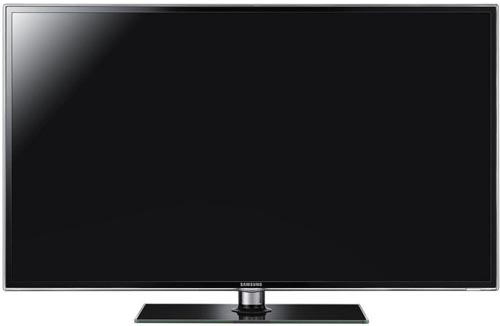
The Samsung UE40D6530 is a beautifully styled HDTV, in fact, we actually prefer its appearance to the high-end D8000 model (although this is, of course, highly subjective). We’re happy to see that the four-legged, fingerprint-prone “claw” stand doesn’t make an appearance here. Instead, we’re treated to a more basic, but also very stylish square tabletop block with a “brushed steel” appearance – perhaps we’re just traditionalists, but we prefer this. The HDTV itself features a thin, shiny grey-black border, which is itself surrounded by glass-like transparent acrylic. The entire unit is only about 3cm thick. It is almost certainly the nicest looking LCD TV we’ve seen this year.
Connections
Although lacking the Satellite tuner input that more expensive Samsung HDTVs feature, the UE40D6530 still sports 4 HDMI inputs, support for SCART, Component, Composite video, PC “VGA”, and of course, a Freeview HD tuner. There’s also a LAN socket, although once again, even at this lessened price point, the LED LCD TV also features built-in Wireless capabilities, so we imagine it will go largely unused.
![]() |
| Rear: 4 x HDMI, VGA, component, SCART, aerial, ethernet & audio outs |
Operation
Samsung’s usual clear, legible menus make a return on the 40D6530. However, they’re more responsive than those seen on higher end models, because they lack the fancy transition animations – which is absolutely fine by us (more than fine, in fact). A quick look through the advanced picture settings menu reveals that the UE40D6530 features all of the calibration tools available on higher end displays. Samsung’s three-axis colour management system (CMS) and 10-point Greyscale adjustment menus are included here.
![]() |
|
| [Picture] menu | |
2D Calibration
Note: Our Samsung UE40D6530 review sample was calibrated using Calman Professional, the industry-leading video calibration software.
In its default mode, the Samsung D6530 was putting out a sharpened, blue-tinted, hyper-real image which doesn’t really suit high quality home viewing (but will certainly grab attention in crowded stores). We selected the “Movie” mode from the TV’s Picture menu, since this is the most accurate out of the box preset mode, and ran some initial Greyscale measurements to see how correct the television’s colour reproduction was. We left the “Colour Space” setting at “Auto” before making any complex colour adjustments.
2D Mode Greyscale
![]() |
| Pre-calibration RGB tracking and delta errors (dEs) |
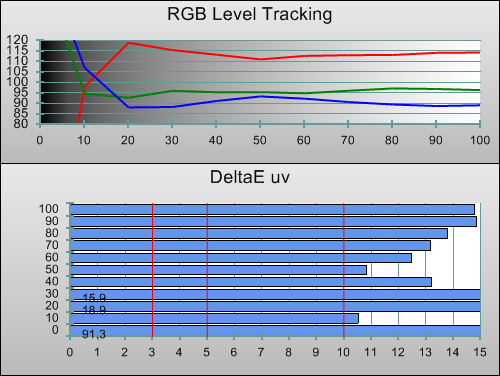
The pre-calibrated Greyscale tracking on our Samsung UE40D6530 review unit was very similar to what we saw from the high-end D8000 LED TV: overly red by default, but uniformly so. We imagine this won’t be overly troubling to users who aren’t used to watching accurate displays. To our eyes, it’s much easier to ignore than a picture that’s overly blue.
![]() |
| Post-calibration RGB tracking and dEs in [Movie] mode |
We then calibrated the HDTV, so we could see what it was capable of when pushed to its absolute limits. Achieving essentially perfect Greyscale reproduction was a cinch thanks to the controls Samsung has provided. First we used the regular 2-point White Balance menu (which has six controls: RGB levels for both the low and high ends) to achieve highly accurate Greyscale tracking at all points. Then, we used the 10-point control to make smaller, more specific corrections – for example, to the 10% (shadowed) areas of the image, which still had a blue tint (common for LCD-based displays). The end result is absolutely excellent, even more so when the UE40D6530′s price is considered.
![]() |
|
| Gamma curve in [Movie] mode | Corresponding gamma tracking |
Not everyone is aware of this, so let’s reiterate it: calibrators can also use the 10-point White Balance menu to flatten out the D6530′s Gamma tracking, by adjusting all three controls simultaneously. You can see the perfect results above for yourself. Since we calibrated to 2.2 (for usage in a normally lit room, and for consistency with our other reviews), we raised the [Gamma] setting to +1. Reducing it will give a “punchier” image, with lessened shadow details, more suitable for darkened viewing environments.
2D Mode Colour
Before we did any specialist calibration work on the UE40D6530, we measured how its colour performed in the out-of-the-box settings. The answer is, very well indeed. Red, Green, and by extension, Yellow, were all suitably accurate, although the colour of Blue was slightly off, as was Magenta. Samsung’s three-axis colour management system allowed these errors to be corrected. The only sticking point was Blue, where we could minimise the error, but never saturate the colour fully. We did also feel that the adjustments were not as fine (that is to say, they were coarser) than on higher-end Samsung displays, but couldn’t verify this. In any case, we were very happy with the final accuracy.
![]() |
| Post-calibration CIE chart with reference to HD Rec.709 |
![]() |
| Post-calibration colour luminance (coloured bars = targets; black bars = measured values) |
Since the colour management menu indirectly allows for control over Luminance (or colour “brightness”), we weren’t surprised that we managed to achieve perfection in this area, also.
3D Calibration
We attached a pair of Samsung’s SSG-3100GB active-shutter 3D glasses to the end of our Klein Instruments K-10 non-contact calibration meter, enabled 3D mode on the TV, and turned on the glasses. We then took the following measurements to get an idea of the picture quality of the UE40D6530 in its 3-dimensional mode.
3D Mode Greyscale
![]() |
| 3D Pre-calibration RGB tracking and delta errors (dEs) |
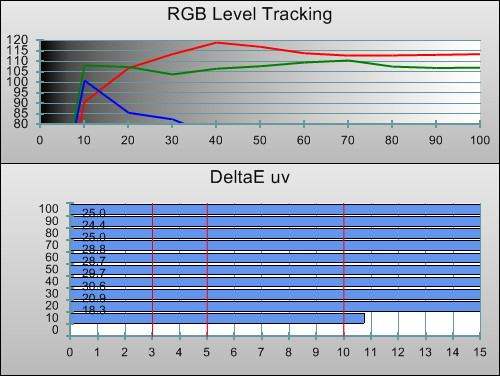
Out-of-the-box accuracy was not a strong point, which wasn’t too surprising given the 40D6530′s price point. The image had a visible greenish appearance in 3D mode before calibration. In fact, when we saw the above measurements, we had to double-check that the glasses hadn’t shut themselves off during the reading.
![]() |
| 3D Post-calibration RGB tracking and dEs in [Movie] mode |
A large improvement was possible, but the final Greyscale tracking quality in 3D is basically on the same level as the company’s first-generation 3D LCD TVs. We could certainly have done with 10-point Greyscale controls here (Samsung doesn’t offer them in 3D mode on any of their models, unlike some other manufacturers), but that may be asking for a lot on a mid-range model. The final calibrated Greyscale quality could be described as “decent” in 3D, although this may be a moot point since most calibrators are not configuring the 3D modes of 3DTVs to this extent (perhaps in the years to come…)
3D Mode Colour
As with all of Samsung’s 3DTV models, there is no separate colour memory for the 3D mode: colour management info is stored per-input, rather than “per dimension”. Although we could theoretically have achieved a better result by dedicating an entire HDMI input just to 3D display, we don’t think anyone would want the inconvenience of this (or the expense of having two players). This is the best practical result we managed to achieve:
![]() |
| 3D Post-calibration CIE chart with reference to HD Rec.709 |
Prior to calibration, secondary colour points were somewhat skewed, but these became far more accurate after Greyscale adjustment.
![]() |
| 3D Post-calibration colour luminance (coloured bars = targets; black bars = measured values) |
Luminance levels were initially too low. We adjusted these as best we could using the single “Colour” control, which we raised to “55″ from its default position. Green, Cyan and Yellow remained a little too dark, though, and without practical individual control over these parameters, we had to accept this small limitation.
Benchmark Test Results
| Dead pixels | None |
| Screen uniformity | Very good: almost no bright/dark patches |
| Overscanning on HDMI | 0% with [P.SIZE] set to “Just Scan” |
| Blacker than black | Passed |
| Calibrated black level (black screen) | 0 cd/m2 (TV turns off LEDs) |
| Calibrated black level (ANSI checkerboard) | 0.04 cd/m2 |
| Black level retention | Stable with [Shadow Detail] set to +2 |
| Primary chromaticity | Very Good (mild error with Blue) |
| Scaling | Excellent, smooth, jaggy-free |
| Video mode deinterlacing | Very effective jaggies reduction |
| Film mode deinterlacing | Failed 2-2 PAL film cadence test |
| Viewing angle | Very Good for an LCD TV, slight colour loss |
| Motion resolution | 900, with some small “sparkling” around edges |
| Digital noise reduction | Mild film grain smoothing forced, except in “Game Mode” |
| Sharpness | Defeatable edge enhancement |
| Luma/Chroma bandwidth (2D Blu-ray) | Full Luma, Chroma horizontally blurred |
| 1080p/24 capability | No judder in 2D, judder with 3D Blu-ray movies |
| Input lag | 46ms compared to lag-free CRT |
| Full 4:4:4 reproduction (PC) | No, 4:4:4 input subsampled in all modes |
Power Consumption
| Default [Standard] mode (2D) | 74 watts |
| Default [Standard] mode (3D) | 90 watts |
| Calibrated [Movie] mode (2D) | 80 watts |
| Calibrated [Movie] mode (3D) | 90 watts |
| Standby | 1 watt |
Picture Performance
Black Level
During the day, we could hardly be happier with the UE40D6530′s contrast performance. The “Ultra Clear Panel” allows the image to have a wonderful “glossy” appearance. As usual, viewing in a darkened room was a bit more revealing, but the blacks still held up very well, measuring 0.04 cd/m2 when measured with an ANSI checkerboard test pattern (which gives a very good indication of contrast performance with actual content). This is opposed to measuring the Samsung D6530 with a fully black screen, which of course returns a value of 0 cd/m2 (absolute black), since the TV shuts its LEDs off to save power.
Motion Resolution
Prior to calibration, we tried out all the different motion-affecting settings on the Samsung UE40D6530, and settled on enabling [Motion Plus] with the “Custom” mode set for maximum blur reduction and no judder reduction. We also enabled [LED Motion Plus], which makes a noticeable improvement to the reproduction of fine moving details (at the expense of some brightness – moreso, we think, than the higher-end implementations of the same feature). The 40D6530 is not as bright as some other Samsung flat-screen televisions, even with its [Backlight] setting turned up full, but even in this configuration, it was putting out enough light for our fairly standard environment.
The HDTV resolved around 900-1000 lines in the FPD Benchmark test chart, although the [LED Motion Plus] setting required to achieve this result did cause some slight “sparkling” (which we presume is the result of the LCD panel being overdriven). It was far less severe than the similar noisy dithering artefacts we see on some Plasma TVs, though.
Overall, motion wasn’t quite as clear as the top-end LCD TVs, and certainly not on the same level as Plasmas, but it was sharp enough for us not to mind given the price point. Users who plan on watching sports or other high-motion video content might want to double-check before they buy, but we had very few complaints with the performance on offer here: it’s still very good for an LCD television.
3D Material
The first thing we checked out with the UE40D6530 was its 3D capabilities, by running our own 3D resolution test chart. Simply put, it doesn’t do well in this area at all, showing the lowest resolution out of any active-shutter 3D TV we’ve tested. It does seem that Samsung has felt compelled to shoe-horn 3D capabilities into a panel that’s not really suited to it, and the result is what looks like halved vertical resolution. Everything in 3D mode – the image you’re watching, and the 3DTV’s own on-screen menus – displays with jaggedness. This is likely to be even more obvious than any 2D errors might have been, given that it’s advisable to sit closer to the screen of an extra-dimensional television for a more immersive experience.
The vertical resolution check area of our test pattern appeared as a solid grey smudge (it’s supposed to be alternating black and white lines), and the diagonal “stipple” pattern did, too. Unfortunately for Samsung, there is a large “FULL HD 3D” logo displayed prominently on the UE40D6530′s box, which, we’re sorry to say, simply isn’t true. Given that Samsung has publicly denounced its cross-town rival LG over the latter’s usage of the term “Full HD 3D” to describe its passive Cinema 3D displays, this is more than a little ironic. We can only assume this is a promotional mistake of some sort, or that in these early days of 3D, a lack of test patterns (we had to made our own) means that TV makers may simply not be entirely or collectively aware of such limitations.
The Samsung UE40D6530 isn’t the only 3DTV promoted as “Full HD 3D” to actually not be – none of the 2011 Panasonic Plasma TV panels we’ve reviewed have been able to reproduce all 1080 lines of the 3D image, although they’re very close and the limitation is nowhere near as extreme. In fact, the only TV manufacturers we haven’t seen slip up in the resolution area so far have been Toshiba and Sony (although we’ve not seen all of their 3D range). This is unfortunate, because one of the greatest strengths of the active-shutter 3D system that Samsung promotes against the Passive system (which LG are proponents of) is… resolution. With this resolution limitation, we’re only left with the down-sides of the active-shutter 3D method – namely expensive glasses, and some flicker visible in bright areas.
Moving on, motion was a mixed bag. To our surprise, 50hz video in 3D played back without any stuttering at all – something that even the top-end D8000 series of LED TV needs some help with (but can manage eventually). The same is true of 60hz. Unfortunately, we couldn’t get 24fps films – such as those on Blu-ray 3D – to play back with what we call “cinema quality” motion (ideally, we want the picture to show without any new motion being generated by the TV, and also without any juddering). When we turned off all of the D6530′s motion smoothing controls, it was clearly adding a lot of unwanted juddering into the image. As a result, we did something we normally never do, and experimented with the motion smoothing controls for 3D film content. Normally we avoid these controls, since they introduce the so-called “soap opera effect”, causing filmic motion to become video-like. However, many users may prefer this to the stutter introduced with 3D movies otherwise. Unfortunately, the mode isn’t saved independently for 2D and 3D, so users will have to switch back and forth if they deem this to be a workable solution.
We then did some subjective viewing to check for 3D crosstalk and assess the overall image quality. We’re not sure if it’s down to the resolution handicap blinding us to whatever other qualities the image might have, or if it’s just the smaller 40″ screen size, but the image certainly didn’t seem to have the same depth as Samsung’s other 3D displays. Even Cloudy With A Chance Of Meatballs, which usually softens even the most grizzled of 3D hearts, didn’t leap out like we were used to. Crosstalk is present, although not to a horribly damaging extent.
All in all, the 3D performance is something of a blight on the Samsung UE40D6530, and only really serves to damage the company’s attempts at promoting active shutter as the superior 3D system.
Standard Definition
SD material looked nearly as good as it possibly could on the Samsung UE40D6530. Samsung’s “crown jewel” is certainly its scaling engine. It’s not to everyone’s taste, because it doesn’t look as immediately razor-sharp as some other scalers, but it’s ideal for standard-def Digital TV because it appears to resize the image in a way which conceals compression artefacts, mosquito noise, and avoids aliasing (jaggedness). Of course, the company’s own “MPEG Noise Reduction” is gentle and non-destructive, too (although don’t expect to use it to watch Chinese VCDs and have them look compression artefact free!).

Diagonal interpolation (for concealing jaggies on video content) was very good. Film mode detection for PAL 2-2 content (in other words, nearly any film broadcast on television) wasn’t so consistent: we couldn’t get it to lock onto the cadence of the film motion test and stay locked in any of its modes. However, we didn’t find this too big an issue since we imagine most users will have upscaling DVD players with their own film mode detection circuitry (making the TV redundant for everything except movies on Digital TV, which are generally too soft to reveal this limitation much anyway). Unsurprisingly, the performance with the American-centric NTSC system was flawless for all intents and purposes.
High Definition
We were very happy that the Samsung UE40D6530 reproduced cinema-quality motion when fed 24p Blu-ray Disc movies in 2D: that is, it was possible to configure it to show films without any unwanted motion interpolation (“soap opera effect”) and also without any unwanted juddering. We used the “Custom” [Motion Plus] mode and selected Blur Reduction: 10, Judder Reduction: 0 to achieve this. We confirmed that absolutely no motion interpolation was taking place with our own custom test pattern, designed to catch such processing.
Samsung’s (almost) undefeatable noise reduction processing is still in play here, but it’s not as noticeable as it has been in the past for two reasons: first is the smaller 40″ screen, second is the fact that they’ve fixed the bug whereby the filter would reset to its highest setting, causing very obvious smearing. It’s still silly to deny the user the choice of turning it off completely, from our point of view. However, any users who are troubled by this can enable the “Game Mode” setting on the UE40D6530. This disables the 10-point White Balance control (losing a bit of Greyscale neutrality) and means “Motion Plus” can’t be used (not really an issue for films), but fortunately does not add any extra judder to the image – smooth 24p, cinema-quality motion can be had even in “Game Mode”. (We also ran a quick test calibration on the “Game Mode” of this display, for users who wouldn’t be able to tolerate the remaining film grain smearing, and were happy with the Greyscale, Gamma and Colour quality on offer).
Viewed during the day, the panel produces an incredibly deep, believable black, with the screen’s coating being just glossy enough to give the image some additional perceived depth, but not so glossy as to become a secondary mirror. This is thanks to the “Ultra Clear Panel”, a screen coating which we think Samsung has down to a T.

Two other strengths of the Samsung UE40D6530 are, surprisingly, its screen uniformity, and its viewing angle. The colours do desaturate a little when viewed from the sides, and overall brightness does change, but the effect seems more minor compared to many other LCD televisions. Oddly, the Greyscale qualities of the screen didn’t noticeably degrade from the sides – whereas many other LCDs (Samsung’s included) can pick up a mild pinkish tint from the sides, there was nothing of the sort to be seen here.
As for screen uniformity, the 40D6530, while imperfect, presents much less obvious uneveness than the higher-end Samsung LCDs we’ve reviewed. We imagine this is purely down to screen size, though: the higher-end models were 46″ and 55″, whereas this display is 40″. By extrapolation, the 32″ UE32D6530 should be even better in this regard.
And, of course, we ask readers to cast their eyes back to the calibration section – the UE40D6530 is capable of very flat Greyscale tracking (both in and out of “Game Mode”), allowing the picture to be free of unwanted colour casts. Its colour accuracy is also very good before and after calibration, resulting in natural, realistic images.
Console Gaming
Subjectively, the familiar Halo: Reach (which, as a first person shooter, is a good candidate for testing display lag) felt a little tight and unresponsive on the Samsung UE40D6530, although it was still possible to play and do fairly well in online games (long-term owners of laggy displays can sometimes effectively adapt their gameplay around the lag, also). We measured the input lag as being 46ms, which explained the “tightness” we felt.
We also played the new Xbox Live Arcade game Insanely Twisted Shadow Planet – most of which is styled in dark black shadows, as the name suggests – to see how well the LCD panel would hold up. The SPVA-type LCD panels that Samsung use, while arguably the best type of LCD panel for use in an HDTV, often show visible ghosting with dark objects, which is why we checked. Although there was some trailing, it was nowhere near as bad as we were expecting.
Also, speaking personally a Plasma TV owner, although I’m not overly concerned with image retention, it is still an annoyance which can still crop up with the competing display technology. It was nice to play games on a high-quality screen (albeit one that would ideally be a little less laggy) without watching the clock.
Conclusion
At an online price of around £800, the Samsung UE40D6530 presents very good value for money and, in 2D, produces deep, involving, accurate, high contrast video with an absolutely beautiful slim design. Surprisingly, the screen uniformity is very good for an edge LED-backlit LCD TV. As such, we would rather think of this as an excellent 2D HDTV, and just forget about its poor attempt at 3D. Were it to be more expensive, we wouldn’t be so lenient, but given the price the D6530 can be had for, and its other strengths, we don’t think it’s too unreasonable to write the 3D mode off as an experiment gone wrong (although Samsung should revisit the “Full HD 3D” label associated with this 3DTV, because it just isn’t true).
We still don’t like the fact that users are not given full control over the [Noise Reduction] setting, and that we have to enable and set up the “Game Mode” (and give up a little bit of Greyscale neutrality) just to see films without any unwanted grain reduction processing. Fortunately, the work-around for this isn’t hugely damaging, meaning that this hasn’t affected the final recommendation much.
If you’re looking for a brilliantly styled, high-performing LCD TV for watching 2D standard-def and HD TV and films on, the Samsung UE40D6530 is it. Hardcore gamers might want to look elsewhere to get a slightly faster screen, and we can’t recommend it at all for 3D. However, if the Korean manufacturer can keep producing LED-assisted LCDs to this standard, we may end up not missing the traditional CCFL-backlit LCD TVs after all.
Note: the final score ignores the 3D mode of the D6530 due to the fact that it is priced on par with 2D-only models.



![[Picture] menu](http://www.hdtvtest.co.uk/image/hdtv/Samsung-UE40D6530/picmenu.jpg)

![Post-calibration RGB Tracking in [Movie] mode](http://www.hdtvtest.co.uk/image/hdtv/Samsung-UE40D6530/post-rgb.png)
![Gamma curve in [Movie] mode](http://www.hdtvtest.co.uk/image/hdtv/Samsung-UE40D6530/post-gamma.png)
![Post-calibration CIE chart in [Movie] mode](http://www.hdtvtest.co.uk/image/hdtv/Samsung-UE40D6530/post-cie.jpg)
![Post-calibration Luminance levels in [Movie] mode](http://www.hdtvtest.co.uk/image/hdtv/Samsung-UE40D6530/post-colour-lum.png)

![3D Post-calibration RGB Tracking in [Movie] mode](http://www.hdtvtest.co.uk/image/hdtv/Samsung-UE40D6530/3d-post-rgb.png)
![3D Post-calibration CIE chart in [Movie] mode](http://www.hdtvtest.co.uk/image/hdtv/Samsung-UE40D6530/3d-post-cie.jpg)
![3D Post-calibration Luminance levels in [Movie] mode](http://www.hdtvtest.co.uk/image/hdtv/Samsung-UE40D6530/3d-post-colour-lum.png)
I had my eye on this one (actually the 46 inch version) so great review. Too bad about the noise reduction as I dont mind the movie grain. How much do you think the noise reduction will be visible on the 46″ version?
Thanks
I presume that you checked for 3D resolution on 7000/8000 and didn’t find this issue? In other words, Samsung is saving money with a less powerful processing chip in the lower 3D capable models?
Great review do you have the calibration details?
I bought the ue32d6530 and am very impressed with SD and freeview HD. Picking up BBC hd in 1080p produces near blu ray quality picture. The sounds reasonable for small tv once you have used the equaliser it’s very clear and reasonable amount of depth given size of speaker.
hi,
just another request for the calibration settings – i got the 46inch version today, and besides for some slightly dodgy wifi reception (needed to move my router someplace else) but managed to get it working excellent with mezzmo dlna on my whs – a great piece of kit…..now for calibration, then for 3d glasses to see what it can really do!
thanks again!
Hi,
Again, excellent review ! I have a 40D6200 and the grayscale is very hard to calibrate. When i see your 2D RGB level tracking, my tv has the same red dominant in “cinema mode”…
Can you give us the firmware used for your review and the calibration settings !?
Thanks in advance and best regards.
hi
great review, wanted to ask if you know if the other tvs in the series 6 have the same or maybe even less input lag while gaming
Thanks
Settings here:
http://www.facebook.com/photo.php?fbid=231709696873413&set=a.231709686873414.64822.110909255620125&type=1&ref=nf
@Barry
It depends on the film and how used you are to seeing movies without any tampering. For me it’s very visible with some films. For example, “Aliens”, without the film grain, the special effects and pre-CG painted backgrounds seem to stick out more. You can always set up “Game Mode” for films though.
@YellowSphere
I have no idea what causes the limitation, but it’s there.
Yes, of course
@Sam:
Good question. Most manufacturers are a little unpredictable in this area. The lag can even vary by screen size…
I follow your reviews quite often and they are great. One question though. I bought calman almost a year ago and have 2 meters. colormunki and dtp94. Can you tell me what you use for the patterns? An optical player or a pattern generator? I bought the onkyo dv-sp809 blu-ray player with thx certification but never know if colors and such are presented without errors. Thanks in advance.
Thanks for a nice review. How would you rate this set’s 2D viewing compared with the D7000 or D8000?
In your opinion, how big a comprimise is having to set Game mode for films?
@Gerard:
We use a Klein Instruments K-10. I don’t have experience with the ColorMunki but we used DTP94 in the past due to its excellent value and ability to read down to fairly low luminance levels.
We also use an optical disc player for patterns (with the AVSHD test disc, as well as a few of our own custom-designed patterns). That player is an Oppo BDP-83 which is confirmed not to alter what’s on the disc. A few players recently have been distorting the stored values, though. In any case, that’s only an issue for us to worry about, because you should calibrate your display using the player that will actually be feeding it – so if your player DOES have any errors, the calibration will take those into account.
@John:
The motion is slightly less clear than the D7000 and D8000, but, perhaps it’s just because of the smaller screen, the uniformity is better.
Game Mode is not really a big compromise anymore. The Greyscale tracking quality is degraded a bit (measurably) but it’s not hugely noticeable.
Thanks for the review David. I have the 46in version of this set and according to the motion test pattern I have used it is able to resolve 1080 lines with the blur reduction set to 10 (and possibly also with it set at a lower level- but I haven’t tested any of these yet). With no blur reduction at all it drops to about 800-900. This is similar to a result of 875 (without blur reduction) which a reviewer on another site reported getting on the 40in version. Anyhow, I have to say I’m pleasantly surprised at the quality of this set for the price; having compared it with the D7000 and D8000 it holds up very well.
@ David
Thanks for the reply. i’ve seen that the oppo were great in outputting without errors
The onkyo is already a big difference compared to my low budget lg player. Was thinking about buying the calman pattern generator but good equipment cost a fortune. And it’s more of a hobby. I have the panasonic 42vt30 and the philips pfl46pfl9705.
Hi there,
Fantastic review of a television I have quite some interest in purchasing. I do however have one question:
An acquittance of mine highlighted that Samsung use different panels depending on size; even if across the same range (I only thought they did this for 37″ as they outsourced it). I have seen many glowing reviews for the D6530, majority of which review the 40″ version. My question to you is; does the 32″ have the same panel as that in the 40″ model? Or is the 32″ model fitted with a substandard panel in comparison to the 40″ yourselves and everyone else seem to review? Which effectively makes it a different television.
Thank you for taking the time in reading and replying to this query, it really would help me.
Hi there,
Fantastic review of a television I have quite some interest in purchasing. I do however have one question:
An acquittance of mine highlighted that Samsung use different panels depending on size; even if across the same range (I only thought they did this for 37″ as they outsourced it). I have seen many glowing reviews for the D6530, majority of which review the 40″ version. My question to you is; does the 32″ have the same panel as that in the 40″ model? Or is the 32″ model fitted with a substandard panel in comparison to the 40″ yourselves and everyone else seem to review? Which effectively makes it a different television.
Thank you for taking the time in reading and replying to this query, it really would help me.
@Bigness:
Great question. I don’t know if the 32″ is the same panel type. What I do know is that (unless things have changed recently), Samsung only manufactures SPVA panels in 32, 40, 46, 50 and I believe 55 (and larger?) sizes. So the 37″ panel won’t be theirs.
Thank you for the swift reply David, it is much appreciated. Since reviewed the 40″, I will copy and paste the following from a post by a member on AVForums which initially caused me to ask the question:
In case any one else is looking, the panel is a 32P1UF3E – translating to a Chin Lin S-MVA, 100Hz, ultra Clear, Full HD, edge lit.
And…
The panel is not 400 Hz CMR, as advertised on Amazon and elsewhere, but 200Hz. I also inferred from the ads that this was a 200 or 400 Hz refresh – it’s not, just 100Hz. Marketing strikes again.
Both of those are from the same member. Would that be of any help for you to be able to clarify one way or the other. As if true…the 32″ seems to be substandard. Thanks again.
(http://www.avforums.com/forums/lcd-led-lcd-tvs/1499153-samsung-d6530-series-led-part-2-a-2.html)
Could you please try to get more Information about the 3D resolution “Problem” ?
Could it be corrected with a firmwareupdate or is the hardware to slow to work with real 3D 1920×1080 ??
Geman AreaDVD Webside sais the Picture in 3D is wonderfull, no word about the resolution Problem.
I have a 46D6500 with 1012 Firmware on it and i SEE the problem… it really NOT does look good…. MegaMind in 2D > GREAT !! in 3D > Bad Resolution !!!
Also the TVs Menues are pixeled in 3D Modus….
Just wanted to question if the 3D resolution problem could not be related to malfunctioning glasses or bluetooth that causes the glasses to not synchronize properly resulting in drop in resolution.
But with Alex1971 having the same problem, I don’t see that likely to be the case…
The d6530 settings is good for d6500?
@Bigness
Thanks for that info. It seems that the panel lottery is in full force. None of the issues described there (crushed blacks etc) appeared on our review unit.
@Alex1971 and Eddie:
The low resolution is visible even before the glasses are added into the mix. Before we got some glasses to use, I hoped that just maybe the glasses would somehow conceal the jaggedness, but that’s not really possible and it’s not what happened.
Some other sites have actually commented on this, whereas other users haven’t. There’s two possibilities. One that there is a ‘panel lottery’ and some panels don’t have this issue. The other is that people simply don’t notice the limitation – something helped on by the fact that there are no commercially available 3D resolution test patterns yet (we made out own).
@David
In german Forum we no have a big discussion about the Problem:
http://www.hifi-forum.de/index.php?action=browseT&forum_id=151&thread=19077
Maybe Samsung uses 2 different Mainboard in Production of D65X0 Models.
One which is able to work with real 1920×1080 3D an one for which every second line must be dropped to handle 3D.
Maybe different Grafikchips e.g. Broadcom / MTK
Maybe one with big Framebuffer RAM / one with to little …..
Hmmm…. different Panels could also cause this Problem… ??
Are u able to contact SAMSUNG an clear this Problem ??
Hi,
I recently took delivery of the UE40D6530 and was initially very enthusiastic about the quality.. Good on SD. Great on HD (SAT Feed from a DM800 receiver). My problems are with backlighting. I seem to have what they describe as ‘clouding’ on the upper right of the panel… a circular patch which tends to be lighter than the rest of the panel during scene transitions or dark scenes… its only slight but once you notice it it becomes annoying. I assume that it would be worth getting a replacement panel from my supplier to see if it improves the problem? Other than the lack of uniformity with the backlight I really like it. I’ve read in other places it can be a bit of a lottery getting a perfect panel. I see the later series of sets use ‘microdimming’ to manage the panel lighting? I assume this remedies this sort of problem. We’ll see what my supplier proposes. Any feedback welcome. thanks.
@Alex: I’ll see if we can make Samsung aware of this.
@Adam: This is, unfortunately, standard for edge-lit LED LCDs. For a TV to be this thin and this cheap, something has to give. You could go through many panels and get some that are better, some worse than others. Our review unit wasn’t perfect, but was surprisingly good for an edge-lit LED LCD TV.
@David
There a signs that D65x0 Tvs with
Version No: 03
on the Backside are able to make FullHD 3D.
I have “Version No: 02″ …. and my TV is not able to….
What are the differents between Version: No:01 / 02 and 03 ?
Mainboard / Panel ??? Both…. ?
100 hrtz or 200hrtz or 400 hrtz?
I bought the 32″D6530 set about 6 weeks ago however it recently developed a fault with the left speaker. So I was sent a replacement. However on the new box I noticed the 400 hertz has a sticker over which now reads 200 hertz clear motion. So does anyone know if the panel used on early models was superior to later edition models?
Perhaps Samsung due to demand run out and is sourcing cheaper panels from alternative source??
look here… a very good TV-Foto for this 3D resolution Problem…
http://www.hifi-forum.de/index.php?action=browseT&forum_id=151&thread=19077&postID=59#59
Woow… looks ugly in that photos
What do you guys think if i can get a good deal on a 46C7000 with a price 120 EUR lower than 46D6500 is it worth getting the last year’s C7000 model over the D6500?
How does they compare in terms of 2D (SD and HD) ?
Thank you.
Great illustrations, Alex – very useful for other readers.
Fotos has gone now… this user has erased his account….
Hmmmmm….hope Samsung will fix the problem…
In answer to Wills question, no the early panels were not superior. As mentioned earlier all 32 inch 6 series use a 100hz Chin Lin S-MVA panel which in colaboration with the backlight effectively produces a 200hz refresh rate. The original 400mhz rating was incorrect for the 32 inch panel (but is correct for 40+ inch panels) and this appears to have been corrected on all current documentation. Unfortunately this panel is generally considered to be not as good as the Samsung s-pva panels (these generally have superior blacks and slightly better viewing angles and seem to be fitted to 40+ inch panels).
But it woul be very interesting what is the difference between 46D6500
Typ No 01
Typ No 02 and
Typ No 03 ?? Panel ? Mainboard.
Up to now nobody know or has an real idea…
How does this compare to the UE40D6100/UE46D6100? Those seem quite a bit cheaper.
hi we just bought this model (40″)and we get juddering when ever something moves quickly its not only on tv channels but also on tv and cable channels thinking of taking it back any ideas as we love the look of the tv
@Joe: have you experimented with the different Motion Plus settings?
I have the 46″ version for two days – 46D6500.
Going over 40″ does not guarantee a Samsung S-PVA panel…
I have “Version 1″ on the sticker. Owning a 4-year Panasonic 32LX70 with IPS-Alpha panel and being used with its great angles of viewing, I noticed that the viewing angles of the new Samsung are not very good so I was curious about the panel I have. Entered the service menu and the panel is produced by AU Optronics, so it is a S-MVA. Type: 46L1UF6E http://u1.ipernity.com/19/30/46/11273046.d6211cf0.560.jpg
The TV is Made in Slovakia and reading here http://en.wikipedia.org/wiki/AU_Optronics I saw that they have a new factory in Slovakia so I assume that all the 46″ 65xx made there will have this panel.
Initially I wanted to return it and go for the D7000 but I noticed that the viewing angles are very dependant on the room lighting, because this morning I tested the same positions of viewing in the uniform daylight and the problem was practically not there anymore. Before I was testing in the dark with a dimmed light in the right corner of the room, so the light hit the screen at an angle and just moving one seat to the right, created visible gamma and blacks shift to the left of the screen. Trying the same thing this morning was a totally different story. So I will use a dim light behind the screen.
Apart from this issue the picture is excellent with great blacks, contrast, colors and resolution.
And on a plus side – the screen uniformity is very good with minimal clouding and corner flashlighting, visible only in total darkness and with the backlight raised to maximum.
The 3D is exactly as described in this review… not so great.
Alex1971 what panel do you have?
I have the 46″ version for two days – 46D6500.
Going over 40″ does not guarantee a Samsung S-PVA panel…
I have “Version 1″ on the sticker. Owning a 4-year Panasonic 32LX70 with IPS-Alpha panel and being used with its great angles of viewing, I noticed that the viewing angles of the new Samsung are not very good so I was curious about the panel I have. Entered the service menu and the panel is produced by AU Optronics, so it is a S-MVA. Type: 46L1UF6E
The TV is Made in Slovakia and reading here http://en.wikipedia.org/wiki/AU_Optronics I saw that they have a new factory in Slovakia so I assume that all the 46″ 65xx made there will have this panel.
Initially I wanted to return it and go for the D7000 but I noticed that the viewing angles are very dependant on the room lighting, because this morning I tested the same positions of viewing in the uniform daylight and the problem was practically not there anymore. Before I was testing in the dark with a dimmed light in the right corner of the room, so the light hit the screen at an angle and just moving one seat to the right, created visible gamma and blacks shift to the left of the screen. Trying the same thing this morning was a totally different story. So I will use a dim light behind the screen.
Apart from this issue the picture is excellent with great blacks, contrast, colors and resolution.
And on a plus side – the screen uniformity is very good with minimal clouding and corner flashlighting, visible only in total darkness and with the backlight raised to maximum.
The 3D is exactly as described in this review… not so great.
Alex1971 what panel do you have?
Great review. I’ve just bought the UE46D6530 and I’m so far very pleased with my purchase, however I’ve got one issue – I cannot seem to get 1:1 pixel mapping from my HTPC, which is set to output 1920 x 1080 at 60 hz (over HDMI). For some reason, the Samsung still scales the image, so I end up with black borders all around (wider at the sides than the top / bottom).
@David Mackenzie
Is it possible to achieve a true 1:1 pixel mapping? I’m surprised if it isn’t, as my much older 37″ Samsung supported this.
Thanks for your advice and assistance.
Yes, you can choose the 1:1 mode using the aspect ratio button on the remote, provided the TV is getting 1080i or 1080p input
@David Mackenzie
Thanks for the advice David. It turns out that the issue was caused by overscan being applied by the ATI drivers – strange that this had not previously been an issue with my older TV, but it certainly affected the D6530.
Is the 46d7000 range worth the extra £500 premium over the 46d6530 ? Seems a lot more money so can i expect a much better picture? 2d quality is more important to me than 3d as it will be 95% of my viewing
TIA
Another update having had my D6530 for a few days. Overall, I’m enjoying the picture quality but as per the findings of David in this review, and many others it would seem, the 3D resolution is definitely reduced (judging by the blockiness I would hazard a guess that both vertical and horizontal are affected by as musch as a 50% loss).
I doubt this i3D issue is panel related, but as somone else pointed out, more likely to do with the mainboard / processing power / memory limitiations.
@David – is this something you are in a position to raise with Samsung? Given the way Samsung are promoting this a s Full HD 3D, I think they should be brought to task over their claims.
Hello and thx for some great reviews.
I am considering the d8000. That review said that game-mode introduced judder. But not on this TV, or is it maybe cause it is only 40″?
Also this review states that the undefeatable noise filter is not as big a problem: “First is the smaller 40″ screen, second is the fact that they’ve fixed the bug whereby the filter would reset to its highest setting, causing very obvious smearing.”
Do these two points also apply to a 40″ d8000 or is the model in this review actually better. The D8000 review seems much tougher on both game-mode and the noise filtering then this one. Shouldn’t the d8000 be the top model?
Kind regards
@David
Can you determine what panel type the unit you reviewed has?
I tested another one at the store and it was a 46P1UF6E – Chi Lin – with “Version 2″ on the back sticker. Maybe we can determine if only some revisions are affected. I have a 46L1UF6E – AU Optronics and to my eyes the 3D is well defined, an I only watched SBS 1080p so practically half the resolution in 3D, I imagine bluray full HD to be even better. There is cross talk but resolution seems fine. The menus are indeed pixelized in 3D but not the actual image.
@Eddie
SBS 1080p (which is 960×1080 in real) looks better then “Original 1080p” Frame Packing 3D from BluRay…
Sad but true…
Actually I looked closer on my TV and the problem is there…
Edges with staircase look exactly as described and shown in the pictures.
If bluray looks worse… it’s sad indeed. Samsung needs to do something about this.
Just purchased the 6530 and overall very impressed and use it for watching a lot of HD sports via my Sky HD box. We have noticed that fast ball action such as tennis does generate an element of judder particularly as it tracks the ball. I have tried playing with some of the settings but am i missing a trick, what are the optimal picture settings for sports? Also when I select the HDMI input by pressing source it says 1920x1080i @50hz. My understanding is that this is a 400hz panel? Do I need to change something on my sky box?
Thank you for any help.
Mike
Is it possible to download and install software such as ‘Sopcast’ to this model ?
@Bryn:
We’ll put this to them when we get a chance.
@Budtz:
The 40 D8000 should now also be free of the latter NR problem, but you still have to use Game Mode to turn the filter off entirely. The D8000 should be the top model, but from our perspective, it’s a case of diminishing returns – the same is true of a lot of top end models. The noise filtering is unlikely to be any different though.
@Mike
50hz refers to the input signal, not the rate the panel is running at.
David,
Can this TV resolve every pixel in a 576i signal over HDMI? This is a problem that is mentioned in the D5500 review and I was wondering if this model suffers from it too.
Thanks
Simon
It doesn’t have that problem.
I have seen some image trailing on 2 different d8000 models. Seems pretty bad as my current lcd tv does not do this. Its there if for example a person with black hair moves fast across the screen and the background is white. Seems strange that this is not mensioned in ether review of the samsung led tv’s.
Has any1 experianced this?
Also i seem not to be able to buy this tv here in denmark. only the d8000 and the d6510.
What is the difference between d6510 and 6530? any1 know?
If you recommend this as a 2d, then what 32″ inch LED non 3D TV is comparable to it?
Hi everyone,
I bought this tv 2 weeks ago. So far I am impressed with the clarity of the 2d picture.
However I noticed some motion stutter watching the US Open both on Sky Sports HD and Eurosport HD. This is very noticeable and happens every few seconds and not only during fast-moving scenes.
This can be reduced / pretty much completely eliminated by turning off Film Mode and switching off auto motion completely. Could someone please confirm they have the same issue with the US Open broadcast? I have not noticed motion issues with football etc. on Sky HD so would like to find out if there is an issue with the TV or whether the US broadcast is poor.
@David Mackenzie
Any reaction from SAMSUNG ??
Did you contact them because of the 3D-resoluotion problem ??
Does anyone know if the newer 6750 suffers from the same poor 3D resolution problems?
I would also appreciate any feedback regarding the 3D-resolution issue, i notice it from where i sit on the couch about 1.5m away & its driving me insane. This is on a 3D blu ray movie. For all the £ i spent on it i at least want to enjoy the damn thing. Cant even return it so the crazy thing is im now hoping it develops a fault!
New firmware is out for this TV!
Does Samsung fix 3d problem?
Unfortunately I think the new firmware merely deals with the Smart Hub- but I’m not 100% certain.
Are all the calibrated settings of use for us that have the tv? I was thinking that some of them needs to be made specificly for each tv.
After many weeks reading reviews I finally decided on 46D6530 – but
now not sure after reading comments on 3d resolution. I will be interested to know
If firmware update has resolved the issue or it’s back to the drawing board!
The Firmwareupdate does NOT fix any 3D-Problem….
Only Smarthub Fixes…
@David Mackenzie
Any reaction from SAMSUNG ??
Did you contact them because of the 3D-resoluotion problem ??
@ Dave – I wouldn’t bother getting the D6530 ignoring the 3D resolution problem there’s also the consistent cross talk to put up with & the awful motion tracking.
If I could I’d opt for the passive LG after the recent improved firmware im reading of minimal crosstalk & good 3D resolution.
A complete turn from my original choice. I still hope there is a fix for the samsung but wont hold my breath.
@Alex1971 – I contacted samsung today regarding 3D res i’ll post back any response.
Overall good TV
BUT IF YOUR USED TO THE AUTOMATIC SWITCH FUNCTION
ON THE OLDER CRT TV WITH SCART SOCKETS FORGET IT
ON THIS SAMSUNGS WITH HDMI – YOU HAVE 4 SOCKETS AND A
COMMON INTERFACE ALL HAVE TO BE MANUAL SWITCHED ONTO
AND BACK TOO THE FREEVIEW TUNNER UNLIKE OUR OLDER PANASONIC.
IF I’D HAVE KNOWN THIS BEFORE I PURCHASED ONE I’D
HAVE SERIOUSLY CONSIDERED PANASONIC OR ANOTHER
MAKE OF TV.
John
For those getting some motion judder, make sure you are using the clear setting on motion plus. The reviews advice on using custom setting is wrong and actually goes against their own advice in the earlier Samsung 55D8000 review where they actually say that using the custom setting stated above caused some judder. However, even on this setting motion handling is still not great with objects like fast moving footballs looking a total blurred mess.
response from Samsung so far is my PS3 is the problem for the 3D resolution problem.
**The information my colleague has previously supplied to you is correct. Unfortunately
the picture you have supplied is not evidence that this has happened to your television.
We would need you to provide us with accurate pictures if possible.
The problem may be come from playing the discs through your PS3. The PS3 will play discs but
the quality resolution on your television will not be full 3D HD as it is not designed to be fully
compatible with 3D.
We have tested this on 2 models of television and we have had no issues with resolution
on either television. **
Any users noticing 3d resolution problems please reply whether your setup includes a PS3 or standalone 3d blu ray player. I dont believe its the PS3 but best who knows.
look here:
http://www.hifi-forum.de/index.php?action=browseT&forum_id=151&thread=19077&postID=399#399
With this 3D-Testpicture the claer proof is possible.
xxD65x0 is NOT possible to show 3D in FullHD !
My Samsung UE40D6500 has exactly the same problem!
3D images can not be shown in Full HD.
No response from Samsung.
A giant shit!! Never again Samsung!
A section of text received from Samsung UK below:
**Thank you for contacting Samsung and I have pleasure in providing the
following assistance.
Your television is full HD and it makes no difference when the 3D effect is turned on-it is always capable of
displaying full HD.**
Im still in the process of trying to resolve this problem and they have responded to my queries within the stated 1 day period and in fairness have responded so far as I would expect. Im still hopeful of resolving the issue with them.
Id suggest if you have the same problem contact them via email here:
https://contactus.samsung.com/customer/contactus/formmail/mail/MailQuest
ionProduct.jsp?SITE_ID=31
The more aware of the problem the better.
Hello David
Can you please tell me how to access the white balance and colour space sub menus – I don’t seem to be able to find them! I can adjust the white balance but can’t find the interval menu for 1 through to 10, likewise can adjust the colour space but only the first number not the rest…..
Help!
It’s a great looking set, with impressive black levels in daylight, but its error-prone motion (even when processing is ‘disabled’), sizeable lag with console games and uneven backlight (impressive for an LED LCD or not) are serious drawbacks. I’ve owned it for a week and sent it back.
Watching dark scenes at night, there are five areas of clouding on my screen, two small areas at the top corners, two large blemishes in the middle and a more muddled gradient protruding from the bottom right corner.
Motion judders, with or without processing enabled. Play a Blu-ray where the frame rate changes (eg behind the scenes footage, switching between film clips and interview footage) and the TV stutters awkwardly as it accommodates the switch. This is also the case with videogames, Pro Evolution Soccer 2012 on PS3 juddering back into 60fps life after a reduced frame rate replay.
And then there’s the lag – clearly not an issue if you’re watching films, but play something like Deus Ex and it’s simply awful. Game mode is not the proclaimed saviour either, greatly reducing motion quality to a dated judder – and it’s incomprehensibly hidden away in the menus, requiring cumbersome fiddling between watching movies and playing games from a single source (eg PS3).
None of these flaws were issues with my three year old Panasonic TX37LZD85, a set regarded “Average” on this very site. Throw in awful 3D and I’m astounded that this set has been awarded “Recommended”.
I can confirm what Mike said. This tv is very impressive at first but reveals some issues with processing motion. I also returned mine and went for the ue40d7000. This set is more expensive but handles motion a lot better. For me it was worth the extra money.
@Chris
The 3D problem is not PS3 related. The jagged edges are visible in TV menus when 3D mode is enabled, also visible in Smart Hub > Explore 3D content, and some SBS content I watched through my media player.
@Eddie
yes i’ve seen this too, tried watching pirates of the Caribbean 3D the other night eyes felt strained gave up 40 mins in. Shocking considering the 3d effect is barely visible as it is.
Have put off calling Samsung to get someone to look at it but its going to have to be done.
Another one that has to agree with Mike. I too am bamboozled as to how this tv has got such rave reviews. A TV that initially looked impresive but after living with it for several weeks, it is now starting to grate. My main gripe is the motion handling. Football is dificult to watch as the football itself, when travelling at speed, disappears into a semi-transparent blurred mess. The blacks are not fantastic either only mediocre. I have tried setting the LED motion plus to help with the motion handling and all that does is make the picture so dim that no amount of blacklight and brightness adjustment will compensate. All in all I have to say my Sony EX503 is a more enjoybale TV to watch even though its picture may lack some of the sharpness and depth of the Samsung. I too might have to replace this tv but it will not be with the another Samsung. Their motion processing is not good enough (even on the D7000 and D8000) and so I might look at getting another Sony.
Engineers coming to view my TV this week provided there is noticeable crosstalk/ghosting ill receive a full refund. I didn’t even want to get into the whole resolution issue. I cant wait to say goodbye to this set.
I can confirm that this TV is not full HD in 3D. The resolution drops significantly. Strange given that Samsung have been bashing LG’s passive technology for doing the same thing. I contacted Samsung – first they asked me to upgrade the firmware (which is already up-to-date) and next they said they’d send an engineer to replace the panel – which I know is not going to help!
Most likely the worst 3D TV money can buy this year, avoid at all cost.
Received a full refund and went shopping for a replacement was shocked how bad the 6530 was in comparison to the sets I viewed.
Since I have no way comparising Samsung D6530 and Toshiba WL768 which one would you recommend? Asking price for 40″ with glasses is almost the same and for now I don’t care much about 3D. I do care about power consumption that’s why I ruled out plasmas.
Hello!
Blacklight?? How much?? What`s the best result with the settings from David Mackenzie.
Thanks. lipp100
Please be a part of us !!! We will reach that this problem / fraud of samsung will get public !!!
http://www.facebook.com/pages/Samsung-3D-Full-HD-Half-HD-Quarter-HD-UExD6xxx/279164975441861
Hi David -
I would like to as that what will be your choice between SONY BRAVIA KDL40EX723 and Samsung ue40D6530..which is better ?
Hi David, many many thanks for your wonderful review! I’ve been following your reviews for a while and now I am about to get a TV. I’m stuck between this D6530 and the Sony ex 723.. both 40 inch versions. My main use of the tv would be to use my xbox 360 with the tv and stream video from my laptop via DLNA to watch movies, etc and I’ll be using 3D ocassionally. So which which one would you suggest given my purposes for the TV? thanks in advance for your reply
Just bought one of these on the back of this review – and others, although it’s the 46′ model i went for. Very pleased indeed with the quality of the picture – having previously been watching a 38′ CRT for last 15 years!
One very minor issue that someone might be able to throw some light on. twice today an on-screen message has appeared saying “TV will turn off in (x) seconds, press OK to cancel” or words to that effect.
I have checked and the settings for the timer auto shut off are set to “off” and there don’t appear to be any ‘eco’ settings that would place it into a auto shutdown mode.
Any ideas?
Grateful for any advice – Thx.
Sry for my bad english.
Amazon Germany told me yesterday, they take my Samsung 6500 (bought 4/11) back and I get my whole money back.
AMAZON ist great!!!
I am trying to make up my mind wether to buy the Samsung UE40D6530W or the Panasonic TXP42GT30 My son is into his XBOX360 for vairous games and i watch mainly 2D Telivision and like the feature IPlayer etc
I have read both reviews and not sure whcih way to go. The current offer at John Lewis has the panasonic @£999 but includes two pairs of glasses and a Blu Ray Player
Can someone either give me a website or the exact options I need to change to make the picture the best it can be on my Samsung UE32D6530. I’m looking for a step by step guide for each picture option and what number along its dial I should change it to, along with what preferences I should turn on or off.
Even to this day Retailers here in the states are still using ads that state the Samsung USA Model 55D6500 is a Full 3d HD TV. Here’s a photo i screen capped from the ad…..
http://i902.photobucket.com/albums/ac223/texasmoose1963/SamsungLies.jpg
This comment section is now closed… for further discussion please visit our dedicated Samsung D6530 3D LED TV forum thread:
http://forums.hdtvtest.co.uk/index.php/topic,6892.0.html
Warmest regards
Vincent
