Top
Tweet
Share

Sony Firmware Update Adds Skype To Bravia Internet-Connected LCD TVs

By Jonathan Sutton • Sunday, 1 May 2011, 11:55 pm BST 

Sony has this week released a free firmware update that adds a number of advanced functionalities to the company’s Bravia line of LCD TV displays. After upgrading their sets, owners will be able to make internet voice and video calls via Skype, use their smartphones as a remote control, as well as access social networking services like Facebook and Twitter on their television sets.
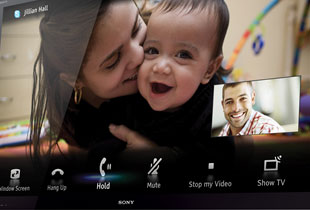
Skype on Sony Bravia LCD TV

Skype is one of the most popular VOIP (voice-over-internet-protocol) software platform in the world, which lets its users (more than 650 million in 2010) conduct voice calls, internet messaging and video conferencing at no charge over the web. Some TV manufacturers such as Samsung and Panasonic has introduced Skype capabilities on their HDTV models as early as last year, but it is only now that Sony has joined the bandwagon.

Any Sony flat-panel TVs that are connected to the internet will be automatically updated with the latest firmware which among other things enables Skyping functionality on the Bravia Internet TV portal. However, to fully partake in voice calling and video conferencing, users will first need to buy the Sony CMU-BR100 webcam and microphone accessory kit which costs around £90.

The firmware upgrade will also make HDTVs from the Japanese brand controllable via smartphone devices or the Remote Keyboard function on Windows-7-powered VAIO laptops, making it much less difficult to input text compared to using a standard remote. The corresponding Media Remote app can be downloaded for free on Apple iPhone and iPad, as well as Android smartphones to interact with the Bravia LCDs.

Finally, with the firmware update, Sony Bravia TV owners can access their Facebook and Twitter accounts directly on their television sets without needing to leave their sofas or reach out for another electronic gadget. The easier process of typing text on screen via the Media Remote app or Remote Keyboard function will certainly come in handy for tweeting and updating Facebook statuses.

21 Comments So Far... Add Yours

  1. KeMa on 4 May 2011 9:42 am

    So I like this: “Remote Keyboard function on Windows-7-powered VAIO laptops, making it much less difficult to input text compared to using a standard remote”
    - but with the exception of having to use a VAIO laptop.

    So how do you use another laptop – anyone?

  2. Ajay on 14 June 2011 3:11 pm

    This Update dosent apply to all Sony Bravia Internet TV’s :(
    I received an email from Sony (see below) about my Sony Bravia internet Tv model

    Dear Ajay

    Thank you for your recent e-mail received on 13/06/2011 01.08 PM.

    I am pleased to read that you are the owner of a KDL-46EX503 BRAVIA Television, however, I am sorry to learn of the difficulties you have been encountering.

    In response to your enquiry, there are no current plans to release a firmware update to enable Skype and Facebook on the KDL-46EX503, this model is not applicable for the firmware.

    This may be due to the TV not being designed to enable Skype and Facebook.

    Sony have only released a firmware for applicable models.

    I hope this information is of some assistance. Thank you for your enquiry.

    Yours sincerely

    Samantha Robinson
    Customer Information Centre
    SONY UNITED KINGDOM

  3. David Golding on 6 July 2011 12:04 pm

    The screenshot above shows skype with video enabled, presumably a webcam would be needed?

  4. Susan grey on 20 July 2011 1:13 pm

    Very disappointed to hear the 503 does not support Skype as we have just bought one

  5. Flag on 21 July 2011 12:38 am

    I am trying to find out if this firmware will work with Sony Bravia KDL-40HX803 in order to use skype but to no avail. I called Sony centre and I was told he is not sure if this firmware will work nor if they are going to release one in future for said model(Sony Bravia KDL-40HX803)

    Anyone knows or heard if this firmware will work with Sony Bravia KDL-40HX803?
    Your reply will be very much appreciated.

    Thanks in advance.

  6. carole dillon on 25 July 2011 8:48 pm

    ive got asony bravia internet tv and i cant work out how to use the internet with it i can access films direct, but dont know how to use the actual internet. any help would br grateful,as long as its explained in simple mans terms

  7. Anish on 9 August 2011 10:23 pm

    I have purchased KDL-40EX523, I upgraded the firmware to the latest version but still I don’t see SKYPE application in my Television.

    I would be grateful if someone could advice how to fix it.

    Thx

  8. Tim Haynes on 18 August 2011 10:13 am

    I do not understand why skype is not available on the KDL-46EX503 range? Is it a technical issue or more likely a cynical marketing strategy?

    Who do I write to in SONY to complain?

    Tim Haynes

  9. mukesh on 23 August 2011 12:37 pm

    hi
    i have Sony bravia KDL-55NX81,software version PKG5.042EUS-0108
    and as it is on auto update but i have not seen new update so as i cant you my
    iphone app to use as my Sony BDV- E380 i can use with i phone
    so as this model compatible with i-phone
    any software upgrade will be release
    thanks

  10. sakibb61 on 24 August 2011 6:41 pm

    Is there a list somewhere of the sony TVs that got the upgrade?

  11. khan on 25 August 2011 10:03 am

    What sony do I buy which will not have any problems 2 access 2 internet n Skype

  12. suryakanth.s,kalsekar on 1 September 2011 5:44 pm

    i have sony bravia tv. model=cx52/32 but i want to register vod.divx.com. i have registration code .but i dont know how i will do it.

  13. cx520 on 13 October 2011 6:28 am

    To answer KeMa: the remote keyboard software appears to be _artificially_ limited to Sony VAIO laptops (there can be no technical reason for such a limitation, it is purely a marketing decision). Probably if you could find a way of bypassing their installation limitation it would work on any PC. Sony like to do stuff like this, read the manual and see that you supposed to be using cat-7 cable for a wired network connection – and this for a 100Mbps (or less?) connection where even cat-5 would be overkill.

  14. scott on 22 October 2011 7:32 am

    Just got sony 55ex720 in Australia 3 days ago – updated software yesterday and ran the skype app – attached a cheap Logitech webcam and made a call but could only get audio working – will try a few more webcams later to see if i can get one to show video. Also downloaded the Media Remote app from Android Market to my Incredible S and was able to control all menus on the tv and enter text in text box using my phones keyboard – very cool !! Hmmmmm – I wonder if they can do simulated 3d in skype call……???

  15. mapa paquet on 10 November 2011 2:28 am

    Hello
    i am asking how to get a audible ring on a receive call from skype on a sony 46ex 720 . also does the tv need to be on.

  16. aseem on 11 December 2011 11:08 pm

    my sony bravia kdl-40ex603 also shows the latest firmware update present but its of no use to me as i haven’t seen any new apps claimed to be available with it.
    guess its just a marketing ploy by them to claim to be in line with other rival brands but atleast i can’t see its any help to me.

  17. Pete on 2 January 2012 8:25 pm

    There’s nothing to stop you using the Sony remote keyboard application on any Windows 7 PC to control your TV via a wired or wireless net. I just did it with my Acer. Get the program here http://www.sony.co.uk/support/en/product/KDL-40EX721/downloads/Remote_Keyboard_Lite
    But I don’t see the big advantage, once I have the PC on my lap. Why on earth couldn’t somebody make a simple remote keyboard for the Bravia TVs? I don’t need the rest of my PC!

  18. CRACKshezy on 5 January 2012 8:32 pm

    guys i have the 55″ HX800, i managed to connect it to the internet but how am i suppose to get skype on it? someone help me out

  19. jan gould on 17 February 2012 11:27 am

    I have a Sony KDL 32EX403U and a Vaio laptop. I bought the TV one year ago and the laptop this year.

    The problem I have is that Sony haven’t offered a substantial firmware upgrade for the TV. It appears that even though it is only a year old, by Sony’s standards it is old and therefore should not benefit from any kind of onward support. You can’t use the remote keyboard function to link the TV to the laptop, because the laptop doesn’t pick up any ‘registered devices’ even though I have the TV set up to stream video and music from my home network.

    The whole thing stinks of of Sony limiting their devices to such an extent that you can’t benefit from any upgrades they offer. Is this because they want me to buy a new product after a year or so? Probably. When I want a new TV will I buy a Sony? Probably not. My mate just bought a Samsung flatscreen which updates firmware constantly.

  20. Mutt a on 23 February 2012 2:18 pm

    I have just purchased a package of Kdl60ex720 tv and bdv-920 3dblu ray. The tv has no Internet but the blu ray does. Can I just plug the Skype cam into the blu ray? It only seems to recognize it when I plug it into the tv but has no Internet access then.

  21. LACOTEROUGE on 12 April 2012 3:58 pm

    My Sony Bravia is great but I am still to try Skype on it. My worry is, do I have to buy a Sony dedicated Webcam with a microphone or could my own Logitec webcam do.
    Thank you for your help.

Add your comment here


Bottom