Top

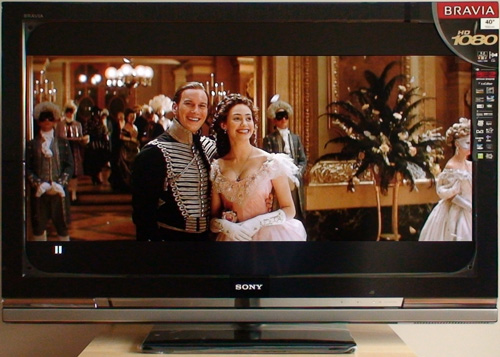
Sony KDL40W4000U Review

By Vincent Teoh • Wednesday, 21 May 2008, 5:30 am GMT  

Sony KDL40W4000U

Thanks to every reader who kindly contributed to the fundraising campaign which made it possible for us to acquire this LCD television for testing purposes, our Sony KDL40W4000 review is now complete.

The specific model we reviewed was the Sony KDL40W4000U, where the ending alphabet “U” denotes the UK 3-pin-plug version. Europeans get the Sony KDL40W4000E which sports the added advantage of an integrated AVC HD tuner. Is it just us or does anyone else feel that the Brits always get short-changed?

Some things the Sony KDL40W4000U did better than the W3000; some things it did worse. While it’s difficult to call it a massive improvement over its predecessor, the Sony KDL40W4000U still delivers exceptional picture quality due in no small part to excellent blacks and accurate primary colours.

64 Comments So Far... Add Yours

  1. AVforum.no - Sony Bravia W4000 on 21 May 2008 7:16 am

    [...] Det ser ut som om HDTVtest.co.uk er ferdige med testen sin av W4000, og likte den Sjekk ut: Sony KDL40W4000U Bravia LCD HDTV Review [...]

  2. Calle on 21 May 2008 9:16 am

    Thanks!

  3. Mika on 21 May 2008 10:56 am

    Did you have a chance to test any football match…to see LCD performance during fast motion?
    If you should decide among this LCD, Samsung LE40A656 and Sony KDL-40X3000, what would be your choice? ( I’d like to use it for SD watching, sports and PC games and internet in connection with Win XP Media center).
    Many thanks for your opinion in advance!

  4. Cem on 21 May 2008 11:13 am

    Excellent review, thanks! I will be buying a new LCD tv with the next month or so and the W4000 sounds like a good choice. The Samsung A656 series also looks great, so it will be one of these two tv’s.

  5. Gorgon on 21 May 2008 11:52 am

    Thank you for yet another excelent review, Vincent!

  6. GANGSTERKILLER on 21 May 2008 1:24 pm

    Thanks for the review mate! I must say (and in meen it), that this site is the best if you’re looking foor a professional LCD/Plasma review. I will buy the new Bravia W4000, now i know that this TV is “highly recommended” on HDTVtest. Keep up the good work…!

    Greetings from Holland

  7. Recensione KDL40W4000 - Forum di Tom's Hardware Italia on 21 May 2008 1:24 pm

    [...] il link ed una traduzione magari Sony KDL40W4000U Bravia LCD HDTV Review Troppo lungo per riportare una [...]

  8. Gorgon on 21 May 2008 1:58 pm

    Just one thing…could we get the calibration sets like you did for the W3000?

    Also, are you sure the TV has no Colour Space Wide set? I can see the option in a downloaded UK manual, unless the manual is wrong.

    Thanks!

  9. Gorgon on 21 May 2008 2:07 pm

    Ok, maybe I’m confusing Colour Space: Wide with RGB Dynamic Range…I though it did the same thing…

  10. CToff on 21 May 2008 2:40 pm

    I follow these reviews from Belgium for a while now and find them very intersting.
    Great job Vincent!!!

    My only remaining concern is this cons : “Motion resolution not as good as those on HDTVs equipped with MCFI/ 100Hz technology”
    Do you know when sony plan to put this techno in a new screen?

    That’s why I also consider the new Samsung 40A656/676 and the Toshiba 40ZF355D (it seems that that’s the first one that worths it …) that have 100hz techno … I have to wait your opinion on these …. aargg

    For this concern (motion resolution) do you advice plasma tech ?

    Thanks again.

  11. mlaun on 21 May 2008 3:47 pm

    thanks vincent,

    as always a good honost review. If I may add my 2 cents; I love ‘ The Phamtom’ blue-ray. I do find though that it looks good on any TV no matter what settings. For me not the right material to show up D65 deviation.

    keep up the good work

    markus

  12. Pete on 21 May 2008 4:51 pm

    Too bad there is still no mention of power usage in the reviews.

  13. Jurgen Noppe on 21 May 2008 5:55 pm

    Hi,

    very correct review,although…
    you can change the rgb values in the service menu. You first have to press initialize, then the 3 numbers come up for setting 0 and you can change them…

    If you missed this,is it possible for you to calibrate the greyscale then with this info?

  14. Jurgen Noppe on 21 May 2008 5:55 pm

    and can you post settings please.

  15. robita on 21 May 2008 7:11 pm

    Thanks Vincent. It was worth donating £5 to give a real review rather than waste £5 on What Hi-fi and the like…..

    Can you post the optimal settings please, that take us as close to D65 as possible.

    Thanks
    Robita

  16. Sven Petterson on 21 May 2008 8:32 pm

    I have to agree that some power numbers should be included in the reviews.

    With these 400 watt power-eaters, it is a bit like reviewing a car and not listing fuel economy. We need to know how much they will cost us in the long run.

  17. Lionheart on 21 May 2008 8:42 pm

    Thanks for the review, much appreciated!!

    “Too bad there is still no mention of power usage in the reviews.”

    I too find this an interesting thing to look at, because if you look at the specs, this TV is rated at 176W, while its predecessor, while inferior, was rated 220W. It seems like Bravia Engine 2 is a lot more economic than BE EX, perhaps built with smaller form factor TV’s in mind later on.

    Power consumption is a big reason why I’m choosing LCD over Plasma personally, although it seems like this TV holds its own image wise as well compared to Panasonic plasmas around the same price category, so that’s great news!

  18. Lionheart on 21 May 2008 8:45 pm

    “With these 400 watt power-eaters, it is a bit like reviewing a car and not listing fuel economy. We need to know how much they will cost us in the long run.”

    Uh, LCD’s in the 40 inch size range are nowhere near 400 watts, at most they seem to be at 250 watts or so, although I haven’t checked all manufacturers’ TVs.

    Plasmas on the other hand do use a lot more. 42 inch 1080p Panasonics are specified to ‘eat’ 579 watts even! Pioneers eat around 330 watts I believe, due to lower resolution.

  19. Lionheart on 21 May 2008 8:55 pm

    Hmmm, now that I check Panasonic’s newer models, it seems like they don’t consume close to that amount I just said at all anymore… Around 330-380 it seems, sorry.

    Somehow I can’t even find the the number I just said there haha. From what I remember, all 1080p 42 inch models on either the American Panasonic site or the Dutch one were rated to consume 579 Watts. Good news that they seem to have worked that out at least, although strange that I can’t find those figures even on the older 1080p models anymore… :S Weird

  20. Christian on 21 May 2008 9:30 pm

    I’m looking for a 40 inch LCD and I will probably go for the sony 40W4000.
    I was also interested in the Samsung 656 and the new Toshiba 40ZF355.
    But both consume much over 200 Watt, which made it a no go for those two.
    The 40 W4000 uses about 180. Why can’t these brands reach or even come close to this benchmarks. (Does 100 Hz make a difference?)
    Consumers should make powerconsumption a basic criteria to select an lcd or any other electronic equipment and should always be also be part of a review.

  21. Tom on 22 May 2008 8:05 am

    Hi,

    great review, thanks!
    The most complete and clear reviews I have saw on the internet!

    1 question: Is it possible to give us some calibration setting like for 40W3000?

    Thanks!!

  22. Santana on 22 May 2008 8:28 am

    What is the bottom line with BE2? Is it equivalent to BE-EX or a strip-down version?

  23. Jake on 22 May 2008 9:41 am

    Great review as always. Many thanks. Couple of questions:

    1. Interested in the 32″ version which lacks the WGL. Will it make any difference to the black levels?

    2. Any idea when we might expect the Panny LZ85 review? Probably the W4000’s closest competitor in the 32″ field.

    Cheers.

  24. Greg on 22 May 2008 10:14 am

    Great review, but I have to agree info on powerconsumption is sorely missing.
    And what about PSU buzzing? Does this TV have any fans??

  25. Vincent on 23 May 2008 1:17 am

    @Mika: For football, there is some drop in motion resolution which is expected of an LCD TV not equipped with 100Hz technology.

    @Gorgon: Colour space and RGB levels are two entirely different issues.

    @CToff: No idea when Sony’s 100Hz version will come out. Currently the highest record holders for motion resolution among all the flat panel HDTVs we’ve tested are plasma televisions.

    @mlaun: Point noted. The movie does give insight into colour accuracy, black level, shadow detail and 1080p/24 handling.

    @Jurgen Noppe: Thanks for the info re: service menu calibration. Unfortunately I no longer have the TV. Settings will be up shortly.

    @robita & Tom: Thanks for your kind words. Settings will be posted shortly.

    @Pete, Sven Petterson, Lionheart & Christian: Point taken re: power usage. It does add some more time and effort to the many tests that we’re already undertaking.

    @Santana: Difficult to say. W4000’s scaling is better than W3000’s; but SD film mode deinterlacing is worse.

    @Jake: Are you referring to WCG? If so, the component that should be affected most is colour and not black level. I think we have an LZD85 review in the pipeline.

    @Greg: No fans. There’s a slight low-pitched electronic hum from the back of the LCD TV, as I’ve listed in the Cons section of the review conclusion page.

  26. Martin on 23 May 2008 11:01 am

    Very good review as always…

    Let’s hope somone tries Jurgen hack inte the service meny and report if it works so we can callibrate the set to D65 standards.
    About the SD deinterlacing i must say it not that bad, most dvd player or digital boxes do this better than the tv so for me it’s no big deal.

  27. kaimietis on 23 May 2008 12:00 pm

    Lionheart,

    Plasma screen power consumption isn’t constant. I think they state maximum consumption in specifications.

    I have an energy meter and measured my 37 inch plasma power consumption during 2 hours football game. It averaged 135W.

  28. Gorgon on 23 May 2008 1:36 pm

    Thanks a lot for the replies, Vincent. You guys rock, keep up the excelent work.

  29. Jurgen Noppe on 23 May 2008 2:36 pm

    i went into it and pressed initialize and so and tried to change the presets then,which worked,but since there are no cuts and gains,i don’t know exactly how calibration would work… Hopefully more info soon from someone

  30. Jurgen Noppe on 23 May 2008 2:37 pm

    hope to have your settings soon vincent

  31. Norb on 23 May 2008 8:16 pm

    Vincent:
    Your comment about the AVC HD tuner being omitted from the UK model is not technically correct, the E and U models are identical in that respect. the reason it is not mentioned in the UK specs, is that because ofcom have decided that they intend to broadcast only SD on DVB-T, but broadcast HD on DVB-T2 which hasn’t been finalised yet, and therefore there are no DVB-T2 tuners - ofcom may relent and broadcast HD over DVB-T:
    “Our regulatory functions under the enactments relevant to these proposals were
    explained in our consultation. We, as the regulator, already provide oversight of
    any technical changes to the DTT platform to promote the best interests of
    viewers as a whole. We note that certain respondents (NGW and Sky) have
    proposed that they should be able to adopt MPEG-4 and DVB-T immediately. We
    are not yet in a position to take a final view on this matter. We will therefore carry
    on discussing these proposals with both parties with a view to gaining a better
    understanding of how this variation could be adopted without causing a
    detrimental impact to DTT viewers.”
    http://www.ofcom.org.uk/consult/condocs/dttfuture/statement/statement.pdf section 2.9

    p.s. My 40W4000 should arrive from soundandvision on Tuesday, so I too would appreciate the settings ;-)

  32. Vincent on 24 May 2008 3:43 pm

    @Norb: Many thanks for the useful info.

    Settings are now up at:

    http://www.hdtvtest.co.uk/Sony-KDL40W4000/Settings

  33. Gorgon on 24 May 2008 4:22 pm

    THANK YOU!

  34. Pedro Soares on 24 May 2008 4:47 pm

    Vincent

    Great review! Many thanks!

    I have a old samsung lcd i and brought a 46w4000.

    The problem is that on my old 32 lcd i didn´t noticed any type of smearing on games and with w4000 i noticed a little bit.

    Here an example:

    http://www.mediafire.com/?jj3z0dmje4y

    As a gamer do you think that a should return my tv and trade by a A656?

    Cheers

    Pedro

  35. brian on 25 May 2008 6:56 pm

    Vincent I don’t suppose you’ve worked out the correct settings for getting 1080p over VGA on this model, I have the 32W4000 and it’s not supported by default but apparently some french or italian people have got it working.

  36. Amadeo on 26 May 2008 8:40 am

    In Cons you wrote:
    Fails to apply 3:2/ 2:2 pulldown to 480i/ 576i film-based content even with [Film Mode] set to “Auto”

    Shouldnt it be “Fails to apply inverse …” or “Fails to detect …” ?

    I’m just trying to understand this rather complicated (for me) subject.
    What does mean in practice? Visible moire patterns and jaggies?

    Many thanks for the review.

  37. Pete on 26 May 2008 9:38 am

    Hi Vincent,

    I notice from the spec differences between W3000 and W4000 that there is no voice zoom feature - as this was thought to be a real plus for us on the W3000 how does the W4000 cope without it? are there other tweaks to compensate for the lack of this voice zoom feature? As you didn’t mention it on the W3000 is this a gimmick?

  38. Daniel on 26 May 2008 9:11 pm

    A little off question:

    As I understand it this lcd has a very good deinterlacer and upscaler.
    So… when watching a dvd would it not be best to let the lcd do the upscaling?
    If this is true then it is not neccesary to buy an expensive upscaling DVD-player but rather it would be best to use a fairly basic DVD-player and ouput the “raw”-SD-signal (using HDMI output set to 576i/480i or using RGB-scart) and leave upscaling and deinterlacing to the lcd???

    Is the above correct? Or does even a pretty basic upscaling dvd-player (1080p output) beat the sony-lcd in terms of upscaling and deinterlacing???

    Confused! If there is a clear answer to this question it would be a nice addition to a “FAQ” to this excellent site …

  39. Steven H. on 26 May 2008 9:59 pm

    Hey Pedro I just saw your video. What´s that effect, is it ghosting?

    Again, nice review hdtv! I believe everyone is holding up to a A656 test to make up their mind :)
    cheers

  40. David on 26 May 2008 11:59 pm

    Using the 40W4000 or 46W4000 with a PC:

    I noticed in the user manual that using the PC through either the VGA input or the HDMI input only allows output at 1360×768 resolution. Is it true that this model can only output 1360×768 when given a signal from a PC either through VGA or HDMI?

    I am mainly looking for a 46″ 1080p LCD to use as a computer monitor in a home theater setting, and I noticed the in the older Sony 40W3000 and 46W3000 models, the manual indicated that both 1920×1080 resolutions were available for the PC via the VGA or HDMI input.

    Any help would be appreciated. I’d love to buy the 46W4000 if it will output the PC at 1920×1080 through the HDMI or VGA inputs.

    Many Thanks!

  41. dizi » Blog Archive » Panasonic PZ85 Or Sony W4000 on 27 May 2008 8:02 pm

    [...] hdtvtest.co.uk/news/sony-…0080521111.htm [...]

  42. Norb on 28 May 2008 11:57 am

    Does anyone know what the correct size and type of machine screws are for the threaded holes for the VESA mounts, as I intend to use them for a shelf for my SA-VE705 centre speaker…

  43. Baz on 28 May 2008 1:37 pm

    Hi Vincent,

    Thank you for the review! I am happy to hear about the improved black levels on the W4000 - you say they are on par with the new Panasonic Plasmas but how does this set compare on SD quality with both Panasonic and Pioneer?

  44. Stewart on 28 May 2008 5:10 pm

    Is the digital cable tuner listed in the specification on the Sony web site the same tuner that you will need for Free Sat?
    Thanks

  45. Matt on 29 May 2008 1:20 pm

    Hi, is this someone settings menu service for the balance of white on W4000? Thank you

  46. Stewart on 31 May 2008 8:07 am

    On the Sony web site they are quoting a power consumption of 176w, but looking at the back of the tv is clearly says 201w.
    Could you tell me which is right.
    Thanks.

  47. Daddycool on 31 May 2008 4:38 pm

    I’d like to answer to david about the resolution in PC mode. I’ve tested the vga input of the 40W4000 and it’s definitly limited to a resolution of 1360×768 with my macbook pro. Damned! I haven’t tryed yet with a dvi to hdmi connection but I’ll report as soon as I could try. There is also an other limitation : you can’t have access to all the picture settings you have in HDMI mode and you have 2 new modes : picture and video. Could someone have a full hd by outputting from a computer (and specially a mac? And I’d like to appologize for my bad english.

  48. bertalert on 31 May 2008 9:35 pm

    Any news Daddycool? I like this tv, but I really want to have full HD from my pc.

  49. bertalert on 1 June 2008 11:56 pm

    I searched a little further: it seems only few brands offer 1080p resolution over the VGA connection. Even if your pc is connected through DVI/HDMI you won’t get full HD working.

    If you want to be sure you should download the manual (possible from Sony site), the supported pc resolutions are always somewhere near the end page.

    As I see it, Samsung is the brand you want if you’re planning on using your hdtv as a pc screen.

  50. GEORGE on 3 June 2008 3:23 pm

    Thank y very much Vincent for the review. i bought the 52W4000 and i will have it next week. i hope the bigger panel does not have much difference than the one y made the review. Thanks again from Greece

  51. Brian on 3 June 2008 6:02 pm

    Please note that a lot of motherboards have a limitation on regards to resolution via VGA. you should use SDVO if you use your motherboards graphics or choose a graphic card that support 1080P.
    Vincent thanks for your reviews. your site has been very helpfull
    Brian

  52. Daddycool on 5 June 2008 8:08 pm

    I’ve tried to plug my mac via DVI output to an HDMI input of the W4000 and… it’s working in 1080P! So I was nearly happy but there is a new problem : when I lug the HDMI 1 input, Digital TV freeze. Thi sproblem happens only in the HDMI 1 input. I wil investigate further.

  53. Nuovi Philips 5603/7603 - Page 6 - Videogiochi Forum su Multiplayer.it on 9 June 2008 12:26 pm

    [...] da consigliare vivamente……….. Sony KDL40W4000 Review: 40" Bravia 1080p LCD HDTV Panel Sony KDL40W4000U Bravia LCD HDTV Review "La Verità ha bisogno di tempo" Irina Derevko. Alias [...]

  54. Rob Barrow on 11 June 2008 10:30 am

    I bought the KDL40-W4000 from the Sony Centre in Birmingham along with the RHT-G900 and a BDPS00.

    I was going to hold off for the BDP350 or just get the PS3 (UK spec) but the sales guy told me that (a) the BDP350 was just a replacement for the 300 and was bot a better spec. and that (b) the PS3 doesn’t do 24fps out - i.e. it’s out by 4%.

    Now I’ve found out that the BDP350 is a better spec player (it will be released with Profile 1.1 firmware and because of the ethernet port it can be upgraded to Profile 2 just as soon as that becomes available).

    As you always use the PS3 for your reviews and quote 1080/24p I assume that either you have a different spec PS3 or he was wrong about that too…

    I want to take the BDP300 back - but I just need to get my facts straight first.

  55. Deehell on 15 June 2008 12:44 pm

    Thanks for the excellent site and reviews Vincent. This level of detailed analysis is sadly missing from the mags and it was highly influential in persuading me to buy the Sony W464000 and I’m very glad I did. Encourage all to hit the donate now button at the end of the reviews….

  56. Guy on 15 June 2008 10:37 pm

    Thanks Vincent, know you considered giving up a while ago, so glad you didnt.
    Been watching for ages and just got off the fence n bought 40w4000 for £945 icluding 5yrs manufacturer warranty (over Sammy and Tosh). Reckon that was decent deal. Reasons: Sammy has too glossy finish to panel - would’ve given me too many problems with reflections. Couldn’t get good enough deal for tosh and couldn’t wait! Also Sony has cute picture mode that runs at reduced power (usb stick, or i’ve found a usb card reader works with card from camera too although jpegs must be in DCIM type layout to work) - at last I can see the plethora of photos lying forgotten on my PC. Rest of the specs frankly too close to call unless you’ve got the panels side by side. And ultimately you gotta bet that the Sony will work better with the inevitable PS3 and/or Bluray player purchase at some point.
    CONTRIBUTION ON IT’S WAY - JOB WELL DONE - THANKS AGAIN

  57. Kynan on 16 June 2008 12:06 pm

    Guy, where did you get the 40w4000 for £945 with 5year warranty?

  58. Calum Mackay on 17 June 2008 5:46 pm

    Rob: the PS3 is definitely 24p.

  59. Aidil on 19 June 2008 10:34 am

    Vincent, can mine 40W400A Asia Pacific model can be set up just like 40W3000? Since mine LCD has Black Corrector, Gamma and White Balance on the Advance Setting.

    thanks

  60. Guy on 21 June 2008 12:04 pm

    @Kynan: sorry m8 was asked not to name the store - it’s just off the M6 J3 near Coventry. Have to pick up in store tho’ to get the Sony warranty form stamped. Check they’ve got stock and reserve b4 u travel. Think Sony 5yr warranty offer ends June 30th 2008, so dont hang about. Everyone else was >£1K for this deal as “store” prices not the same as “internet” prices.

  61. Mike on 23 June 2008 12:25 pm

    @Kynan: Look hard and you’ll find it, I have. Google is a wonderful tool!

  62. tylo on 27 June 2008 12:41 pm

    @Daniel

    As noone has answered you on the DVD upscaling question, I have tested this with my Cambridge Audio DVD89, which is an “above average” upscaling player.

    I have found that the W4000 does better upscaling than the DVD89 to 1080i. so I send data as 576i raw output from the player. So yes, the W4000 does upscaling/deinterlacing very well indeed!

  63. mirak on 30 June 2008 3:56 pm

    Hi,

    I have watched the eurofoot 2008 in HD through cable.
    However I found that the image had to much bluring in travelings, while the latency of the screen is pretty good, I have no problems in games.
    So at first I suspected the source and the caméra but …

    I think that the signal was 1080i@50, and I think that the TV does a deinterlacing to go down to 1080p@25

    Normally since the TV have 1080 lines it should be able to display the both interlaced image fields alternatively without doing any efforts, like a cathodic TV can do in 576i in pal (or 540i in ntsc)

    So I didn’t see any reason that it looks like it’s deinterlaced.
    However the TV doesn’t display the pixel one per one, there is an overscan, like most fullhd tv have.

    The problem is that when you overscan the number of lines doesn’t match, and you need to deinterlace, because upscaling the fields 540 lignes to 1080 and show them alternatively would produce to much flickering.

    So what would need this TV is to be able to disable interlacing on 1080i streams when you switch it to one per one pixel mode because it shouldn’t need it.

  64. Samsung LE40A656 versus Sony KDL40W4500 - AVForums.com on 27 October 2008 8:05 pm

    [...] lag the Samsung LE40A656 is 60 ms slower than the W4000 which is the previous model to the 4500 Sony KDL40W4000U Bravia LCD HDTV Review . How much of a difference does 60ms input lag make to a non gamer and what is the absolute figure [...]

Add your comment here


Bottom