… and why is it important. Many HDTVs will have a control, often tucked away under advanced settings in a picture settings menu, labelled gamma. User manuals are often unhelpful in explaining what the gamma control does and even the better ones may be less than specific with terms such as “adjusts the balance between bright and dark areas of the picture”. To know how to adjust the gamma control we need to know what it does and why, so read on.
Gamma is actually a throw-back to the days of CRT televisions. Look at the graph below which plots incoming signal level versus light output of a typical CRT TV.
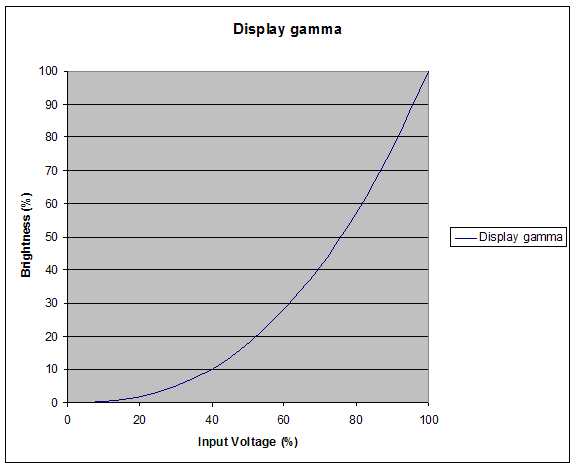
Notice how an input voltage of 50% produces only 18% of maximum brightness. This non-linear relationship between input voltage and output brightness is inherent in CRT technology.
To correct this “defect” an inverse gamma curve, like the one below, is applied to the source material.
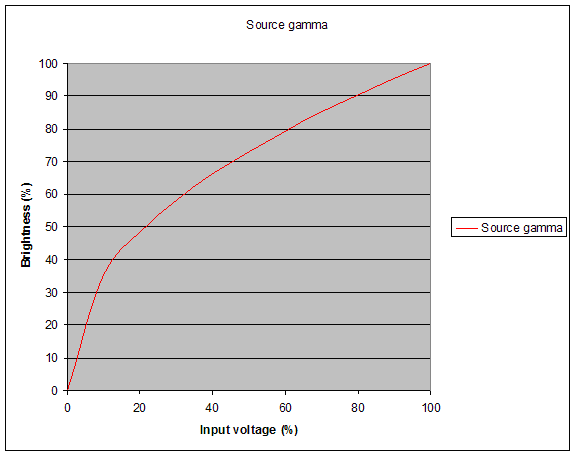
Combine the “corrected” input gamma black line and the “broken” CRT gamma red line and the result is a linear relationship between input and output (the yellow line).
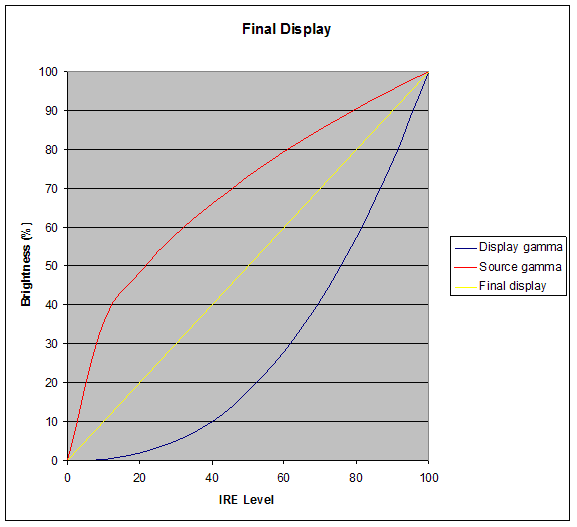
So that was how it worked on a CRT TV!
Fast forward to flat screen displays and what do we find? Plasmas and LCD displays don’t behave like CRT screens – they are inherently linear devices – but the source material is all being corrected for the old CRT displays so there is a big problem. What we now need is to make the flat panel HDTVs behave as if they were CRT devices and this is what the gamma control should do. We need to turn the yellow line into the black curve.
A gamma setting of 2.2 is usually considered the ideal setting and though some manufacturers offer adjustments with choices such as 2.0, 2.2, 2.5 etc. selecting 2.2 doesn’t necessarily guarantee that 2.2 is what you get. The only way to be sure is to measure the display’s output with a video analyzer and doing so is an essential part of an ISF calibration.
In the absence of a video analyzer can it be done by eye? Possibly, but you need to know what to look for! If gamma is set too low the picture will appear to be “washed out” whereas if set too high shadow detail close to black will be lacking.
The user manual that advised that the gamma control “adjusts the balance between bright and dark areas of the picture” tells the truth but isn”t too helpful. One more graph may help:
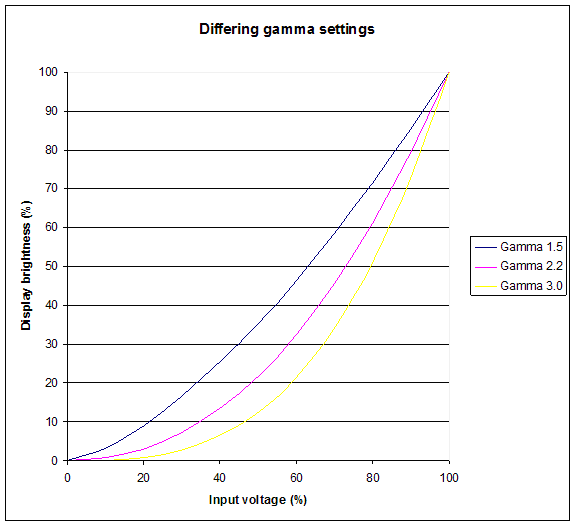
Big differences are apparent on the graph in the mid range (30 – 70 % input voltage). What does this mean in practice? Here are three screen captures, with gamma set to low (e.g. 1.5), normal (e.g. 2.2) and high (e.g. 3.0).
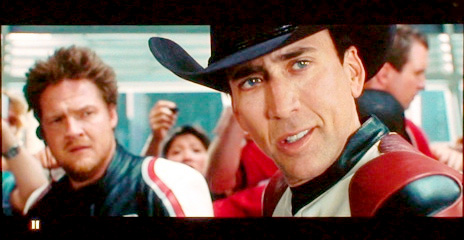 |
| Example photo of low gamma (e.g. 1.5) |
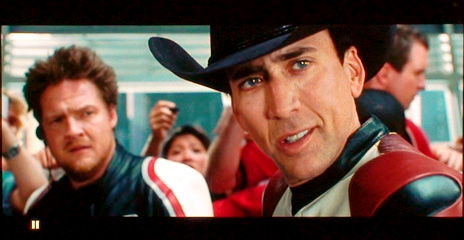 |
| Example photo of normal gamma (e.g. 2.2) |
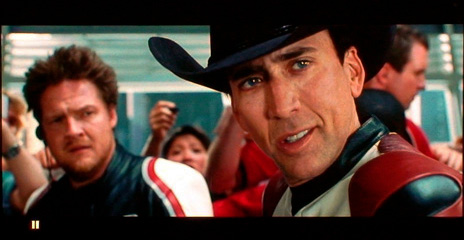 |
| Example photo of high gamma (e.g. 3.0) |
Look at the mid range first. Low gamma (e.g. 1.5) produces a picture that looks “milky”, it looks flat and lacks punch. High gamma (e.g. 3.0) has loads of punch but now look at detail in the black areas – it has gone. Normal gamma (e.g. 2.2) gets the black detail and a picture that is crisp.
Setting gamma correctly is just one part of accurately calibrating an HDTV but it is an important part.
Piers Clerk
ISF Calibrator
www.homecinemaengineering.com
© Home Cinema Engineering Ltd. 2008
