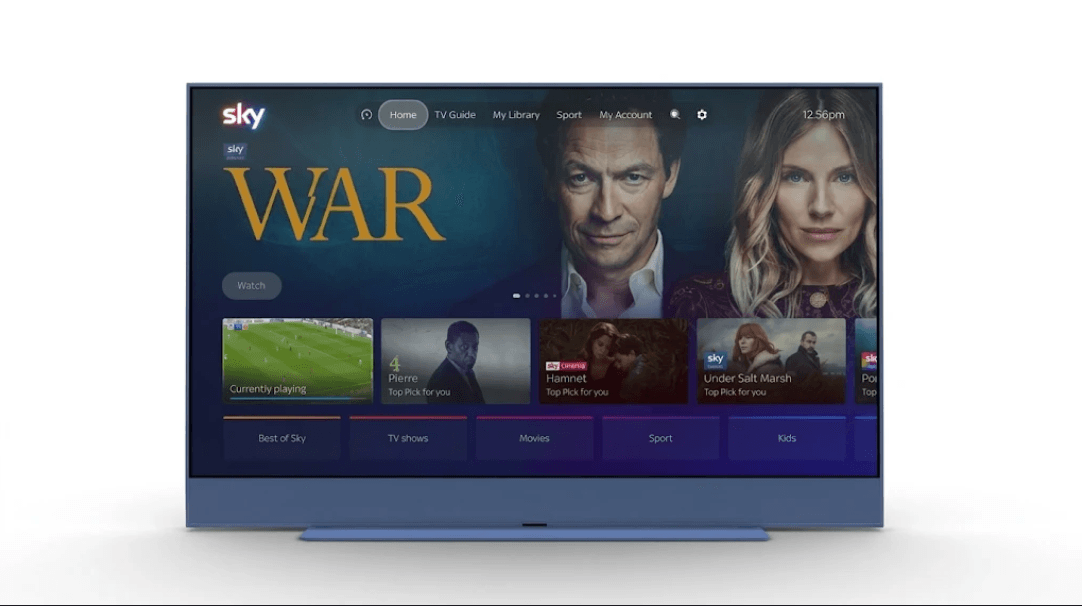
Sky TV subscribers are getting a major new operating system software update this week that’s going to help make it “easier to find, watch and enjoy the TV user’s love.”
The update to Sky OS is coming to all Sky Stream and Sky Glass TV subscribers and also the company’s mobile application, Sky Go, and it brings not just a fresh lick of paint, but some interesting new features to the user interface and navigation.
For many subscribers, one of the most useful new changes is going to be Smart Voice, which works much like Gemini on some Google TVs, or Siri AI on the Apple TV 4K. The idea is that viewers can interact with their TV in a more conversational way, with less precision required than its existing voice controls. Simply try to guess the name of a TV show by saying, for example, “what’s the name of that show with Bryan Cranson who cooks meth?” and the TV will understand exactly what you’re looking for and bring it up.
Smart Voice will be able to interpret more vague queries and questions. Users can ask for suggestions for TV shows similar to Breaking Bad or House of the Dragon, for example, and it will do its best to find content on the platforms you’ve subscribed to. They can also ask questions like “where is The Gilded Age set?” and the TV will come up with the answer. Alternatively, if you’re in the mood for football, you can say “which football games are being streamed live right now?” and it will let you know.
To activate Smart Voice, simply press and hold the voice button on the remote control or say “hello Sky,” to bring up the assistant without touching anything.
Carli Kerr, who is managing director of Sky TV and NOW TV, said Smart Voice is designed to make finding stuff to watch more effortless. “Smart Voice gives customers an intelligent entertainment assistant built into Sky, so they can now talk to the TV like they would a friend, making it easier to find something they’ll love,” she promised.
This week’s update is not just about voice controls. In addition, viewers will see a refreshed and more intuitive homepage when they turn the TV on. Sky promised that the redesigned UI will help people to “get to the good stuff quicker.” At the top of the homepage, you’ll find sections including Home, TV Guide, My Library, Sport, Search and Settings are all bunched together at the top of the screen in a new navigation bar.
My Library is an entirely new thing which allows viewers to bookmark content and also save and access up to 1,000 hours of recorded TV shows and movies. It’s from here that users can choose between recording an entire series as each episode is published, or an individual episode. Note, however, that recording is only available for “eligible content,” and is subject to “content rights and customer restrictions,” so we assume that means it won’t work for every show that’s watchable on Sky.
Elsewhere, there’s a new Recents tab, which is pretty self-explanatory, bringing up a list of things you’ve been watching recently. Finally, there’s a new Sports hub that encompasses all of Sky’s sports-related content, including Premier League football, rugby, golf, Formula One racing, tennis and so on. This section will show what’s playing live now, what’s coming up soon and what sports content is available to see on-demand. It will also suggest personal recommendations for users based on their teams and preferences.
Some users may have already received the latest Sky OS update, but if not, expect it to arrive in the next few days, as it’s undertaking a staggered rollout. As mentioned, the Sky Go app, which is free for all Sky Glass and Sky Stream subscribers, is getting an update too so as to match what’s available on the big screen.
The company previewed the new-look Sky Go app in September, but rather sneakily forgot to mention that it’s also coming to TVs.
